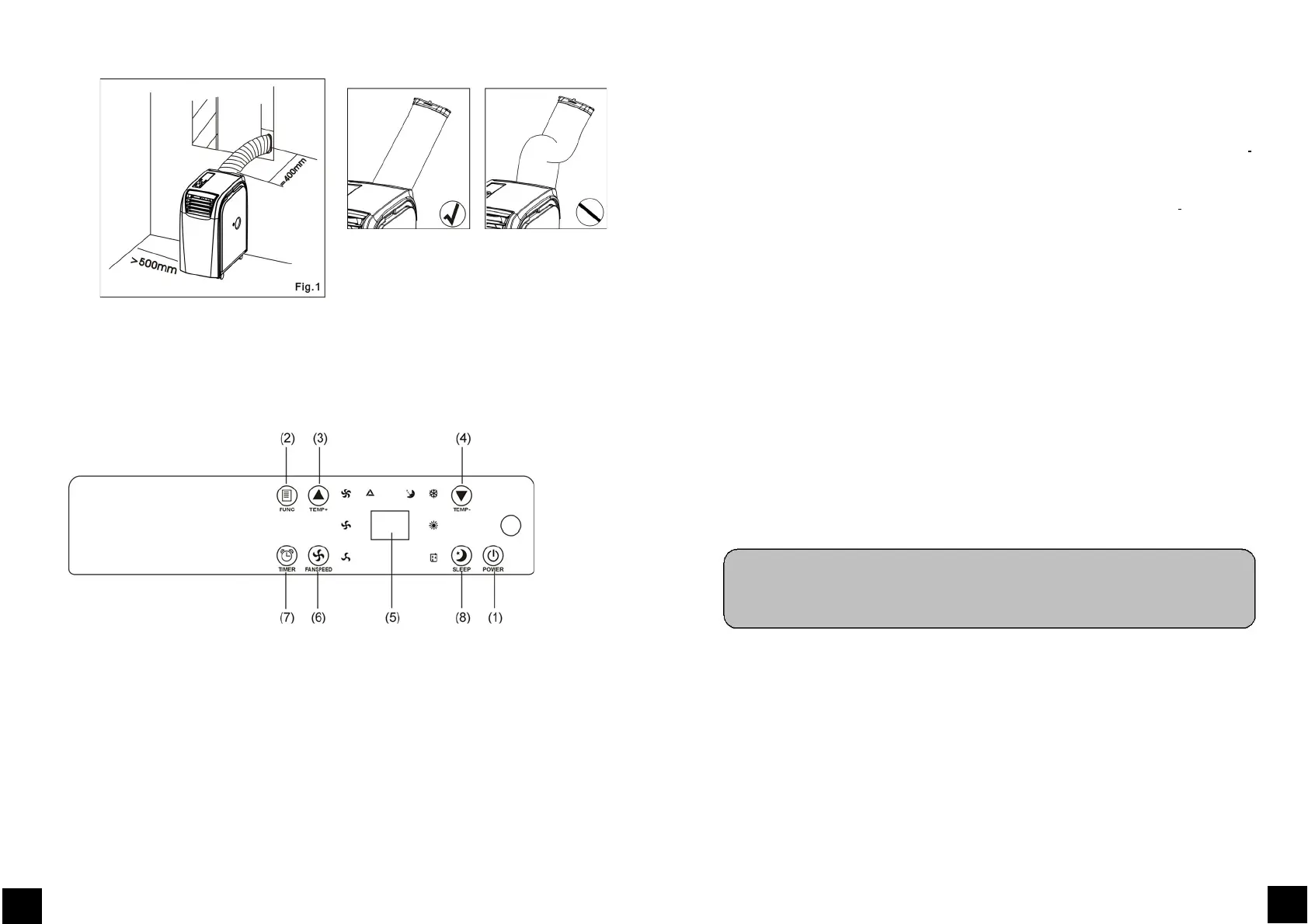
2.
Operation
CONTROLPANEL&DESCRIPTIONOFFUNCTION
1. POWERKEY
Presstoturnunit"ON"or"OFF".
FUNCTION
Pressthiskeytoselectcooling,heating,ordehumidifying.
3. TEMPERATUREREGULATIONKEY(UP)
Duringcoolingfunction:Thiskeyraisesthepresettemperatureby1℃eachtimeitispressed
andthemaximumlimitis30℃.
68
GB
Duringheatingfunction:
Thiskeyraisesthepresettemperatureby1℃
eachtimeitis
pressedandthemaximumlimitis25℃.
4. TEMPERATUREREGULATIONKEY(DOWN)
Duringcoolingfunction:Thiskeylowersthepresettemperatureby1℃eachtimeitis
pressedandtheminimumlimitis17℃.
Duringheatingfunction:Thiskeylowersthepresettemperatureby1℃eachtimeand
theminimumlimitis15℃.
L.E.D.DISPLAY
Thedisplayindicatesthecurrentsettingtemperatureorthetimersetting.Whentheset
temperatureorthetimerisadjusted,thenewsettingisshownthenthedisplayreturnsthe
currentsettemperature.
Thedisplayisalsousedtoshowerrorcodesshouldafaultoccur,seeERROR
CODES.
6.
SPEED
PresstoselecteitherLOW,MEDIUM,HIGHorAUTOfanspeed.
If"AUTO"isselected,”HIGH”or"MEDIUM"or“LOW"willbe
selectedautomaticallyaccordingtothedifferencebetweensettingtemperature
andambienttemperature.
Note:Inheatingfunctionanddehumidifyingfunction,thiskeyisinvalidbecausetheunitis
definedtobehighspeedinheatingmodeandlowspeedindehumidifyingmode.
7.
PROGRAMMABLETIMER
ProgrammabletimerON/OFFkey.
TIMER‐ON:Thetimer‐onisusedtoturnontheunitautomaticallyafterthesettimeisover.
a) Pressthe"TIMER"keyatstand‐bystatustosetthetimeyoudesired.
b) Oncethesethourhascometoanend,theunitwillturnonautomatically.
i. Press the "POWER" key before time out, the setting time will be canceled
andtheunitwillturn
on.
69
GB
5.



 To Next Page