EN
36
01
Adjusting bevel angle (Fig. X)
1. Unlock the bevel locking handle (8). (Fig. X step 1)
2. Slide the bevel adjusting hand wheel (6) and set the saw blade to the desired
bevel angle - as shown on the bevel angle scale (77). (Fig. X step 2).
3. Lock the bevel locking handle (8). (Fig. X step 3).
02
Adjusting saw blade height (Fig. Y)
1. Turn height adjusting handle (7) clockwise to raise the saw blade (26).
2. Turn height adjusting handle (7) anticlockwise to lower the saw blade (26).
03
Adjusting rip fence
This rip fence is used for all rip cutting operations. Never rip freehand without the fence
in place and securely locked. Follow the same instruction of “Assembly-Rip fence”.
04
Adjusting mitre angle (Fig. N)
1. Loosen the mitre gauge locking handle (59).
2. By turning the parallel profile (56), set the desired angle on the scale (60).
3. Tighten the mitre gauge locking handle (59).
05
Adjusting extension table (Fig. B)
1. Loosen the locking knob (38) of the extension table.
2. Pull out the extension table to desired position. The increased width can be read
from the scale of the extension table.
3. Tighten the locking knob afterwards.
06
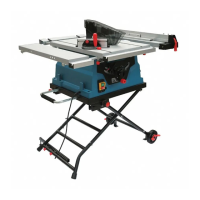
Adjusting foldable stand (Fig. T, U)
Balance bar (Fig. T)
1. Loosen the two locking knobs (69) and pull out the balance bar (14) completely
then tighten the two locking knobs afterwards.
2. Rotate the support bolt (66) anti-clockwise until it touches the ground. This will
WARNING! Always check the bevel locking handle (8) before working. A
loose bevel locking handle may cause serious injury.


 To Next Page