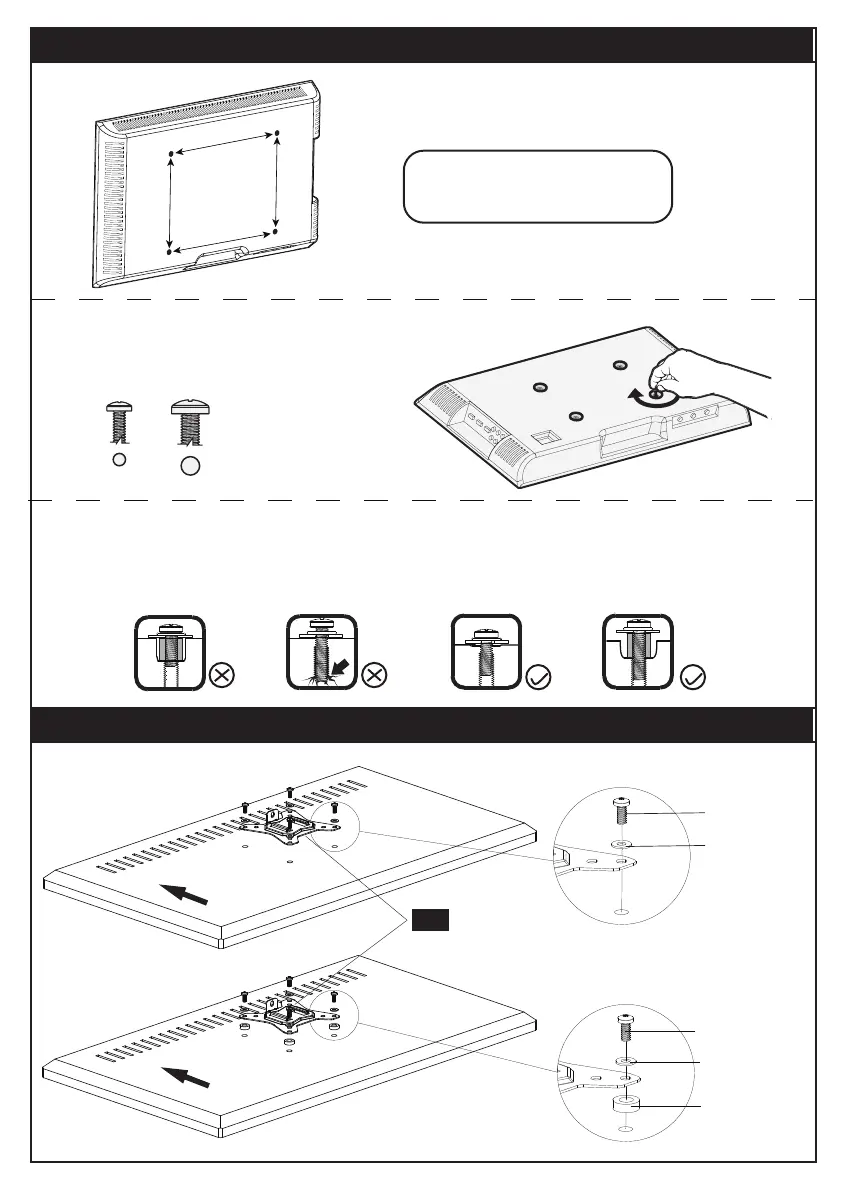
STEP 3 Check Monitor Hole Pattern and Select Monitor Bolts
MAX:100
mm/4 in.
MAX:100
mm/4 in.
M5M4
Only one size fits your TV.
100 mm ≈ 7 7/8 in.
75 mm ≈ 4 in.
M-A/M-C
M-E
05
M-B/M-D
M-E
M-F
FLAT BACK MONITOR
(UNIVERSAL MONITOR PLATE)
ROUND BACK MONITOR
(UNIVERSAL MONITOR PLATE)
STEP 4 Attach the Monitor Plates [05] to the Monitors
Bolt length:Verify adequate thread engagement with bolts or bolts/spacers
combination. We recommend thread engagement by at least 5 turns.
-Too short will not hold the monitor.
-Too long will damage the monitor.
Too Short Too Long Correct Correct
04


 To Next Page