0.4 - 3.5"
(10 - 90mm)
0.4 - 3.5"
(10 - 90mm)
3/8" - 1 1/16"
(10 - 27mm)
NOTE: The hole should be
at least 2" (50mm) from
the edge of the desk.
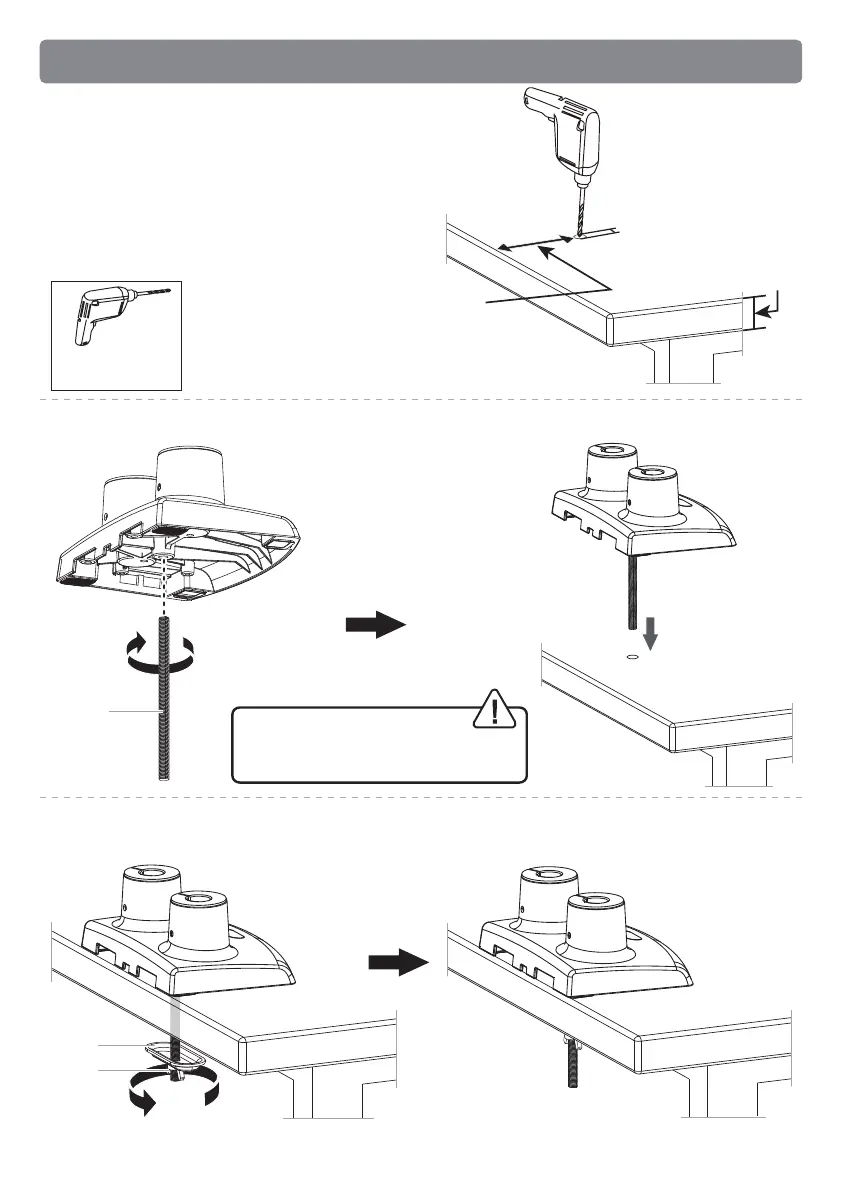
2B-3 Slide locking plate [E] and butterfly nut [F] onto the grommet bolt and firmly
secure with butterfly nut [F].
2B-2 Screw grommet bolt [D] into the base, and then put it through the desk.
2B-1 If a hole is needed for grommet
installation, be sure to leave at least 2”
from the edge of desktop and mark where
the hole will be drilled. Use either a 3/8” or
1 1/16” drill bit for this step.
Electric Drill
(Not Included)
WARNING:
Ensure the grommet bolt is
threaded securely to the base.
Option B: For Grommet Mounting
DD
EE
FF
09


 To Next Page