KK
II
II
KK
0.1-0.2" (3-5mm)
spacing left
Turn clockwise to thread
Fig. A
For Monitor Hole Pattern:
100 x 100mm (3.9 x 3.9”)
For Monitor Hole Pattern:
75 x 75mm (3 x 3”)
Fig. B
Fig. C
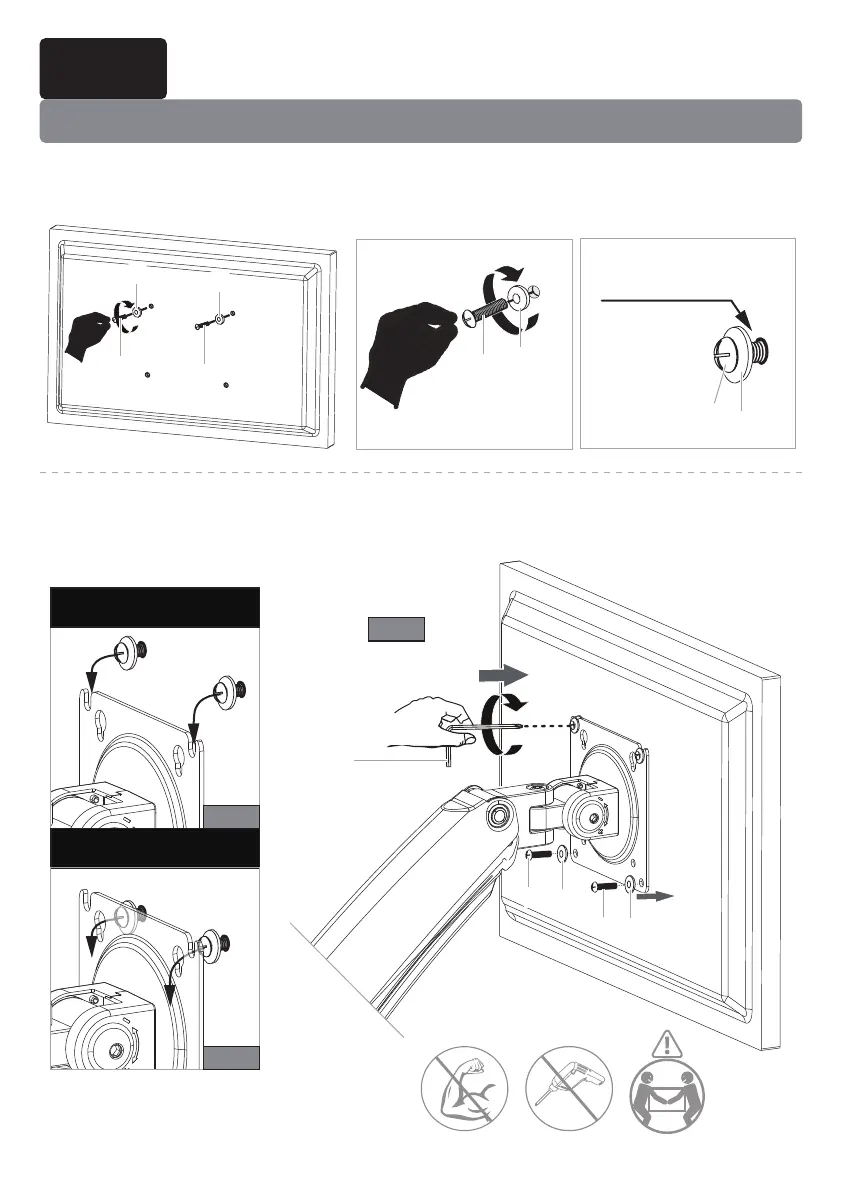
5A-1 Thread two bolts [I] with washers [K] into the top holes until about 0.1-0.2"
(3-5mm) of space is left between monitor back and washer.
5A-2 Hang the monitor from the monitor plate with the top two bolts [I] (see Fig. A
or Fig. B). Screw the remaining two bolts [I] into the bottom holes (see Fig.C).
Tighten all bolts [I] evenly.
Step 5 Attach the Monitors to the Arms
Option A (For Flat Back Monitor)
II
II
II
KK
II
KK
KK
M3M3
KK
12


 To Next Page