For Monitor Hole Pattern:
100 x 100mm (3.9 x 3.9”)
Fig. A
For Monitor Hole Pattern:
75 x 75mm (3 x 3”)
Fig. B
Fig. C
M3M3
0.1-0.2" (3-5mm)
spacing left
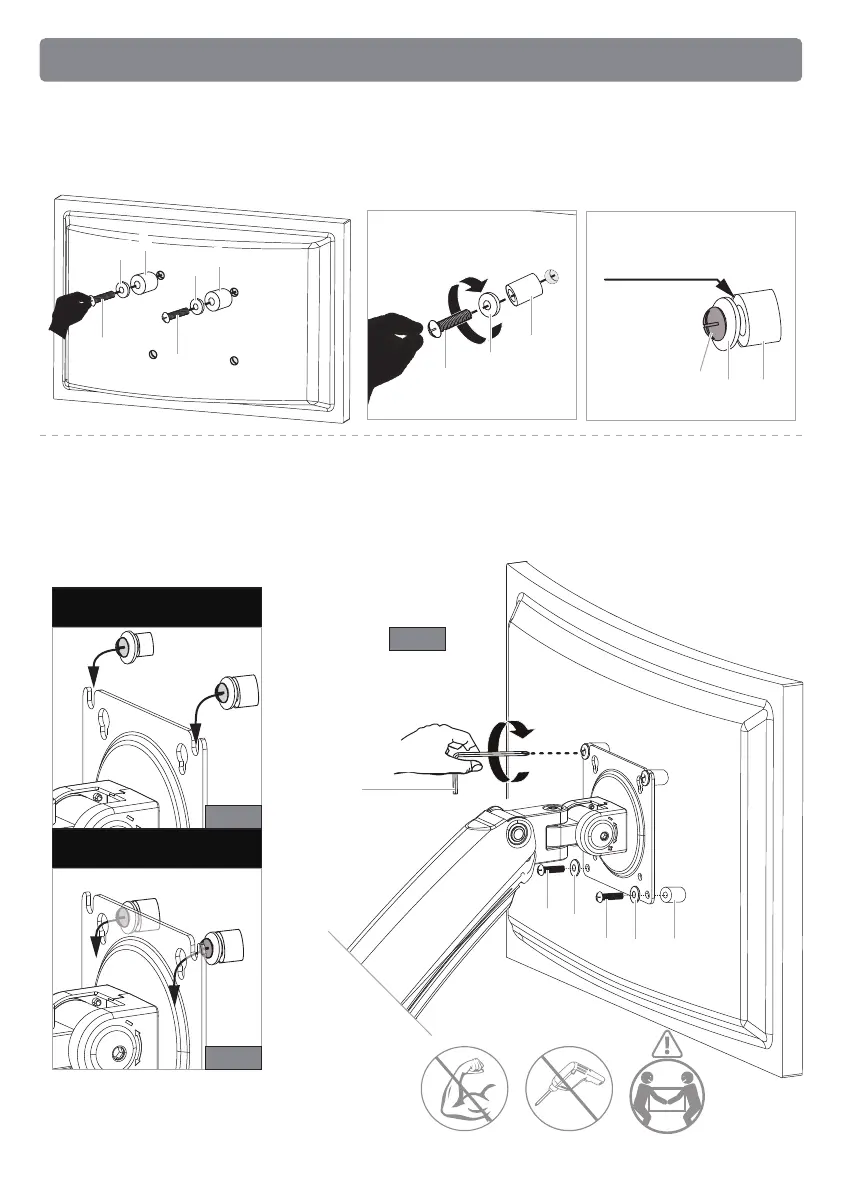
Option B (For Curved Back Monitor)
5B-1 Slide the washers [K] and spacers [L] over the bolts [J]. Turn the top two bolts
[J] CLOCKWISE until about 0.1-0.2" (3-5mm) of space is left between the washer
[K] and the spacer [L].
5B-2 Hang the monitor from the monitor plate with the top two bolts [J] (see Fig. A
or Fig. B). Place the spacers [L] between the monitor plate and back of monitor.
Screw the remaining two bolts [J] into the bottom holes (see Fig.C). Tighten all
bolts evenly.
KK
LL
JJ
KK
LL
JJ
JJ
KK
LL
JJ
JJ
KK
LL
KK
JJ
KK
LL
13


 To Next Page