WARNING!
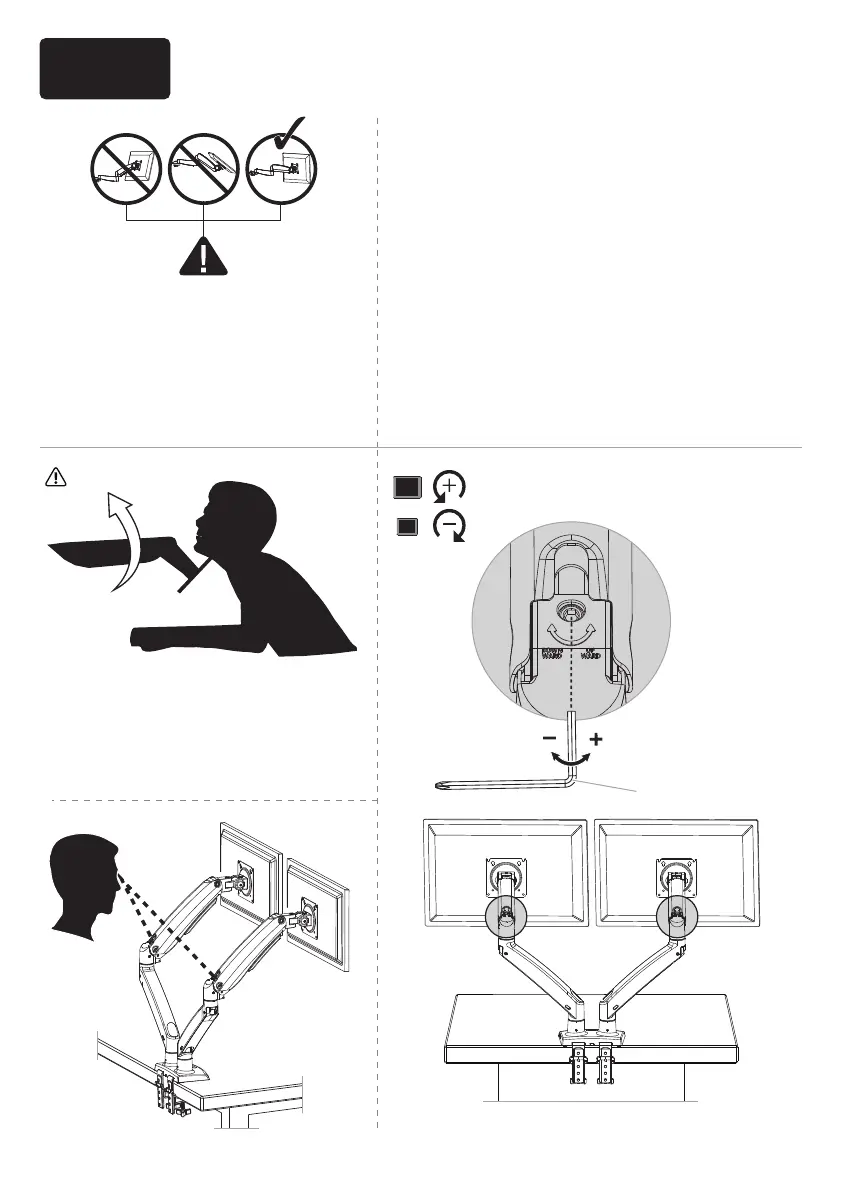
Gas Spring arm is under pressure
and should be handled with care.
Failure to follow the instructions
may result in damage to the
mount and / or personal injury.
NOTE: Ensure the arm is held in a
horizontal position (parallel to
desktop) during adjustment. Failing
to do so may result in difficulty
adjusting or potential damage to
the mount.
6-1 If the gas spring arm RISES with the
monitor attached, hold the arm in a
horizontal position while using the large
Allen key [M3] to turn the adjustment bolt
CLOCKWISE, REDUCING the arm tension.
6-2 If the gas spring arm LOWERS with the
monitor attached, hold the arm in a
horizontal position while using the large
Allen key [M3] to turn the adjustment bolt
COUNTER-CLOCKWISE, INCREASING the arm
tension.
Clockwise to
REDUCE tension
Counter-clockwise
to INCREASE tension
M3M3
Step 6 Adjust the Gas Spring Tension
14


 To Next Page