3
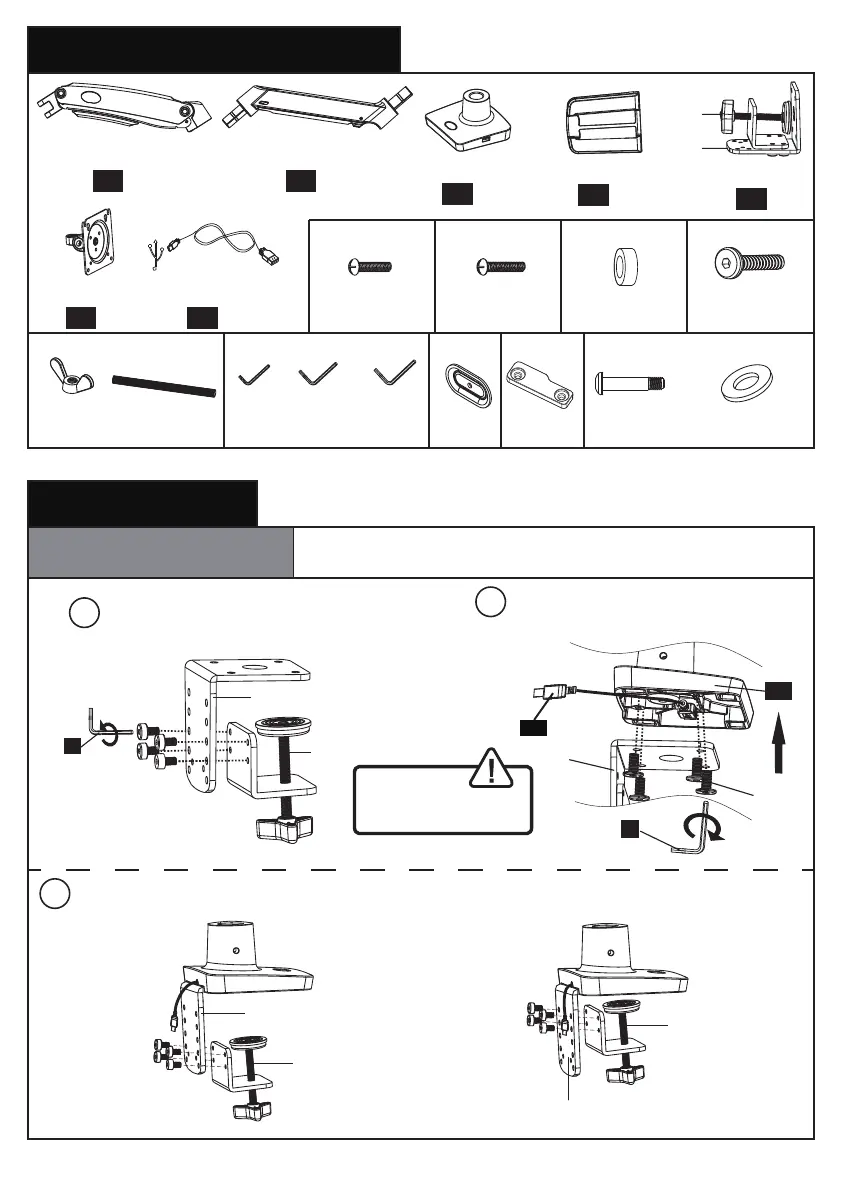
Parts and Hardware Included
1. Install the Base
1/8 in.
(3mm)
5/32 in.
(4mm)
13/64 in.
(5mm)
Warning:
Ensure bolts are
secured firmly.
01 X1 02 X1
05 X1
03 X1
04 X1
D
E G
A. For Clamp Mounting
A-1 Install the USB Cable and C Clamp to the
Base
M4x12mm
Bolt (x4)
A
M4x16mm
Bolt (x4)
B-1
Bolt (4pcs)
M6x12mm
C
M8x38mm
Bolt
φ16xφ8.2x1.5mm
Washer
Base
Arm ExtenderArm
Decorative Cover
C-Clamp
06 X1
Monitor Plate
Allen Key
F
Locking
Plate
H
Pressure
Plate
2
Install the USB cable [07] to
the base [03], then secure part [Y]
to the base [03]
Connect part [X] to part [Y] according to the thickness of the desktop
Y
X
1
Detach the C-clamp entirely
E
(4mm)
X
Y
5mm
Spacer (x4)
B-2
07 X1
USB Cable
X
Y
X
Y
OR
E
(4mm)
C
Y
07
03
Grommet
Bolt
Butterfly
Nut
04



 To Next Page