iMiniPlus PDF Logger User Guide v2.0
- 16 -
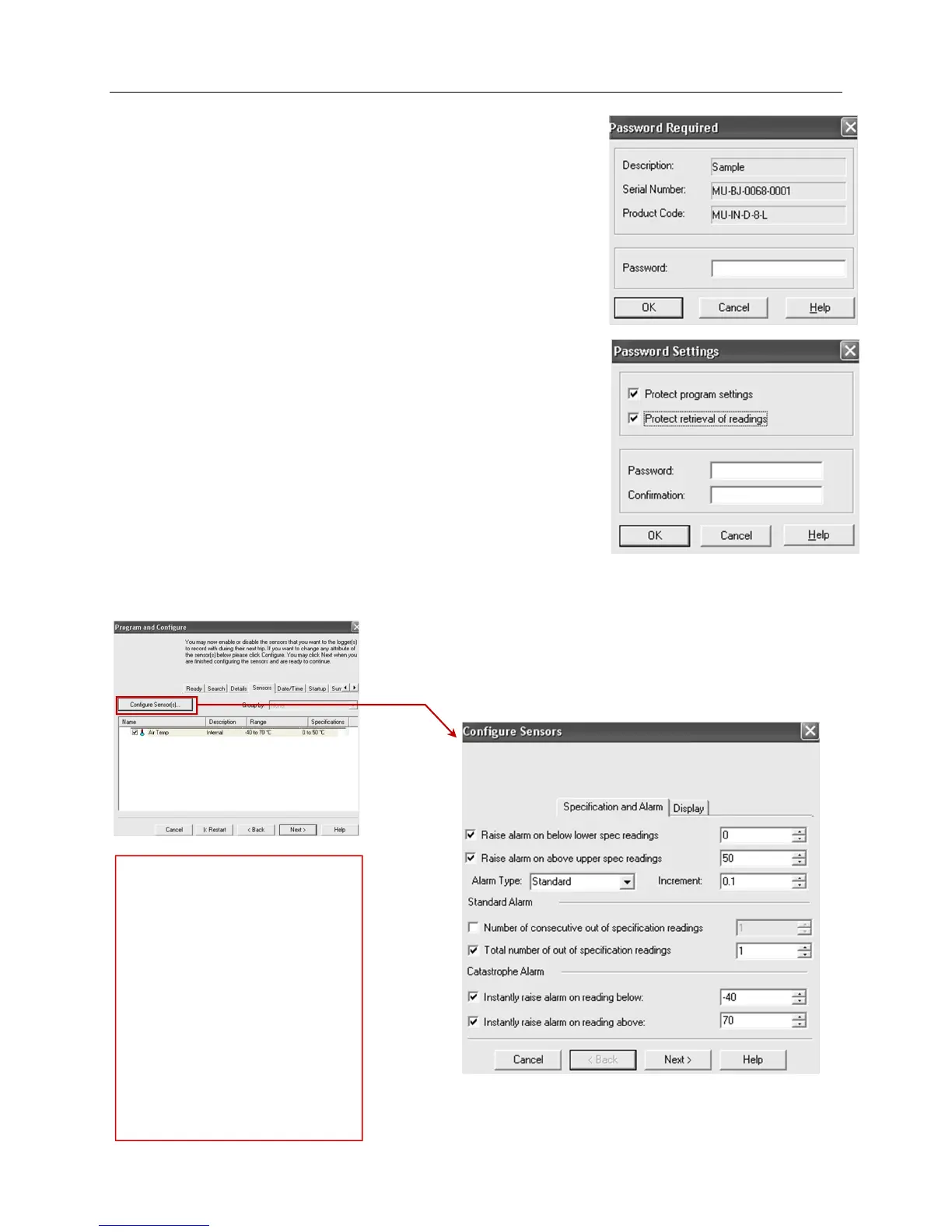
The Program and Configure process will only continue successfully if the
correct password is supplied by the user. Passwords are digits only, up to 4
characters.
You can enter a password to safeguard your logger from unauthorized
tampering. Make sure that you keep a note of your password and logger
serial number in a safe place. If you lose or forget the password, the logger
will have to be returned to your nearest distributor or Cryopak to restore
default password.
Change Password – if you have password protected the iMiniPlus PDF
Logger or want to add a password for the first time you can do this here.
Protect program settings - Tick this option if you want to protect your
programming settings for the current logger.
Protect retrieval of readings- Tick this option to disallow viewing of data
from the current logger without a password.
After complete the password section, click OK
Select the Next button or Sensors tab.
9.3 Configure Sensors and Alarm Settings
Sensors Tab – this displays the
sensor information some of which
can be changed by using Configure
Sensor(s) and others that remain
fixed i.e. range -40C to 70C. The
description “Internal” refers to the
type of sensor as opposed to
“External” which will display on the
external sensor model.
Configure Sensor(s)… – click on this
button to set up the alarm and LCD
display parameters.



 To Next Page