Partial Lockout 3
This mode allows the installer to set the Maximum
temperature Setpoint (factory default 21°c), and locks
all keys/slider except, to change the time and date, off
(frost protection) and allow temporary manual override
(temperature Up/Down arrows).
Partial Lockout 4
This mode allows the installer to set the Maximum
temperature Setpoint (factory default 21°c), and locks
all keys/slider except from off (frost protection) and
allow temporary manual override (temperature Up/
Down arrows).
Full Lockout 5
This mode locks all keys/slider. The End user cannot
adjust anything.
4. To exit the Installer Menu, press the
Home button.
N.B. *Temperature can be adjusted up to the installer
set limits.
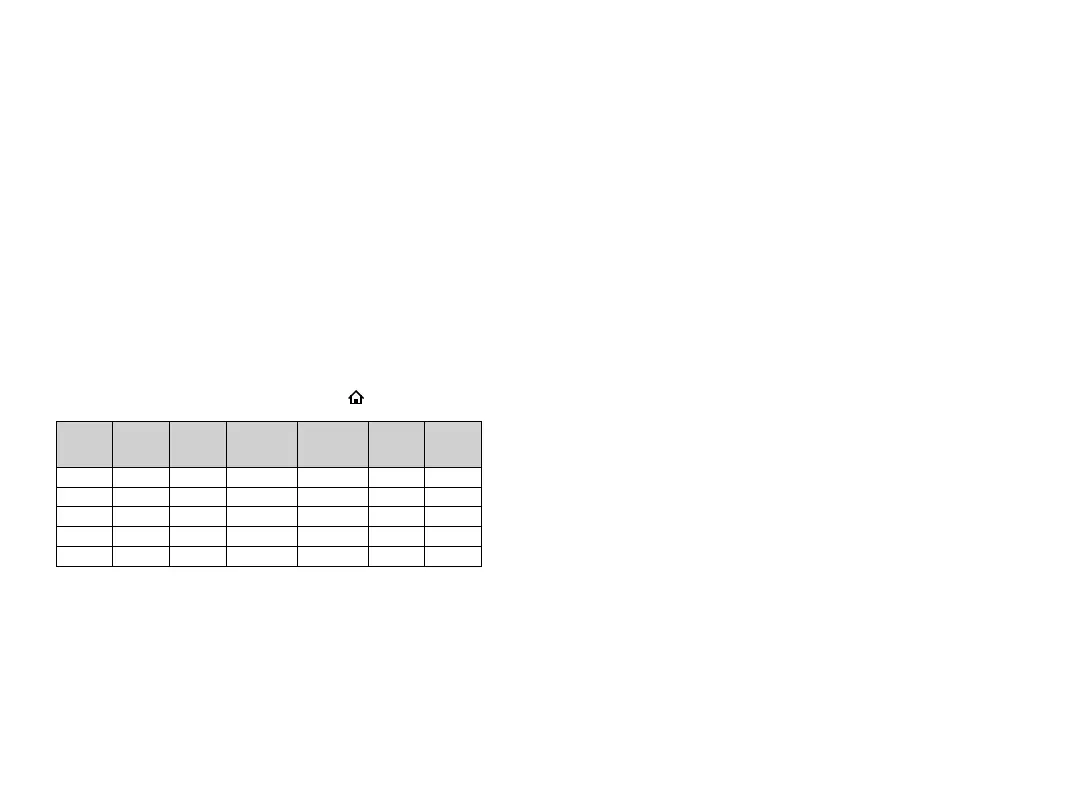
Number
Time /
Date
Program
Permanent
Manual
Override
Temp
Manual
Override
All Day Holiday
1
✓ ✓ ✓ ✓ ✓ ✓
2
✓ ✓
✓* ✓* ✓* ✓*
3
✓ ✗ ✗
✓*
✗ ✗
4
✗ ✗ ✗
✓*
✗ ✗
5
✗ ✗ ✗ ✗ ✗ ✗
WARNING: Interference with sealed parts renders the
guarantee void.
In the interests of continuous product improvement we reserve
the right to alter designs, specifications and materials without
prior notice and cannot accept liability for errors.



 To Next Page