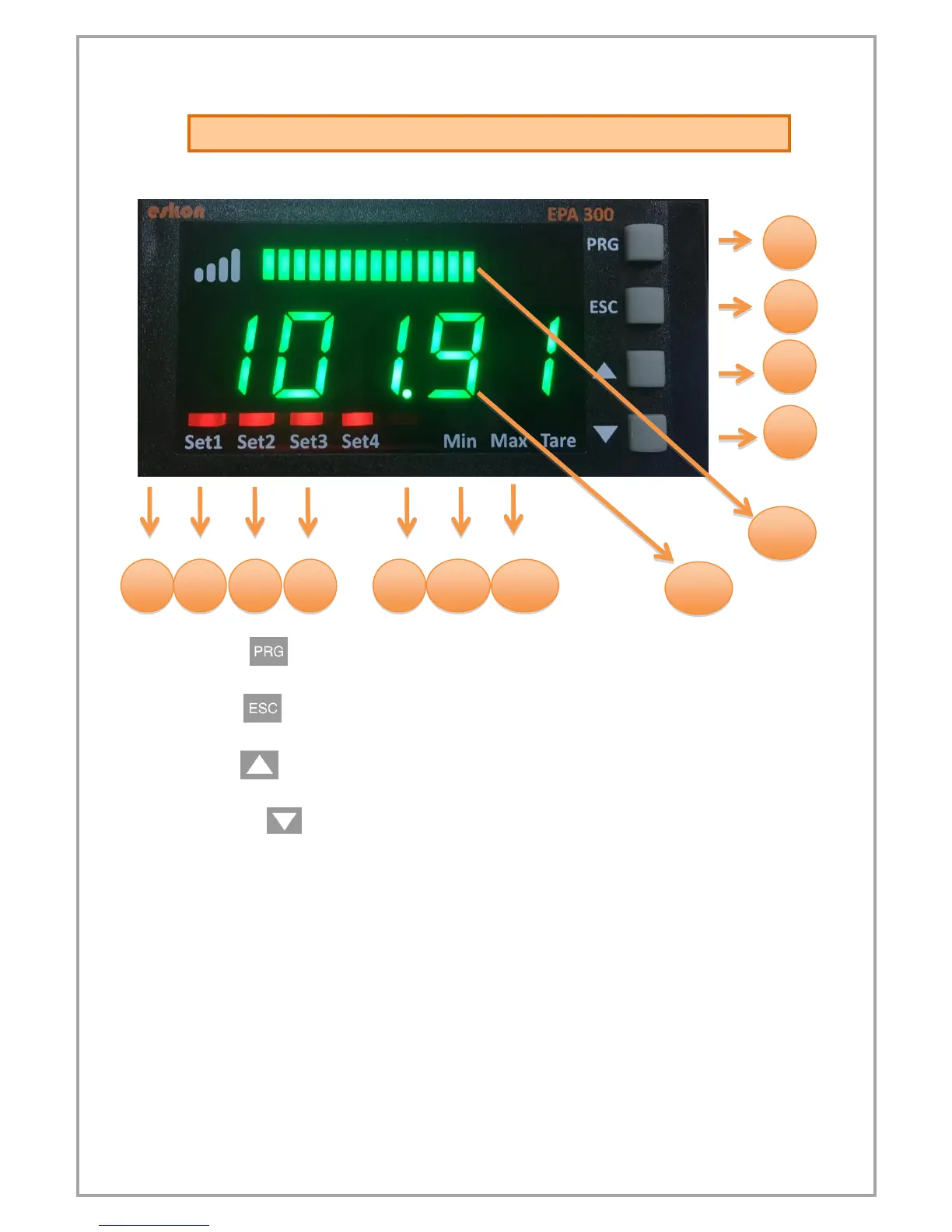
1) PRG ( ): Programming and Enter key. It is used to enter the menus or
confirm the entered values.
2) ESC ( ): Escape, exit and backspace key. It is used to return to the upper
menu or to exit the menus.
3) UP ( ): Up key. Navigating between menus; Is used to increment the
value or move to a higher digit when entering a value.
4) DOWN ( ): Down key. Navigating between menus; Used to decrease the
value when entering a value or to switch to a lower step.
5)Set1 Status LED: 1. Display when the relay output is active.
6)Set2 Status LED: 2. Display when the relay output is active.
7)Set3 Status LED: 3. Display when the relay output is active.
8)Set4 Status LED: 4. Display when the relay output is active.
9)Min Status LED: Lights up when the lowest (minimum) value read from the
moment the device starts to operate.
10)Max Status LED: Lights up when the maximum read value is displayed
when the device starts operating.
11)Tare Status Led: Indicator that is lit when the key function is active.
12) Display Screen: Display screen consisting of 5 lines from a single line.
13) LED bar: The entered scale values increase and decrease in range.


 To Next Page