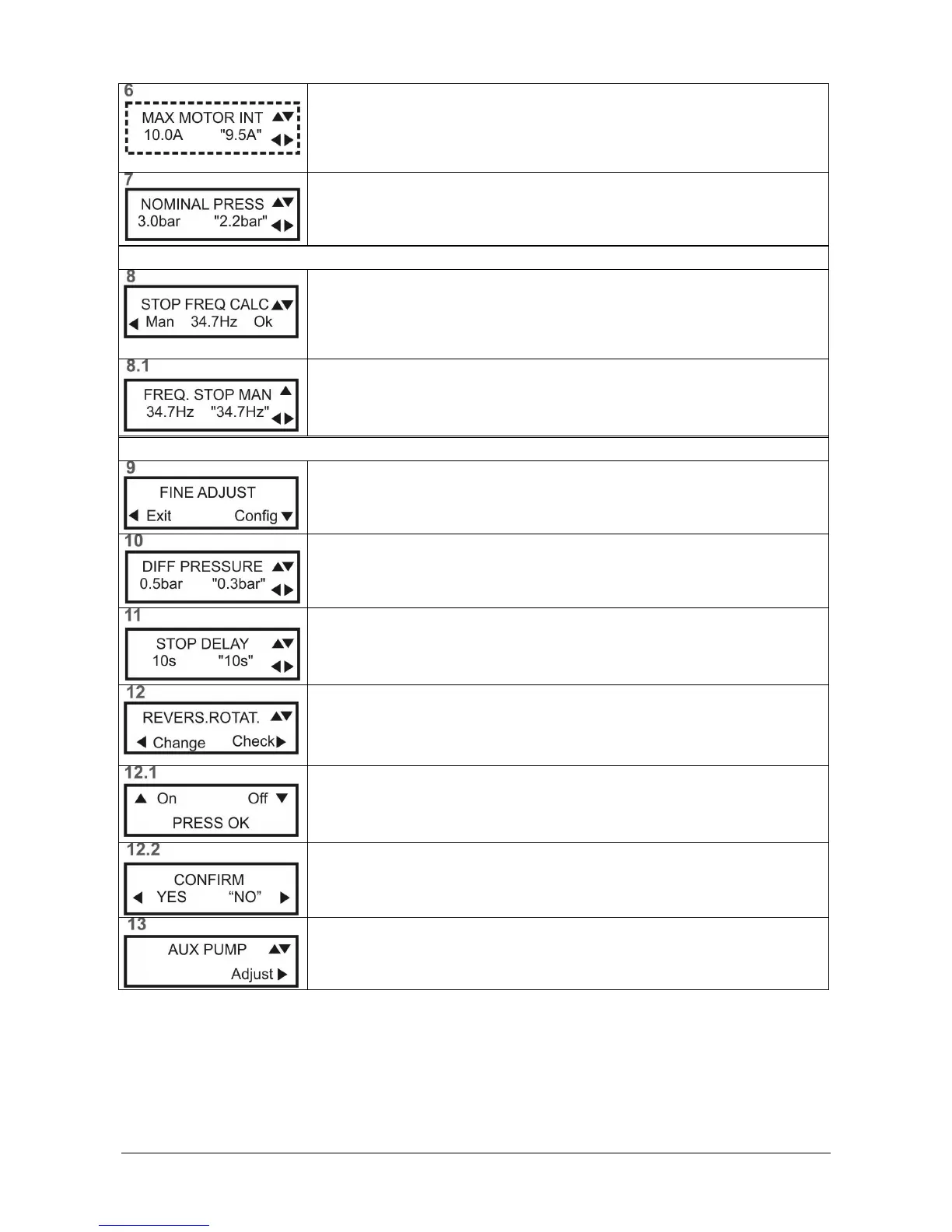
NOMINAL PRESSURE
NOMINAL PRESSURENOMINAL PRESSURE
NOMINAL PRESSURE
Configuration of the work pressure of the unit.
CONFIGURATION OF THE STOP FREQUENCY
CONFIGURATION OF THE STOP FREQUENCYCONFIGURATION OF THE STOP FREQUENCY
CONFIGURATION OF THE STOP FREQUENCY
CALCULATED STOP FREQUENCY
CALCULATED STOP FREQUENCYCALCULATED STOP FREQUENCY
CALCULATED STOP FREQUENCY
The stop frequency is calculated automatically.
Will be recalculated every time that is changed the nominal pressure.
To set a value in the manual mode, press◄ (Man)
STOP FREQUENCY MANUALLY
STOP FREQUENCY MANUALLYSTOP FREQUENCY MANUALLY
STOP FREQUENCY MANUALLY
Enter the desired stop frequency.
Note: This value should only be entered by experts.
ADDITIONAL PARAMETERS SETTING
ADDITIONAL PARAMETERS SETTINGADDITIONAL PARAMETERS SETTING
ADDITIONAL PARAMETERS SETTING
FINE ADJUSTMENTS
FINE ADJUSTMENTSFINE ADJUSTMENTS
FINE ADJUSTMENTS
To set additional parameters, press ▼ (Config)
To complete the setup, press ◄ (Exit)
DIFFERENTIAL PRESSURE
DIFFERENTIAL PRESSUREDIFFERENTIAL PRESSURE
DIFFERENTIAL PRESSURE
Configuration of the difference between the set and start-up pressure.
For ex. : 3 bars set – 0.5 bars differential = 2.5 bars start-up
STOP DELAY
STOP DELAYSTOP DELAY
STOP DELAY
Timing of the unit before a stop. This timing process is associated to the stop
frequency.
REVESE ROTATION
REVESE ROTATIONREVESE ROTATION
REVESE ROTATION
To check the motor rotation direction, press ► (Check)
To change rotation direction, press ◄ (Change)
Starting the motor, to 25Hz, for CHECK TURN DIRECTION
Press ▲ ON, to activate the pump.
Press▼ OFF, to stop the pump.
Press OK
OKOK
OK to exit the screen.
Confirm INVERT TURN.
Change to "YES" to reverse the turn direction
AUXILIARY PUMPS
AUXILIARY PUMPSAUXILIARY PUMPS
AUXILIARY PUMPS
For adjust auxiliary pumps parameters, press ► (Adjust)
If there are no regulated pumps, press ▼ to advance to screen 11.


 To Next Page