MenuView
Backlight
BacklightBacklight
Backlight
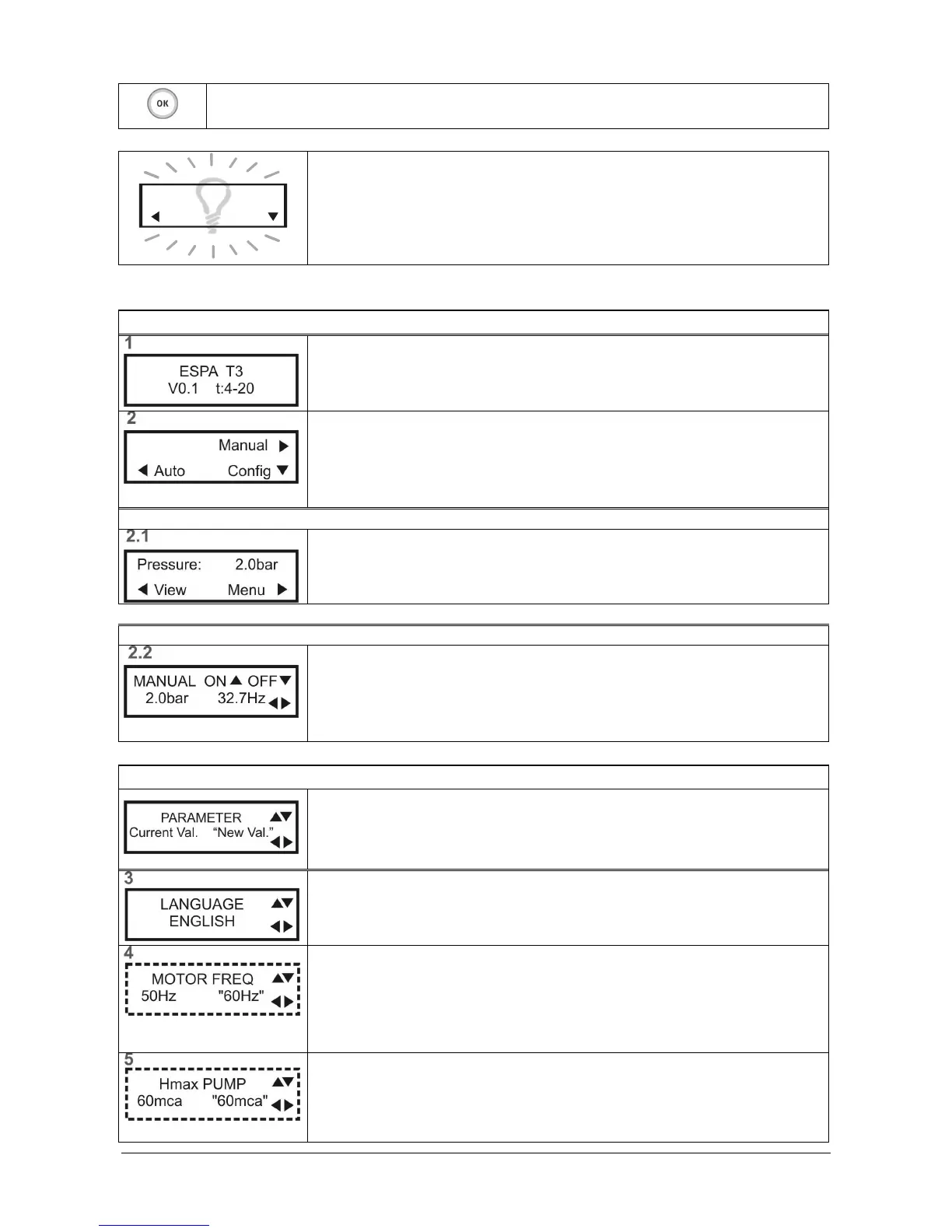
The screen is backlit display for better reading.
To save power, the backlight turns off in 60 seconds without pressing any keys.
To activate the backlight, press OK
OKOK
OK.
Without backlight does not work any other key.
5.3)
5.3)5.3)
5.3) Description of the menus.
Description of the menus. Description of the menus.
Description of the menus.
START SCREENS
START SCREENSSTART SCREENS
START SCREENS
Introduction screen
Introduction screenIntroduction screen
Introduction screen
Displayed during a few seconds when connecting the equipment.
Indicates: model, software version and pressure sensor configuration.
Start screen
Start screenStart screen
Start screen
The pump is not activated.
To start the pump manually, press ► (Man)
For automatic operation, press ◄ (Auto)
To configure parameters, press ▼ (Config)
MAIN SCREEN
MAIN SCREENMAIN SCREEN
MAIN SCREEN
It shows the system pressure. The pump will run automatically, as needed.
To display parameters, press ◄ (View)
To return to the start screen, press ► (Menu)
MANUAL OPERATION
MANUAL OPERATIONMANUAL OPERATION
MANUAL OPERATION
It shows the system pressure and Speedrive output frequency.
Press ▲ ON, to activate the pump. Start-up is always performed at 15Hz.
Press▼ OFF, to stop the pump.
Press◄ or ►, to adjust the frequency.
Press O
OO
OK
KK
K to exit the screen.
CONFIGURATION
CONFIGURATIONCONFIGURATION
CONFIGURATION
Screen descriptions:
- Top : parameter being configured.
- Lower left : current value of the parameter.
- Lower right, "flashing": new value being configured. Press OK
OKOK
OK to confirm.
LANGUAGE
LANGUAGELANGUAGE
LANGUAGE
Select the desired language.
MOTOR FREQUENCY
MOTOR FREQUENCYMOTOR FREQUENCY
MOTOR FREQUENCY
Configuration of the nominal frequency of the motor, 50Hz or 60Hz.
Check the motor's nameplate.
Note: This screen only appears in the initial preset or retrieving the factory
settings.
MAXIMUM PUMP HEIGHT
MAXIMUM PUMP HEIGHTMAXIMUM PUMP HEIGHT
MAXIMUM PUMP HEIGHT
Setting the maximum pressure the pump can provide.
Check the pump’s nameplate.
Note: This screen only appears in the initial preset or retrieving the factory settings


 To Next Page