EasyManua.ls Logo

ESPERANZA EMV300 - User Manual

ESPERANZA EMV300
12 pages
Print Icon
To Next Page IconTo Next Page
Loading...
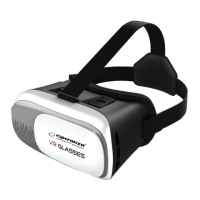
ESPERANZA EMV300 GLASSES - OPERATING INSTRUCTIONS
Warnings about the health and safety
• Make sure that all users of the VR device read the following warnings carefully prior to using it to
mitigate a risk of injury, discomfort or damage to property.
Prior to using the VR device
• Read all the instructions on setting-up and using the device and follow them.
• The device must be adapted to every user and calibrated using the configuration software (if
available) prior to using the device. Failure to follow these instructions may result in a higher risk of
feeling discomfort by the user.
• We recommend to consult a doctor prior to using the device in case of pregnancy, prior problems
with such glasses, mental disorders, heart problems or other severe ailments.
Epileptic seizures
Some people (approx. 1 to 4000) when exposed to flashing lights or light patterns may suffer from
severe dizziness, convulsions, epileptic seizures or momentary loss of consciousness; they can occur
when watching TV, playing computer games or experiencing the virtual reality, even if these people
did not suffer from convulsions, epileptic seizures or momentary loss of consciousness earlier. Such
attacks often occur at children and young people aged up to 20 years. Any person who suffers from
such seizures, loss of consciousness or other symptoms related to epilepsy should consult a doctor
prior to using the device.
Children
Children under the age of 13 should not use the device. Parents should check if children (aged 13
years or older) who have used or use the device suffer from the above-specified symptoms; they
should reduce the time spent by children on using the device and make sure if children have breaks
when using the device. Avoid excessive use of the device because it may adversely affect eye-hand
coordination, balance and divisibility of attention. Parents should carefully check if children do not
have any limitation of these skills when (or after) using the device.
General instructions and precautions
Always follow the instructions and take the specified precautions when using the device in order to
reduce a risk of injury or discomfort.
The product should be used within secure surroundings only.
• The device generates immersive sensation of the virtual reality which causes dispersion and limited
vision of real surroundings. In order to ensure maximum safety, always use the device when seated.
When using the device or immediately upon its use, it is required to pay special attention not to be in
the vicinity of other people, objects, stairs, balconies, windows, furniture or other items which you
can fall into or roll over.
When using the device, do not use sharp or any other dangerous items. Do not put on the device in
situations which require you to focus attention, e.g. when walking, cycling or driving.
Safety in use
• Make sure that the device is evenly and safely put on your head and you have one clear vision.
Question and Answer IconNeed help?

Do you have a question about the ESPERANZA EMV300 and is the answer not in the manual?

Summary

Warnings about the health and safety

Prior to using the VR device

Read all instructions on setup and use. Adapt and calibrate the device. Consult a doctor if pregnant or with prior health issues.

Epileptic seizures

Warning about flashing lights triggering seizures. Advise consultation with a doctor if prone to such symptoms.

Children

Under 13 should not use. Check older children for symptoms and limit usage time with breaks.

General instructions and precautions

Always use the device in secure surroundings and seated. Be aware of your surroundings to avoid injury.

Safety in use

Ensure the device is worn securely and vision is clear. Adapt to VR gradually for better comfort.

Discomfort and Adverse Effects

Managing Discomfort

Stop use immediately if symptoms like dizziness, nausea, eye strain, or motion sickness occur.

Post-use Precautions

Avoid driving or operating machinery until symptoms cease. Consult doctor for severe or ongoing symptoms.

Muscle Tension Damage

Prolonged use of controls can cause pain. Take breaks and consult doctor if pain or stiffness recurs.

Introduction and Setup

Radio frequency interferences

Warning about radio waves affecting electronic devices, especially pacemakers. Consult doctor if applicable.

General remarks

Recommended to wear contact lenses. Keep lenses clean. Store and use device between 5°C-35°C.

Product Overview

ESPERANZA EMV300 glasses work with smartphones for VR content. Connects to controllers and headphones.

Getting Started with EMV300

Content Preparation

Download VR-marked games/films from app stores. Use 'Side by Side' for 3D films.

Device Assembly

Install game controller (optional). Start game/film. Fasten phone securely in the holder.

Headphone Connection

Guide headphone cables through designated holes and connect to phone.

Controller Pairing

Pairing Procedure

Activate controller pairing mode. Search for 'EMV300' on phone's Bluetooth and follow on-screen prompts.

Connection Confirmation

LED stops flashing upon successful connection. Re-pair if procedure fails.

ESPERANZA EMV300 Specifications

General IconGeneral
BrandESPERANZA
ModelEMV300
CategoryVirtual Reality Headsets
LanguageEnglish