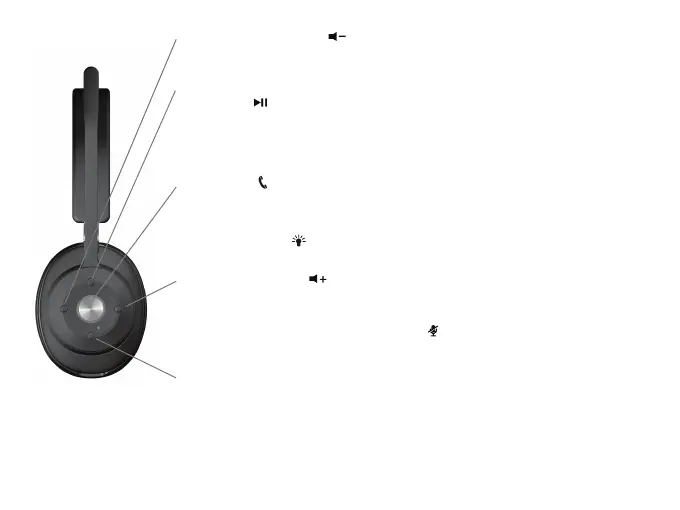
Volume Down Button
- Short press to reduce the volume.
- Long press for more than 2 seconds to continuously reduce the volume.
Multi-Function Button
Play / Pause
- Short press to pause music, press again to resume music.
ANC On/Off (Note 1)
- Long press continuously for more than 3 seconds to turn ANC On/Off or
Transparent mode (Transparent mode will shut off music and mute mic)
Call button
Answer / Hang up (Function is for connected Smartphone only)
- Press to answer an incoming call or hang up a call
- During an incoming call, long press for 2 seconds to reject the call.
Busy Light (Note 2)
- Press twice to turn the Busy Light On or Off.
Volume Up Button
- Short press to increase the volume.
- Long press for more than 2 seconds to continuously increase the volume.
Microphone mute / un-mute (Note 3)
- Short press both “Volume up“ and “Volume down” simultaneously to mute/
un-mute the mic input.
Bluetooth / Power Button
- In standby mode, press & hold the power button until “Power On”
voice prompt to turn on the headset.
- In working mode, long press for 2 seconds to turn off the headset.
Note 1) Transparency mode is to allow you hear your environment around your and talk to a person close
to you without having to take off the headset.
Note 2) Not available during a Voice Call.
Note 3) Not available if mic boom is raised and in the mute position.
Controls
Page 6



 To Next Page