3. Remove Valco short nut from the side of the sampling needle using a 1/4 inch
wrench. See Figure 4ao.
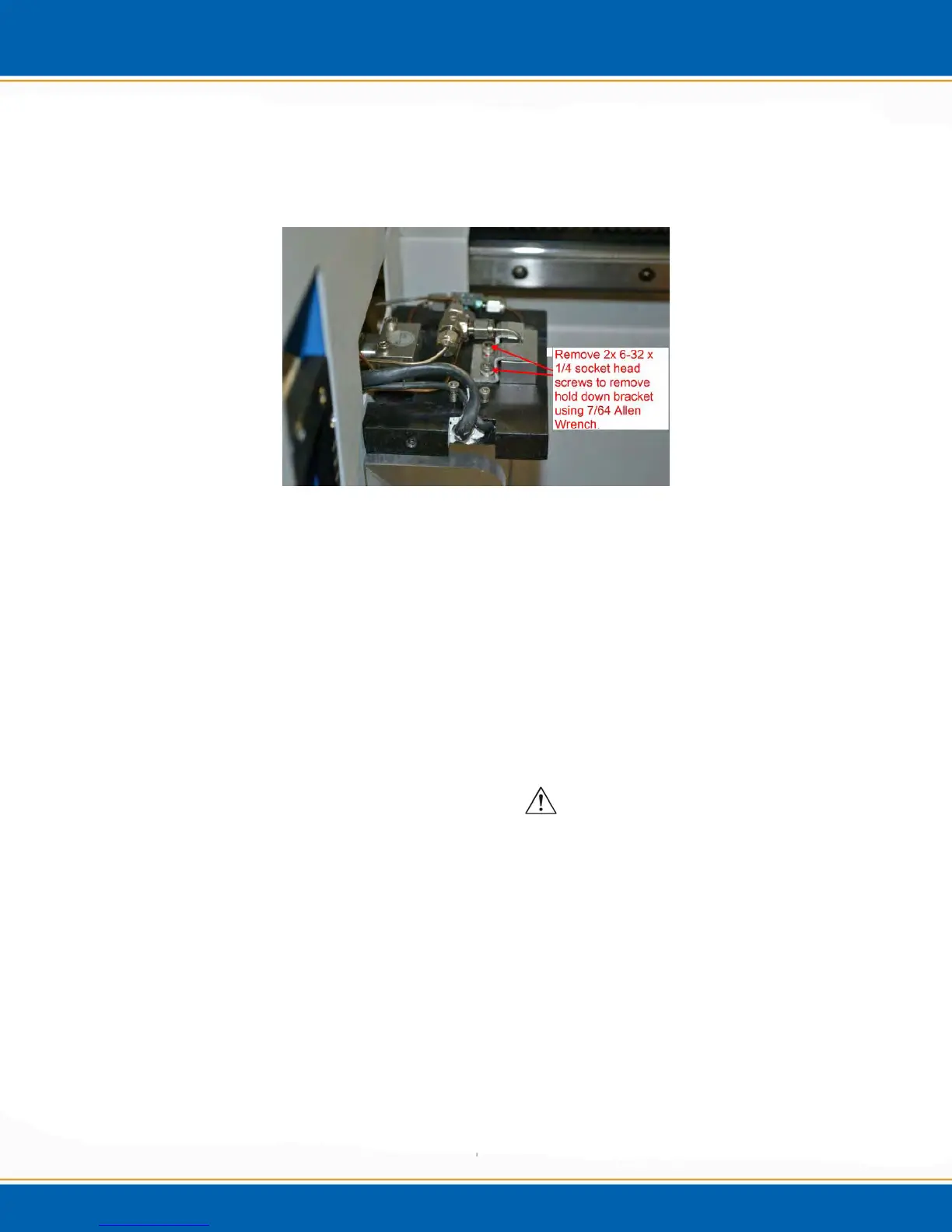
4. Remove the two 6-32 x 1/4 inch screws holding down the needle bracket using a 7/64
inch allen wrench. See Figure 4ap.
Figure 4ap: Needle Bracket Screws
5. Needle should then be free to remove from the sample plate assembly. Once
removed then the new sampling needle assembly can be installed.
6. Place the new sampling needle in the sampling plate assembly; attach the sampling
needle brace back to the needle and sampling plate using the 2 6-32 x 1/4 inch socket
cap screws. Then run the plumbing line with Valco nut back to the side of the
sampling needle. Tighten properly.
7. Place a new Teflon ferrule to the top of the sampling needle and reconnect to the top
of the union tee. Tighten properly.
8. Replace the blue oven cover onto the sampling plate. Tighten button cap screws
using a 5/64 inch allen wrench.
4.9 Removal/Installation of Water Needle
1. Remove the 4-40 x 3/8 inch socket head screw using a 3/32 inch allen wrench. See
Figure 4aq.



 To Next Page