26
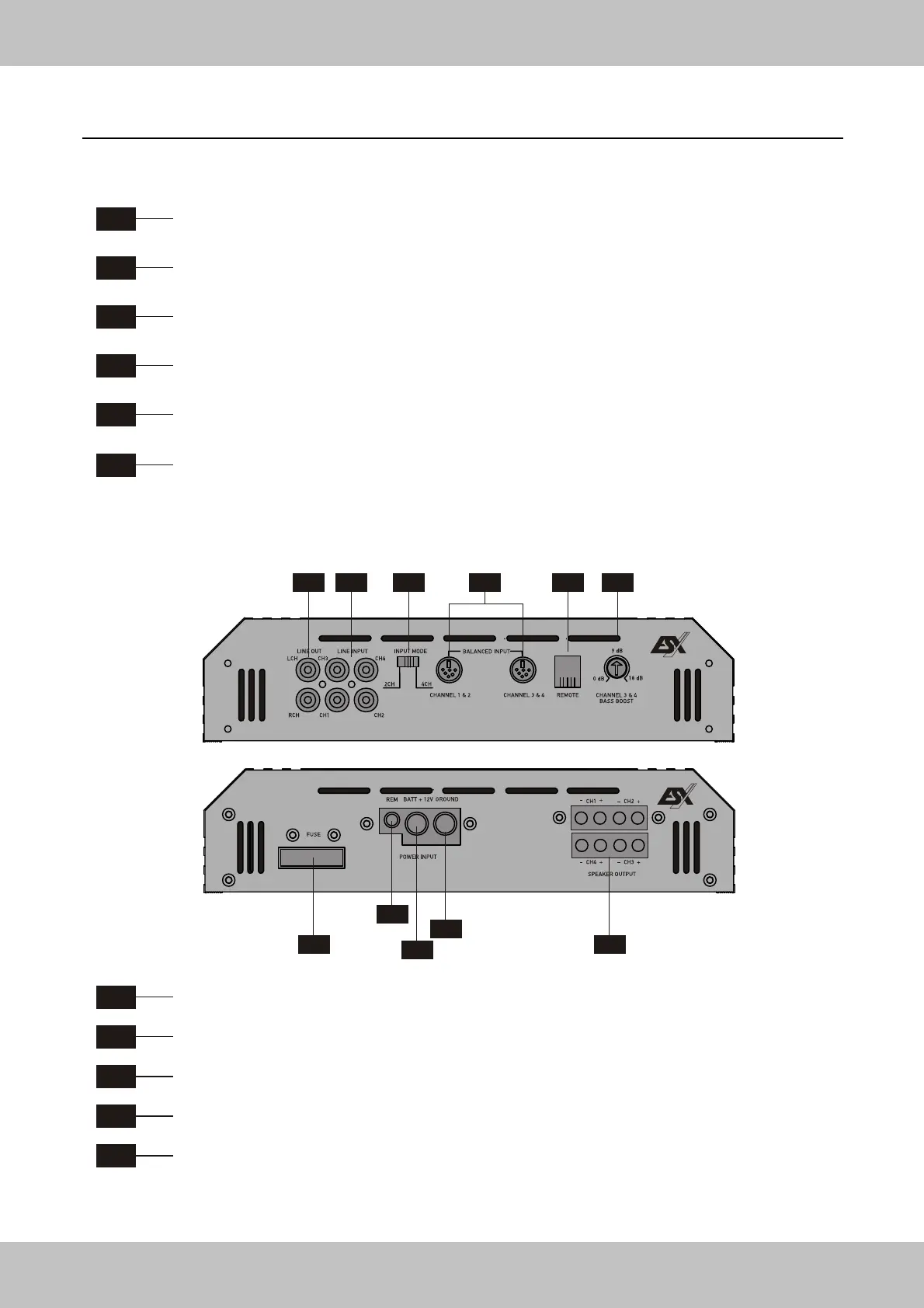
F4
REMOTE
Terminal for the included REMOTE CONTROL to adjust the Bass Boost.
F5
INPUT MODE
Selector for 2- or 4- Channel-Input Mode.
FUNCTIONS & CONTROLS FRONT-PANEL / REAR-PANEL
4-Channel Amplifer VE800.4 / VE1200.4
F1
LINE OUT
Provides a full range line level (RCA) output that allows you to trigger additional amplifiers.
F2
LINE INPUT
This allows you to connect the head unit outputs (CH 1/2 / CH 3/4) by appropriate RCA cables.
F3
BALANCED INPUT CHANNEL 1 & 2 / CHANNEL 3 & 4
Accepts a balanced symmetrical line signal from a appropriate Signal transmitter. (See page 32)
F6
CHANNEL 3 & 4 BASS BOOST
This controller allows you to adjust the BASS BOOST of Channel 3 & 4 from 0 up to 18 dB.
Please use the Bass Boost carefully.
R1
FUSE - Fuse block to prevent damages of the amplifier (See page 20).
R2
BATT +12V - Terminal for the plus connection (See page 20).
R3
REM - Terminal for remote turn-on of the head unit (See page 20).
R4
GROUND - Terminal for the ground/minus connection (See page 20).
R5
SPEAKER OUTPUT
Terminal for loudspeakers or a bridged subwoofer (MONO mode).
Attend the several examples for Loundspeaker Wiring on the following pages!
F2 F5 F6
F1
F2 F3 F4
R5R1
R2
R4
R3


 To Next Page