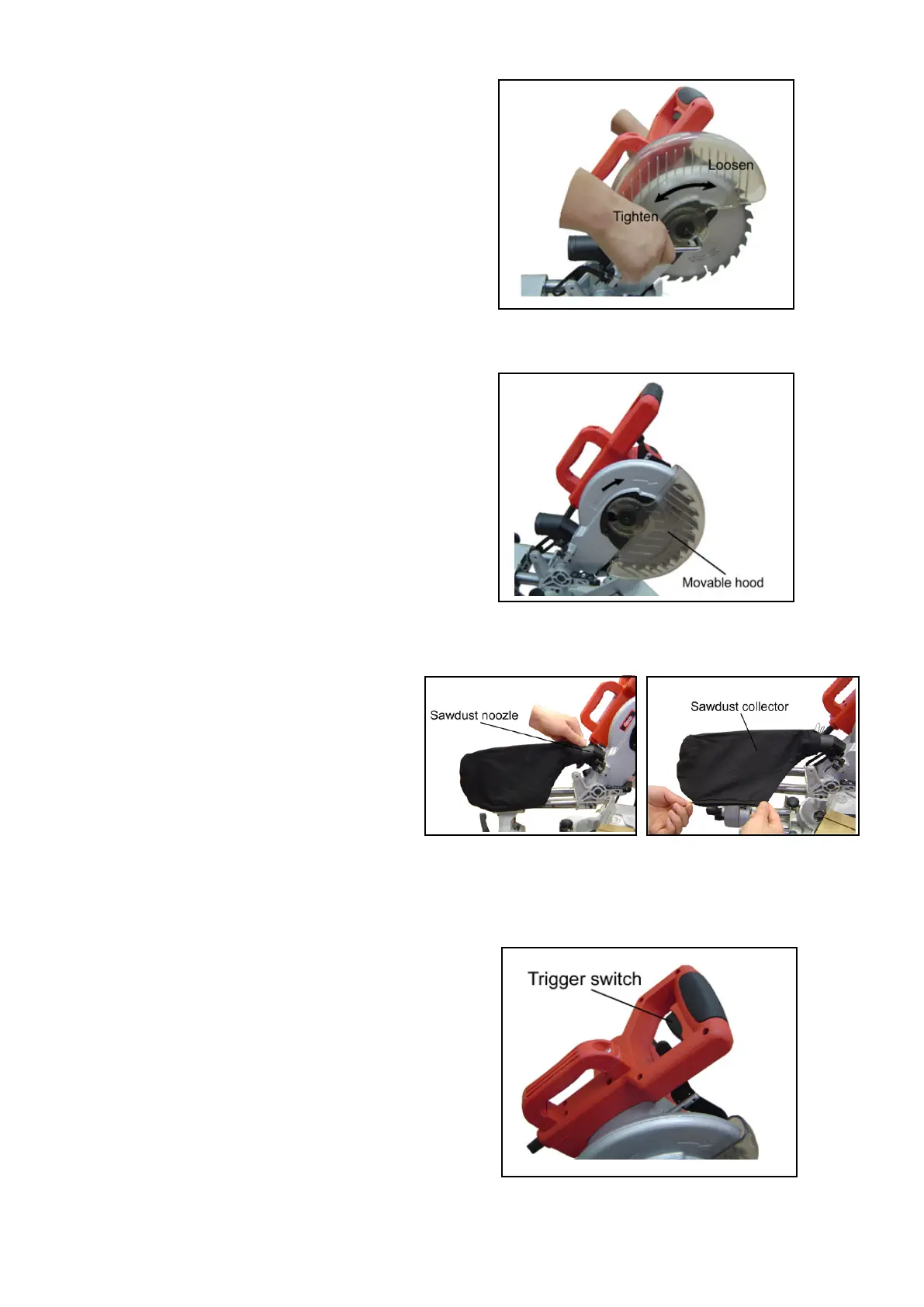
Install the outer flange and the hex bolt .
Then press down the shaft locking arm,
and tighten the hex bolt firmly by turning
it counterclockwise using the socket
wrench.
When removing sawblade, lift up movable
hood and central cover, loosen the hex
bolt with the socket wrench and remove
the hex bolt outer flange and sawblade.
Movable hood
When sawing the movable hood will be
lifted up by the workpiece. After you
finished cutting the movable hood will
be reset to original position automatically
with the handle raised. Never abandon
or remove the movable hood.
Sawdust collector
You can operate this machine more
conveniently with the sawdust collector.
Connect the adapter of the collector to the
nozzle of the protective cover, then fix the
collector inlet to the adapter of the collector.
When the sawdust collector is half full, take
the collector off from the protective cover
and open the collector door at the bottom.
Clean the sawdust completely.
4
Operating the switch
To prevent accidental starting, the tool
is equipped with a protective switch.
To start the tool, first press the protective
switch and press down the trigger switch.
Release the trigger switch and the tool
is switched off.


 To Next Page