VM-10 Installation Guide Rev 05.12 Page 11 of 19 Essential Trading Systems Corp.
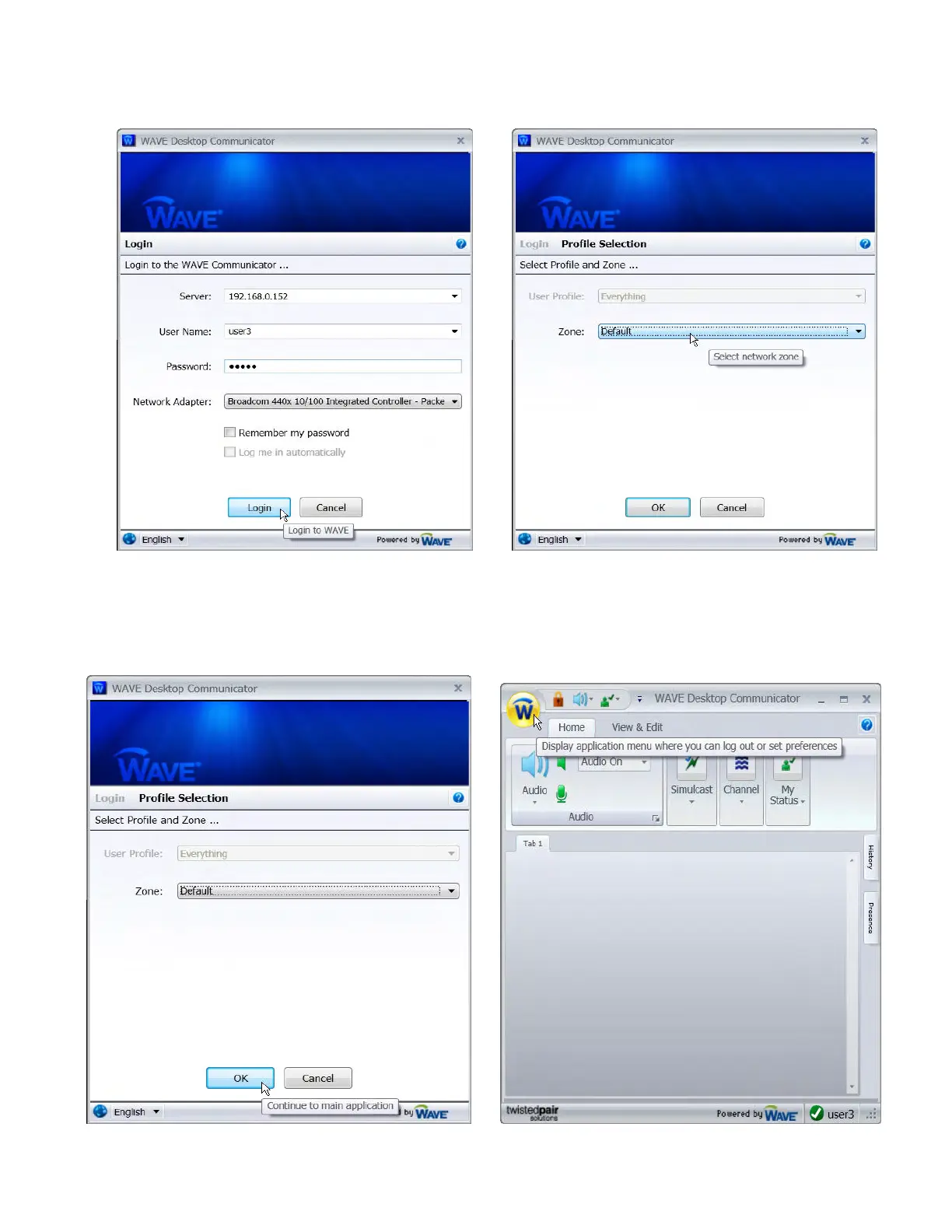
.Click the
L
L
o
o
g
g
i
i
n
n button (Figure 21) The
P
P
r
r
o
o
f
f
i
i
l
l
e
e
S
S
e
e
l
l
e
e
c
c
t
t
i
i
o
o
n
n window will open. Click on
Z
Z
o
o
n
n
e
e
:
: and
choose the correct network zone (Figure 22)
Figure 21 Figure 22
Click the
O
O
K
K button (Figure 23) and wait for the
W
W
A
A
V
V
E
E
D
D
e
e
s
s
k
k
t
t
o
o
p
p
C
C
o
o
m
m
m
m
u
u
n
n
i
i
c
c
a
a
t
t
o
o
r
r window to open.
The
W
W
A
A
V
V
E
E
D
D
e
e
s
s
k
k
t
t
o
o
p
p
C
C
o
o
m
m
m
m
u
u
n
n
i
i
c
c
a
a
t
t
o
o
r
r window will open showing no assigned channels. To begin
configuration click on the “
W
W” button (Figure 24).
Figure 23 Figure 24


 To Next Page