VM-10 Installation Guide Rev 05.12 Page 3 of 19 Essential Trading Systems Corp.
Introduction
ETC’s VM-10 programmable microphone is designed to integrate with virtually any 3
rd
party
desktop VoIP (Voice Over Internet Protocol) applications. For purposes of this guide, Twisted
Pair’s WAVE 4.8 Desktop Communicator is referenced. The VM-10 is ideal for situations where a
multi-channel, plug-n-play, desktop audio interface is needed. With virtually any USB (Universal
Serial Bus) compliant PC and VoIP desktop application software, the VM-10 enables “mouse free”
interaction on up to 10 channels of audio without the need to ‘point-and-click’ on the Desktop
Communicator itself. This allows the user to speak on the ‘hoots’ while performing other tasks on
the PC. The VM-10 has the ability to utilize your computer’s internal speakers, or power an
external set from the 3/8” jack on the back.
The following instructions will guide the user through configuring the microphone to interact with
WAVE 4.8.
I
I
n
n
a
a
W
W
i
i
n
n
d
d
o
o
w
w
s
s
e
e
n
n
v
v
i
i
r
r
o
o
n
n
m
m
e
e
n
n
t
t
w
w
h
h
e
e
r
r
e
e
t
t
h
h
e
e
m
m
i
i
c
c
r
r
o
o
p
p
h
h
o
o
n
n
e
e
m
m
a
a
y
y
b
b
e
e
f
f
r
r
e
e
q
q
u
u
e
e
n
n
t
t
l
l
y
y
d
d
i
i
s
s
c
c
o
o
n
n
n
n
e
e
c
c
t
t
e
e
d
d
,
,
w
w
e
e
h
h
a
a
v
v
e
e
i
i
n
n
c
c
l
l
u
u
d
d
e
e
d
d
t
t
h
h
e
e
d
d
i
i
r
r
e
e
c
c
t
t
i
i
o
o
n
n
s
s
o
o
n
n
d
d
o
o
w
w
n
n
l
l
o
o
a
a
d
d
i
i
n
n
g
g
W
W
i
i
n
n
d
d
o
o
w
w
s
s
.
.
N
N
E
E
T
T
F
F
r
r
a
a
m
m
e
e
w
w
o
o
r
r
k
k
4
4
,
,
i
i
n
n
s
s
t
t
a
a
l
l
l
l
i
i
n
n
g
g
E
E
T
T
C
C
D
D
r
r
i
i
v
v
e
e
r
r
U
U
t
t
i
i
l
l
i
i
t
t
y
y
,
,
a
a
n
n
d
d
M
M
i
i
c
c
r
r
o
o
p
p
h
h
o
o
n
n
e
e
R
R
e
e
m
m
o
o
v
v
a
a
l
l
P
P
r
r
o
o
c
c
e
e
d
d
u
u
r
r
e
e
.
.
I
I
f
f
t
t
h
h
e
e
m
m
i
i
c
c
r
r
o
o
p
p
h
h
o
o
n
n
e
e
i
i
s
s
‘
‘
p
p
e
e
r
r
m
m
a
a
n
n
e
e
n
n
t
t
’
’
,
,
a
a
n
n
d
d
w
w
i
i
l
l
l
l
n
n
o
o
t
t
b
b
e
e
d
d
i
i
s
s
c
c
o
o
n
n
n
n
e
e
c
c
t
t
e
e
d
d
,
,
y
y
o
o
u
u
m
m
a
a
y
y
c
c
h
h
o
o
o
o
s
s
e
e
t
t
o
o
s
s
k
k
i
i
p
p
t
t
h
h
e
e
s
s
e
e
s
s
t
t
e
e
p
p
s
s.
The application software versions used in this guide are Windows XP Pro, Microsoft .NET
Framework 4, and WAVE 4.8 (which requires Internet Explorer 7 or higher). If you are using any
other versions of these products your windows may look different. Linux is noted in this manual,
although the VM-10 has not been tested with it.
Parts List
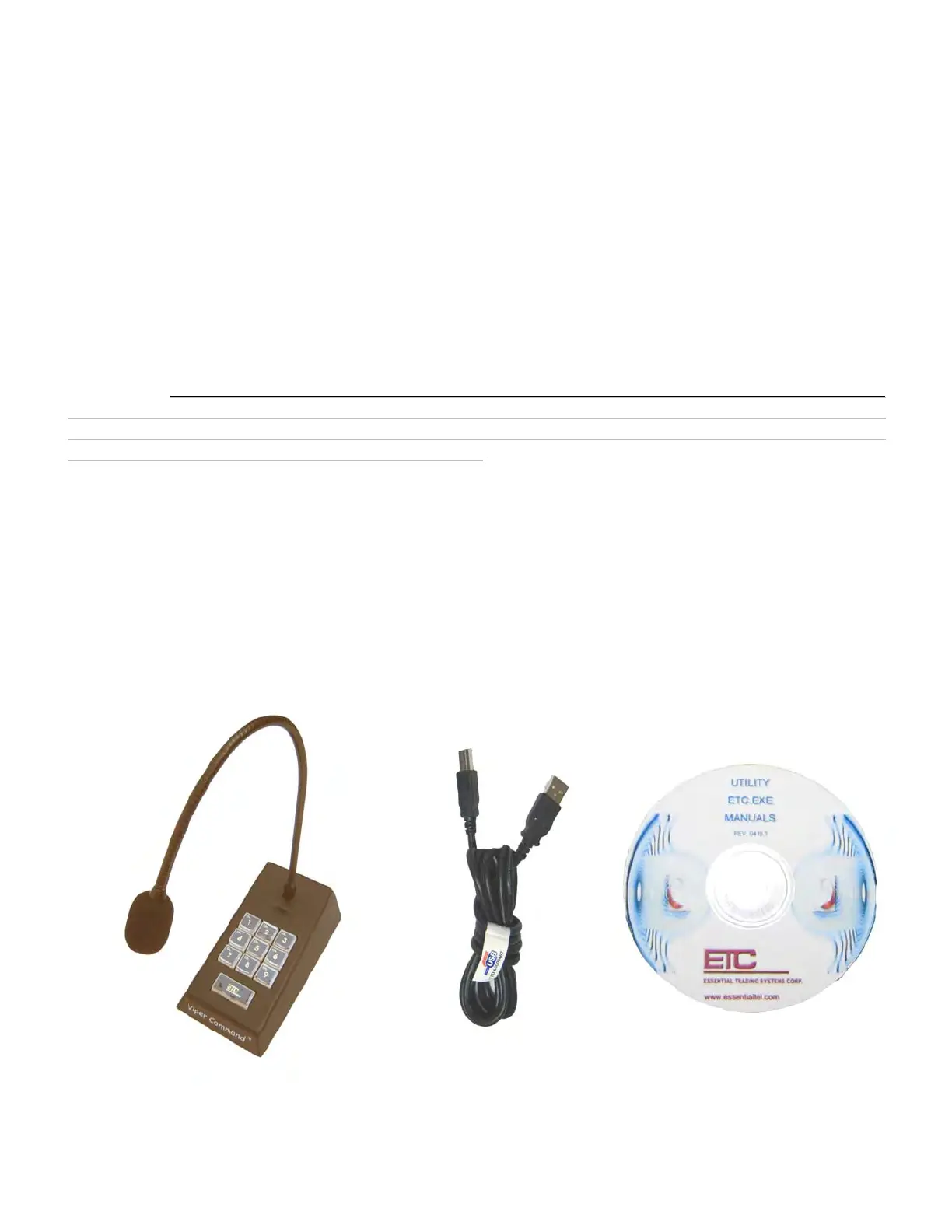
The VM-10) (Figure A) comes equipped with a USB “A/B” 2.0 cable (Figure B) and ETC Utility disc
(Figure C)
Figure A Figure B Figure C


 To Next Page