VM-10 Installation Guide Rev 05.12 Page 14 of 19 Essential Trading Systems Corp.
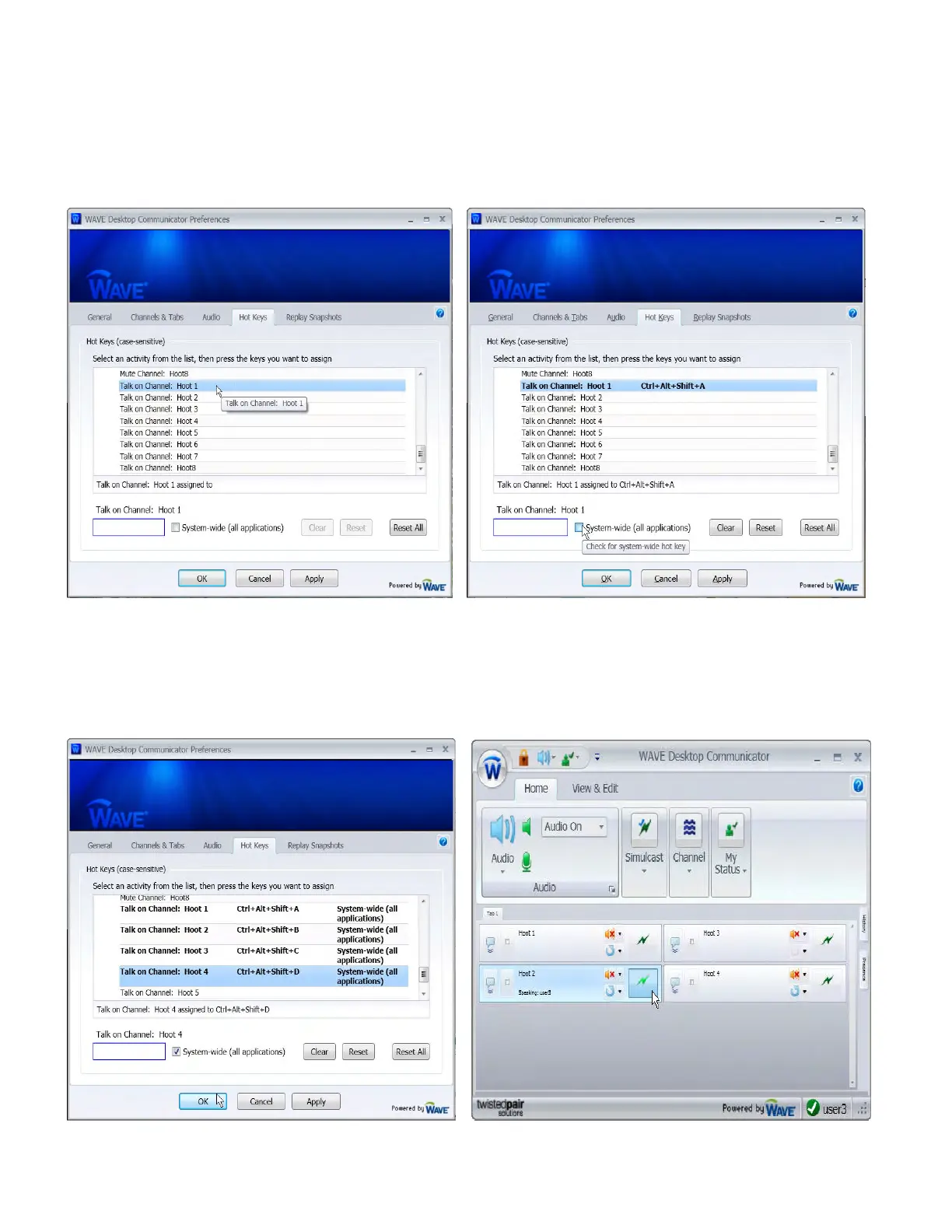
Click the
H
H
o
o
t
t
K
K
e
e
y
y
s
s tab and scroll to the bottom of the list. Click on the
T
T
a
a
l
l
k
k
o
o
n
n
C
C
h
h
a
a
n
n
n
n
e
e
l
l
:
: you want to
program (Hoot 1 in this example) (Figure 30.) Press the
1
1
k
k
e
e
y
y
o
o
n
n
t
t
h
h
e
e
V
V
M
M
-
-
1
1
0
0
to program
T
T
a
a
l
l
k
k
o
o
n
n
C
C
h
h
a
a
n
n
n
n
e
e
l
l
:
:
(
(
H
H
o
o
o
o
t
t
1
1
i
i
n
n
t
t
h
h
i
i
s
s
e
e
x
x
a
a
m
m
p
p
l
l
e
e
)
). The pre-programmed Hot Keys sequence will appear next to the
programmed channel
(
(Figure 31)
.
.
Check the
S
S
y
y
s
s
t
t
e
e
m
m
-
-
w
w
i
i
d
d
e
e
(
(
a
a
l
l
l
l
a
a
p
p
p
p
l
l
i
i
c
c
a
a
t
t
i
i
o
o
n
n
s
s
)
) check box (Figure 31).
This allows operation of a minimized Wave client. Repeat this procedure until all channels have
been programmed.
Figure 30 Figure 31
Click the
O
O
K
K button to save changes and close the
P
P
r
r
e
e
f
f
e
e
r
r
e
e
n
n
c
c
e
e
s
s screen (Figure 32). The
W
W
A
A
V
V
E
E
D
D
e
e
s
s
k
k
t
t
o
o
p
p
C
C
o
o
m
m
m
m
u
u
n
n
i
i
c
c
a
a
t
t
o
o
r
r screen will appear will all programmed channels. You can transmit audio
three ways: by clicking on the
T
T
a
a
l
l
k
k button (Figure 33), pressing the VM-10 Microphone button, or
using the hot keys sequence on the keyboard.
Figure 32 Figure 33


 To Next Page