ETC
®
Service Note
Congo™ jr Master Wing LCD Replacement
Congo™ jr Master Wing LCD Replacement Page 49 Electronic Theatre Controls, Inc.
Corporate Headquarters
3031 Pleasant View Road, P.O. Box 620979, Middleton, Wisconsin 53562-0979 USA
Tel +608 831 4116
Fax +608 836 1736
London, UK
Unit 26-28, Victoria Industrial Estate, Victoria Road, London W3 6UU, UK
Tel +44 (0)20 8896 1000
Fax +44 (0)20 8896 2000
Rome, IT
Via Ennio Quirino Visconti, 11, 00193 Rome, Italy
Tel +39 (06) 32 111 683
Fax +39 (06) 32 656 990
Holzkirchen, DE
Ohmstrasse 3, 83607 Holzkirchen, Germany
Tel +49 (80 24) 47 00-0
Fax +49 (80 24) 47 00-3 00
Hong Kong
Room 1801, 18/F, Tower 1 Phase 1, Enterprise Square, 9 Sheung Yuet Road, Kowloon Bay, Kowloon, Hong Kong
Tel +852 2799 1220
Fax +852 2799 9325
Service:
(Americas) service@etcconnect.com
(UK) service@etceurope.com
(DE) techserv-hoki@etcetcconnect.com.com
(Asia) service@etcasia.com
Web:
www.etcconnect.com
Copyright © 2006 ETC. All Rights Reserved.
Product information and specifications subject to change.
Pending
Rev A
Released 02/2007
Tools Required:
#1 Phillips Screwdriver
Soldering Iron
Lead Free Solder
Procedure:
Step 1: Remove the protective side panels from the Congo jr Master Wing.
Step 2: Place the master wing face down exposing the back side.
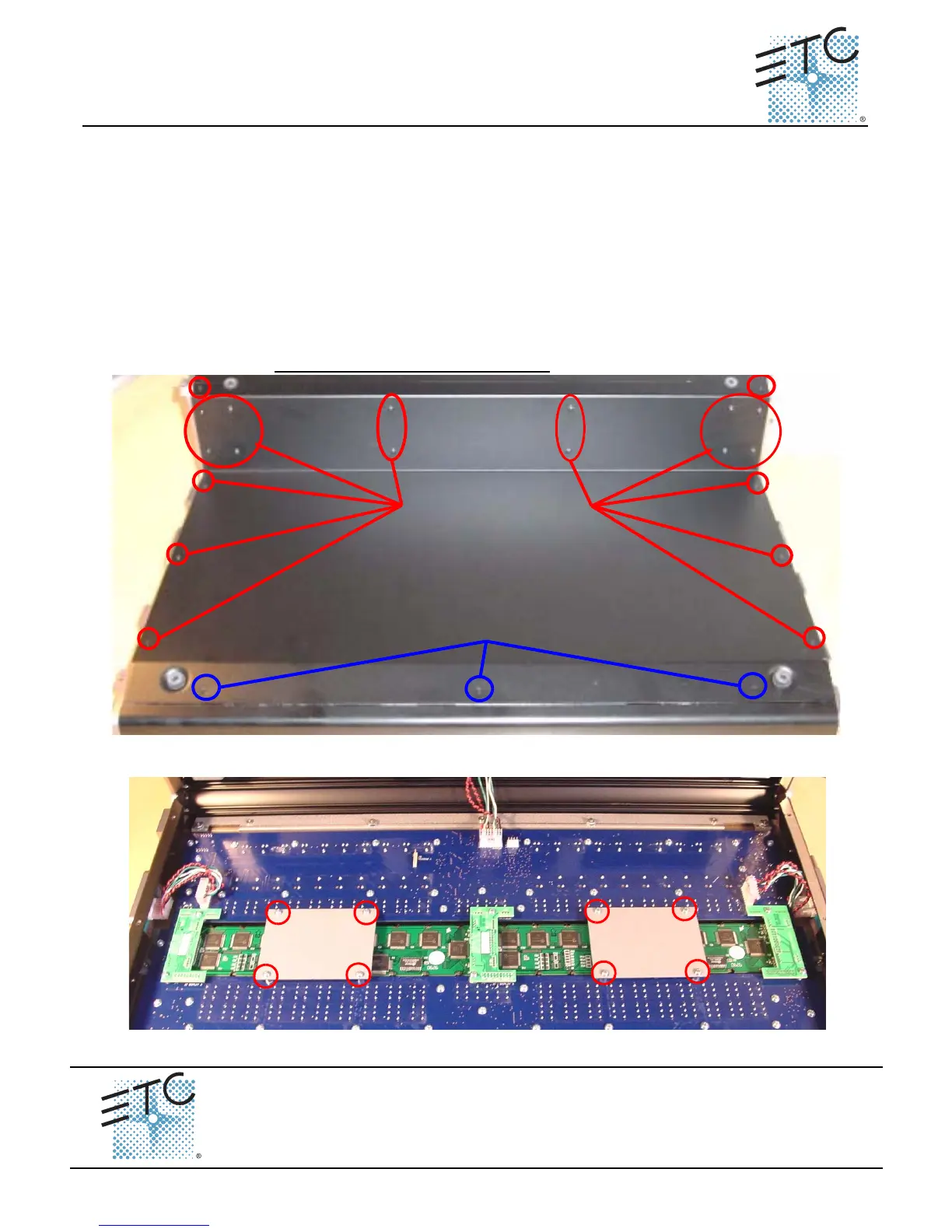
Step 3: Remove the 20 screws indicated in Red below.
Step 4: Loosen the 3 screws indicated in Blue below.
NOTE: DO NOT remove the 3 screws.
Step 5: Remove the master wing bottom plate and set it aside.
Step 6: Remove the 8 screws from the LCD pressure plates. Set the screws and plates aside.
Master Wing LCD Replacement
Remove these screws
Loosen these screws
3 Full Turns
LCD
Pressure Plate
LCD
Pressure Plate



 To Next Page