Step 5. Adjusting the Tilt
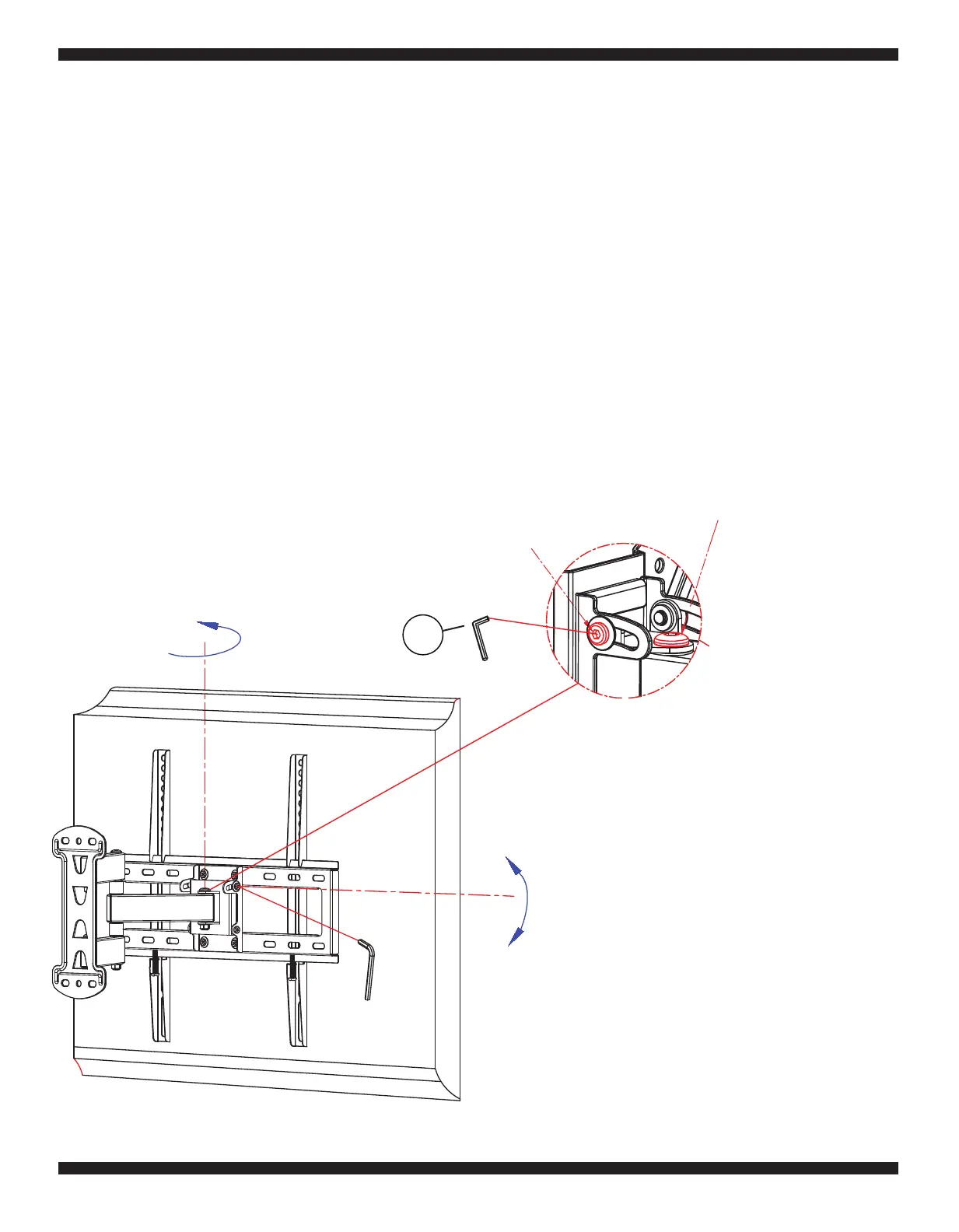
Fig. 5
9
1.
Use the Allen Wrench (T) to loosen the Swivel Adjustment Screw about 1/2 turn.
2.
To adjust the swivel angle, simply grab the sides of the TV with two hands and carefully slide the TV
in the desired direction. When the TV is in the desired position, carefully let go of the TV.
Step 6. Adjusting the Swivel Tension
To adjust how easily the TV Mount can Swivel you may need to loosen the Swivel Adjustment Screw
shown in Fig. 5.
Screw
Tilt Adjustment
Screw
Swivel Adjustment
T
S
+5°
-15°
±90°
To adjust the Tilt Angle of your TV you may need to loosen the Tilt Adjustment Screw as shown
in Fig. 5.
1. Use the Allen Wrench (T) to loosen the Tilt Adjustment Screw about 1/2 turn. Then adjust the
Tilt Angle of the TV to your liking.
2. The Tilt Adjustment Screw can be re-tightened if you do not want to make further changes to
the Tilt Angle of the TV in the future.


 To Next Page