OPERATION OF SHOWER / SUB REMOTE CONTROLS
The SHOWER/SUB CONTROLS overrides the operation of the main control.
Leave the operation switch on the MAIN CONTROL switched ON.
YST-84/84S SHOWER/SUB CONTROLS
1.
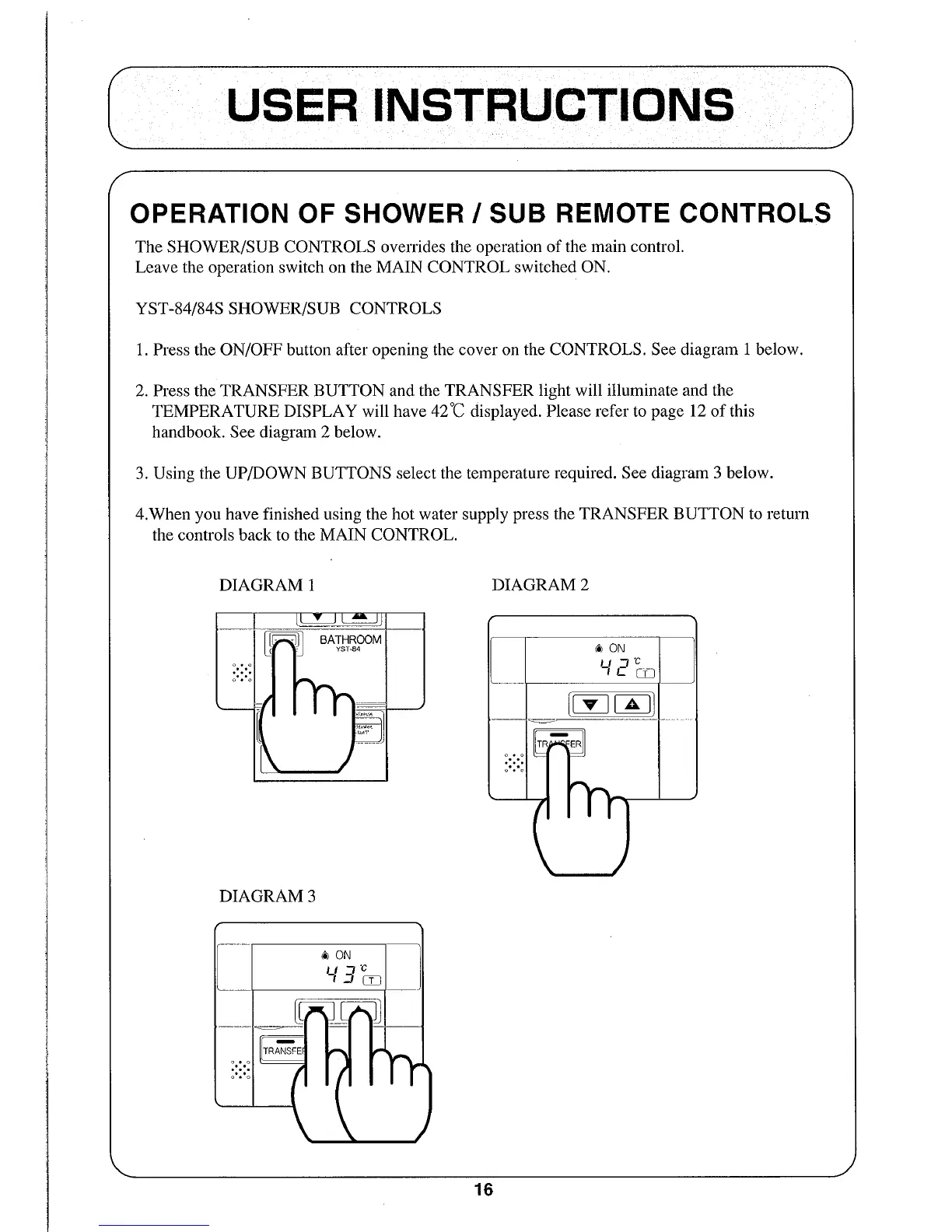
Press the ON/OFF button after opening the cover on the CONTROLS. See diagram 1 below.
2.
Press the TRANSFER BUTTON and the TRANSFER light will illuminate and the
TEMPERATURE DISPLAY will have 42°C displayed. Please refer to page 12 of this
handbook. See diagram 2 below.
3.
Using the UP/DOWN BUTTONS select the temperature required. See diagram 3 below.
4.When you have finished using the hot water supply press the TRANSFER BUTTON to return
the controls back to the MAIN CONTROL.
DIAGRAM 1
DIAGRAM 2
DIAGRAM 3
USER INSTRUCTIONS
16



 To Next Page