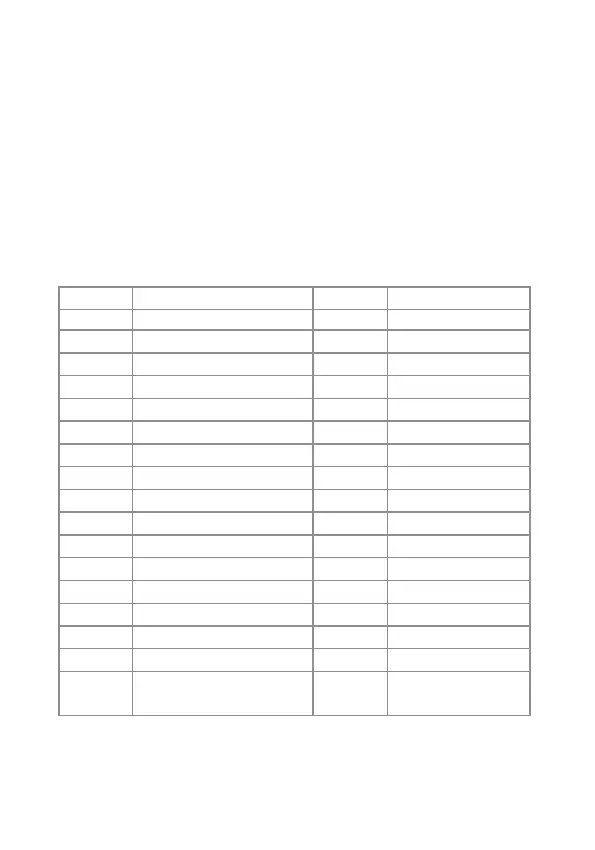
SMS code Function
?
00
0
1
2
5
6
91~99
10
11
12
13
21
22
23
24
0000
check SMS commands
Settings inquiry
Disarm the system
Arm the system
Home Mode
Store Phone numbers
Store SMS numbers
Rename zone
Rename RFID-tag
Entry and exit delay time
Siren volume and ringing time
User code
Delete all accessories
Delete remote control
Delete wireless detector
Delete RFID-tag
Restore system to factory
settings
SMS code Function
0001~0015
0001
0002
0003
0004
0005
0006
0007
0008
0009
0010
0011
0012
0013
0014
0015
Set system language
English
French
Russian
Danish
Dutch
Italian
Swedish
German
Spanish
Finnish
Norwegian
Arabic
Farsi
Chinese
Portuguese
Read on for the complete list of settings by SMS.
Note
- Languages available may vary depending on the version of your
product.
- Only stored numbers can send the SMS to control the system.
How it works
For each setting you want to modify by SMS, it works as below:
- Send a code by SMS.
- The control panel replies you with the corresponding settings currently
saved in your alarm.
- Copy this SMS and paste it as a reply to the control panel.
- Modify the SMS according to the setting you wish to change, before
sending back to the control panel.
- The control panel replies "ok" as a confirmation.


 To Next Page