EN 32
USING THE COMBI FUNCTIONS
Microwave +grill
This setting combines the radiant heat from thegrill and the fast cooking through the microwave.
The cooking time is shortened and the result is a browned, crispy layer.
This function is suitable for all kinds of food that has to be warmed up and browned
(e.g. baked pasta) and dishes that require a short cooking time for a brown crust. This setting
can also be used for thick portions for which a brown, crunchy crust is tasty (e.g. chicken
drumsticks).
If you want to brown both sides of the food, turn it over halfway through cooking.
Selecting the microwave +grill function
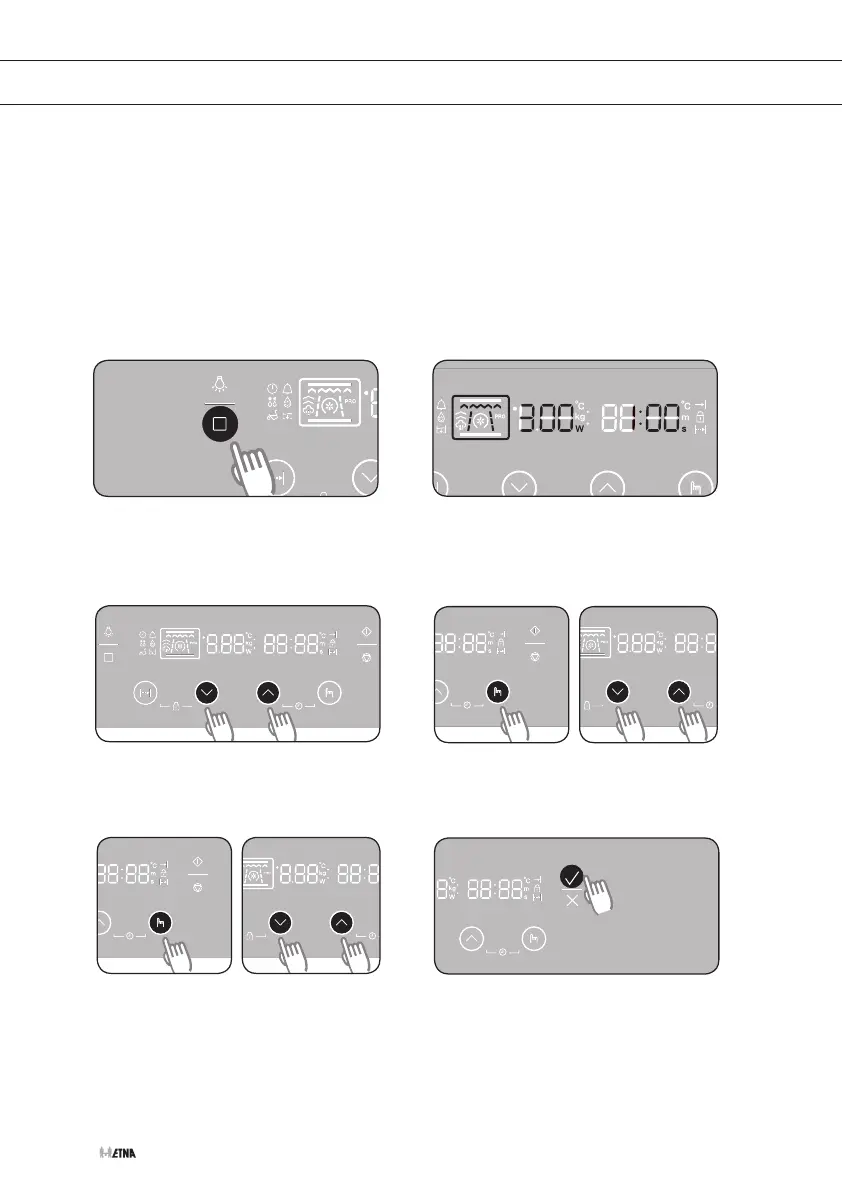
Press the function selection button six
times to select the microwave +grill
setting.
The microwave +grill function, the
cooking time and power are visible in
the display.
Press the settings buttons to set the
desired cooking time.
Press the selection button and set the
power using the settings buttons.
Press the selection button and set the
desired temperature using the settings
buttons. During cooking you can
change the temperature.
Press the start button to start cooking.
1 2
3 4
5 6


 To Next Page