EN 7
USE
Initial use
Prepare for use
• Remove all accessories from inside the oven and clean them
thoroughly with warm soapy water. Close the door and switch the
empty oven to maximum temperature for approximately 30 minutes.
After this, switch on the grill for 15 minutes. Allow the oven to cool
down before cleaning it with warm water.
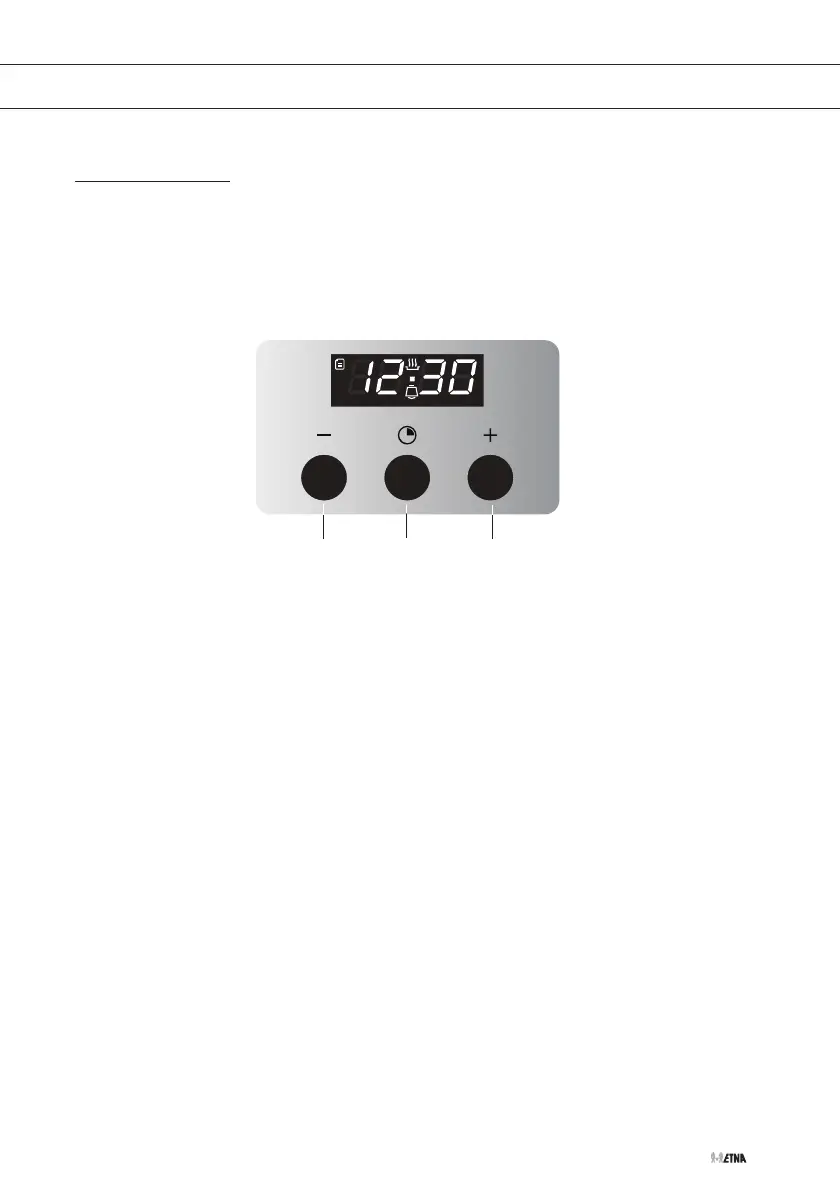
11
12
13
Setting the current time
• When the oven is connected to mains power ‘12:30’ will appear
in the display and the ‘hours’ indicator will flash. Press the + (13)
or - (11) button to set the correct hour. Press the clock button (12)
to confirm. The minute indicator will then start to flash. Press the +
(13) or - (11) button to set the right minutes. Press the clock button
(12) to confirm.
• The time can be adjusted by depressing the + (13) and - (11)
buttons simultaneously until the ‘hours’ indicator starts to flash.
Set the clock as described above.
No aluminium on the oven floor
• Never cover the base of the oven with aluminium foil and also never
place baking trays or tins on the base of the oven. Foil actually
blocks the heat, damaging the enamel and negatively influencing
the cooking result.
Clean immediately
• Spilled food containing sugar or fruit juices, such as prune juice or
rhubarb, can damage the colour of the enamel. We recommend you
clean such spillages immediately.



 To Next Page