EN 6
USING YOUR DISHWASHER
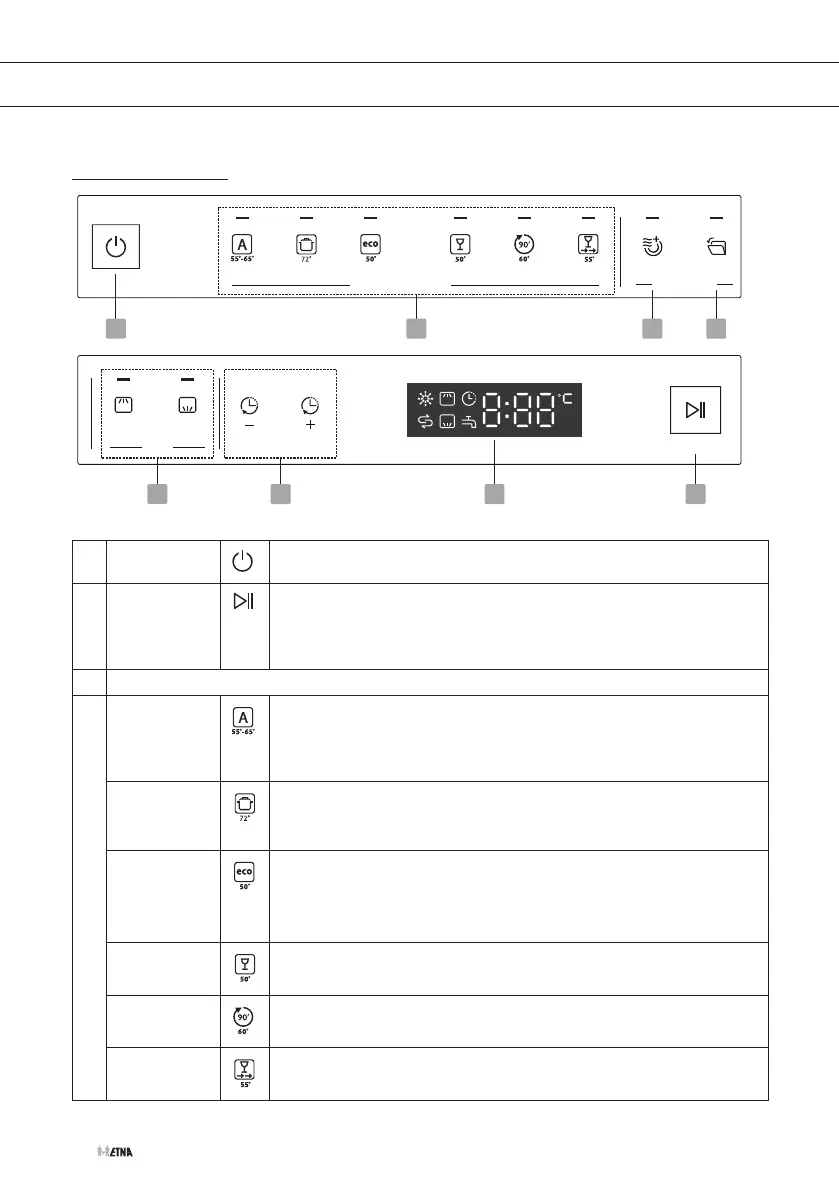
Control panel
1 2 3 4
5 6 78
Programs
Functions
Alt Delay
Programs Functions Alt Delay
1 On/Off
1 2 3 4
5 6 78
Programs
Functions
Alt Delay
Programs Functions Alt Delay
Press this button to turn on your dishwasher, the screen lights up.
7 Start
1 2 3 4
5 6 78
Programs
Functions
Alt Delay
Programs Functions Alt Delay
• Press this button to start after selecting a programme (and
possibly a function).
• Press and hold this button for 3 seconds to cancel the current
programme and function.
2 Programs
Auto
1 2 3 4
5 6 78
Programs
Functions
Alt Delay
Programs Functions Alt Delay
An auto sensing wash for lightly, normally or heavily soiled
crockery, with or without dried-on food. A sensor detects how dirty
the water in the machine is and automatically adjusts the program
temperature and duration.
Intensive
1 2 3 4
5 6 78
Programs
Functions
Alt Delay
Programs Functions Alt Delay
For heavily soiled items, include pots and pans, with dried on food.
ECO
1 2 3 4
5 6 78
Programs
Functions
Alt Delay
Programs Functions Alt Delay
This is the standard program suitable for normally soiled loads,
such as pots, plates, glasses and lightly soiled pans. It is the
most efficient program in terms of its combined energy and water
consumption for normaly soiled loads.
Glass
1 2 3 4
5 6 78
Programs
Functions
Alt Delay
Programs Functions Alt Delay
For lightly soiled crockery and glass.
90 min
1 2 3 4
5 6 78
Programs
Functions
Alt Delay
Programs Functions Alt Delay
For normally soiled loads that need a quick wash.
Rapid
1 2 3 4
5 6 78
Programs
Functions
Alt Delay
Programs Functions Alt Delay
A shorter wash for lightly soiled loads that do not need drying.



 To Next Page