4930638-02 - Page 5
Using Your Sunbed
Before using your sunbed, please note the following:
• Your skin should be free of cosmetics, tanning oils, or other body
lotions prior to tanning except for those specically made for use
with tanning devices. However, do not remove natural body oils by
bathing or showering immediately before tanning.
• Keep treated hair from contacting sunbed surfaces. Many hair prod-
ucts can damage the sunbed acrylic. Wear a shower cap or towel if
you use gels, mousses, sprays, or other hair products.
• Your sunbed is designed for individual use. Always wear the safety
goggles supplied with your sunbed or another approved pair of gog-
gles, as dened under 21 CFR 1040.20. Regular sunglasses do not
provide adequate protection from ultraviolet light.
Exposure Times
Follow the guidelines for skin type and exposure times as shown in the
table below. Untanned persons should not tan on consecutive days
during their rst week of tanning. Never tan more than once a day. Tan-
ning normally appears after the rst few sessions and maximizes after
approximately four weeks. Tan once or twice per week thereafter to
maintain appearance. Persons already having a base tan may begin at
advanced levels corresponding to the extent of their base tan.
Skin Type:
I Sensitive Skin (Burns easily and severely and does not tan.)
II Light Skin (Burns easily and severely and tans minimally.)
III Normal Skin (Burns moderately and tans average.)
IV Dark Skin (Burns minimally, tans easily and above average.)
RECOMMENDED EXPOSURE TIMES IN MINUTES
Level 1/Week 1 Level 2 Level 3 Level 4 Level 5
Skin Type: 1st-3rd Sessions
I Sensitive NOT RECOMMENDED FOR TANNING
II Light 4 8 12 16 20
III Normal 6 10 15 20 20
IV Dark 8 12 16 20 20
MAXIMUM EXPOSURE TIME IS 20 MINUTES
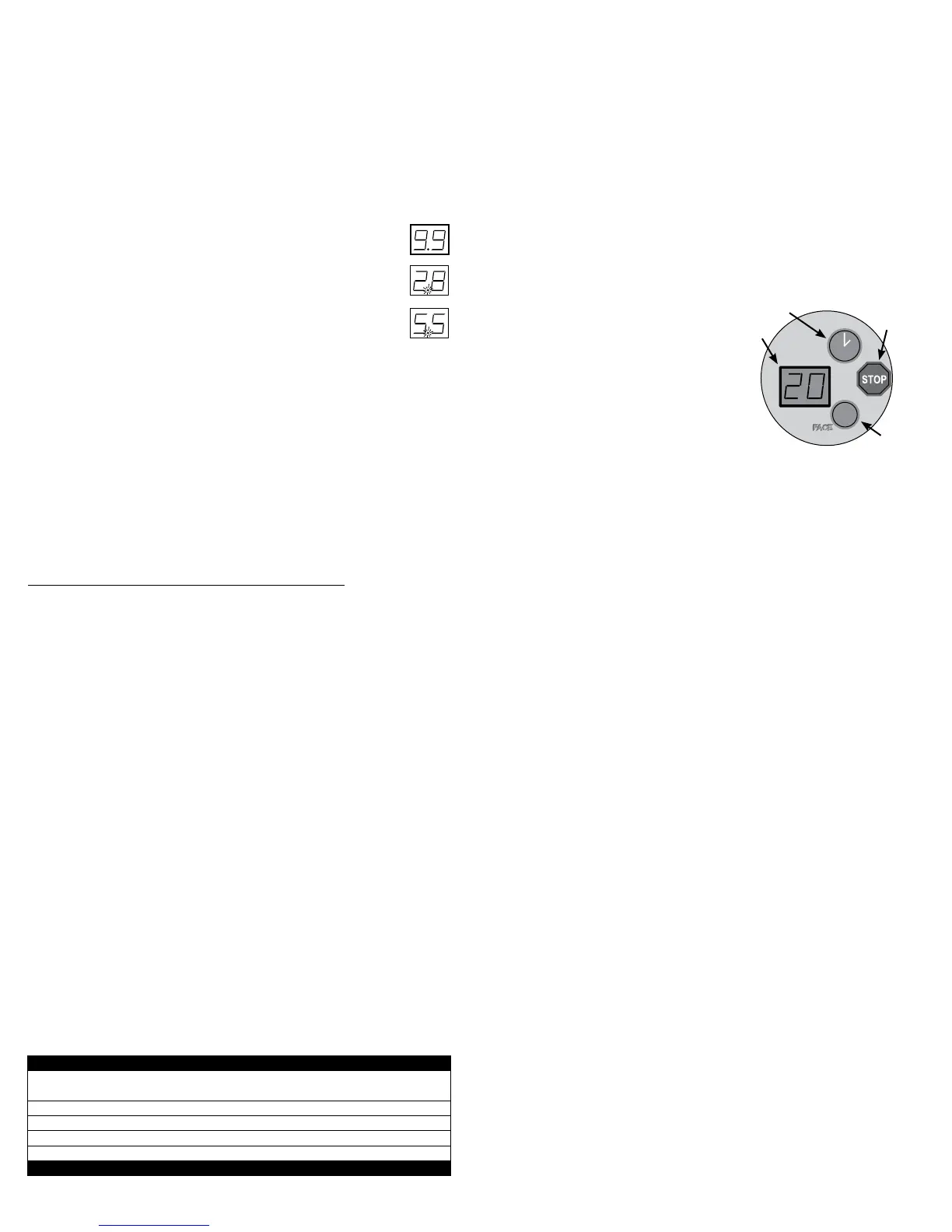
Operation
A Timer display - Displays remaining time.
B Timer button - Turns bed on. Timer display
shows remaining time. If a lesser time
is desired, press timer button until de-
sired time is displayed.
C Stop button - Interrupts tanning session.
D Face tanner button - (Units equipped with facial units only.) Turns
face tanner on and off.
Setting the address manually
Before connecting your sunbed to the T-Max® Manager or T-Max® 1A
or 3A, the address of your sunbed must rst be set. Set the address
manually as described below.
Setting the Address
1 Make sure the sunbed display is showing “0”.
2 Press the red stop button and, without releasing it, press the green
timer button and hold both for three seconds. The display should
indicate an address number from “1” to “255”.
3 If you are using a T-Max® 1A or 3A as a “master” remote, the ad-
dress of the sunbed must be set to “1”. If you are using a T-Max®
Manager each sunbed must be assigned a different address. To adjust
the address, press the green timer button to count up until the desired
number (from 1 to 128) is achieved. Addresses 252 to 255 are not
normally used.
4 Press the red stop button to return to the normal display
mode.
1-99
100-128
(blinking dot)
252-255
(blinking dot)
A
B
C
D
(When used without remote or when connected to a remote system
using a control relay)
1 Press the timer button (B) to begin the tanning session. The timer dis-
play (A) displays the remaining time. The lamps will turn on and the
timer will begin to count down from the maximum tanning session
time. If a tanning time less than the displayed time is desired, repeat-
edly press the timer button (B) to decrease the remaining time.
2 Lift the canopy, lie down on the bench (face up), lower the canopy
as close to your body as possible, with no less than 2” between the
canopy acrylic and your body.
3 When the timer reaches “0” the lamps turn off. If you want to stop
your session before time expires, press the stop button (C).
4 Raise the canopy by using the outer edge of the canopy, do not push
up on the acrylic shield as it may crack. The cooling fans run for three
minutes after the lamps shut off to aid in cooling the sunbed.
(When connected to the T-Max® Manager or T-Max® 1A or 3A.)
1 If the remote system has been set to allow a pre-tanning delay time,
the timer display (A) will repeatedly ash the delay symbol “dL” and
then the remaining delay time. Press the timer button (B) or wait until
the delay time has expired to begin the tanning session. The lamps
will turn on and the timer will begin to count down.
2 Lift the canopy, lie down on the bench (face up), lower the canopy
as close to your body as possible, with no less than 2” between the
canopy acrylic and your body.
3 When the timer reaches “0” the lamps turn off. If you want to stop
your session before time expires, press the stop button (C).
4 Raise the canopy by using the outer edge of the canopy, do not push
up on the acrylic shield as it may crack. The cooling fans run for
three minutes after the lamps shut off to aid in cooling the sunbed.
The timer will indicate “..” as a reminder to clean the sunbed. After
the sunbed is cleaned press the timer button and the display will
return to “0”.



 To Next Page
 Loading...