The document is a user manual for the Eureka Atom W 65/75 coffee grinder, providing detailed information on its safety, operation, technical specifications, and maintenance.
Function Description
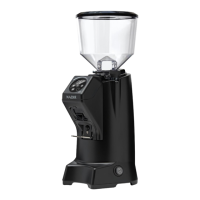
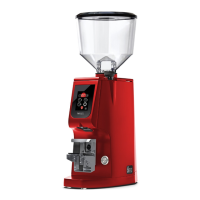
The Eureka Atom W 65/75 is a commercial coffee grinder designed for grinding roasted coffee beans. Its primary function is to grind coffee to a desired fineness, with options for continuous dispensing or pre-set doses based on weight or time. The grinder features a touch screen display for easy operation and adjustment of various settings. It is intended for commercial use in environments such as restaurant kitchens, canteens, hospitals, bakeries, and butcher shops, but not for continuous food production.
Important Technical Specifications
The manual provides a table of technical data for both the Atom W 65 and Atom W 75 models.
General Specifications:
- Manufacturer: CONTI VALERIO - Via Luigi Longo 39/41 - 50019 Sesto Fiorentino (FI) - ITALY
- Model: ATOM W 65/75
Electrical Specifications:
| Specification |
W 65 (220/240V) |
W 65 (110/120V) |
W 75 (220/240V) |
W 75 (110/120V) |
| Voltage (V) |
220/240 |
110/120 |
220/240 |
110/120 |
| Frequency (Hz) |
50/60 |
60 |
50/60 |
60 |
| Current (A) |
N/A |
4.2 |
N/A |
8.3 |
| Absorption (W) |
280/460 |
N/A |
480 |
N/A |
Performance Specifications:
- RPM*:
- Atom W 65: 1370/1600 (220/240V), 1700 (110/120V)
- Atom W 75: 1400/1700 (220/240V), 1700 (110/120V)
- *Values refer to actual revolutions of the grinders.
- Atom W 65: Ton 30s – Toff 270s
- Atom W 75: Ton 30S – Toff 420s
- Productivity (g/s):
- W 65: 2.8-3.3 (50Hz), 3.3-3.8 (60Hz), 3.3-3.8 (110/120V)
- W 75: 4.5-5 (50Hz), 5-5.5 (60Hz), 5-5.5 (110/120V)
Physical Specifications:
- Weight when empty (kg): 13 (for both W 65 and W 75)
- Hopper Capacity (Kg): 1.2 (for both W 65 and W 75)
- Height (mm): 540 (for both W 65 and W 75)
- Width (mm): 180 (for both W 65 and W 75)
- Depth (mm): 240 (for both W 65 and W 75)
Operating Conditions:
- Temperature: -5°C to +30°C
Usage Features
The grinder is designed for user-friendly operation with several key features:
- Touch Screen Display (5): The main interface for all settings and operations.
- Grinding Adjustment Knob (4): Allows for precise adjustment of the grinding degree. Turning clockwise makes the powder finer, while counter-clockwise increases grain size. This adjustment is stepless and should be done gradually.
- Filter Holder Fork (8): Supports the filter holder during grinding. Its height can be adjusted by loosening two screws beneath it.
- Dose Selection:
- Selected Dose Grams Display (A): Shows the current dose in grams.
- Grams Decrease Button (B) / Grams Increase Button (G): Used to adjust the dispensing time of the selected dose in increments of 5 hundredths of a second.
- Dose 1 Selection (C) / Dose 2 Selection (H) / Dose 3 Selection (D): Buttons for selecting pre-programmed doses.
- Continuous Dose Selection (I): Allows for manual, continuous grinding as long as the button is pressed.
- Dose Adjustment Lock (E): A feature to block dose adjustment, preventing accidental changes.
- Preliminary Operations:
- Coffee Bean Container (2): Inserted into its seat and locked with a screw.
- Opening/Closing Tab (3): Controls the flow of coffee beans from the hopper to the grinding mechanism.
- Container Lid (1): Covers the coffee bean container.
- Grinding Mode (Weight/Time): The grinder can operate in two modes:
- Grinding by Weight: The main screen is red, and doses are dispensed based on a pre-set weight.
- Grinding by Time: The main screen is green, and doses are dispensed based on a pre-set time.
- Safety Features:
- The grinder will not start if the filter holder is not inserted correctly.
- Automatic dispensing can be paused by pressing the selected dose button or the front activation button.
- The system resets if grinding is not restarted or the filter holder is removed within a specified time (30 seconds for paused doses, 5 seconds for continuous dispensing).
- An alarm (F) can be activated to indicate when the grinder burrs need replacement.
- Menu Access (J): Provides access to the main menu for advanced settings.
- Technical Menu Access (M): Allows access to technical settings, often password-protected.
- Password Protection: The technical menu and dose adjustment lock can be secured with a 4-digit password.
- Language Selection: The display language can be changed from a list of available languages.
- Standby Mode: The grinder can be set to enter standby after a period of inactivity, with adjustable delay time.
Maintenance Features
The manual outlines several maintenance procedures to ensure the longevity and optimal performance of the grinder:
- Cleaning the Coffee Bean Container (2):
- Remove from the machine.
- Wash with water and neutral soap to remove oily residue.
- Rinse and dry thoroughly.
- Repeat for the plastic lid.
- Frequency: Recommended at least once a week.
- Note: Do not wash in a dishwasher.
- Cleaning the Grinding System:
- Remove the hopper.
- Clean grinders and internal parts with a brush or dry cloth.
- Use a vacuum cleaner or compressed air if necessary.
- For complete sanitization, use detergent tablets for grinders or food-approved products.
- Grinder Maintenance (Burr Replacement):
- Frequency: Check and replace grinders every 500 kg of coffee.
- Procedure:
- Disconnect from power supply.
- Remove the bean container.
- Loosen the screw on the lid and the screws securing the upper grinder holder.
- Clean grinders with a brush or dry cloth, or use a vacuum cleaner/compressed air.
- Burrs Type Setting: The manual allows setting the type of burrs (Standard, Redspeed, Tin, Diamond) and size (65, 75) for accurate maintenance tracking.
- Grinder Change Counter and Alarm:
- The grinder tracks the amount of coffee ground.
- An alarm (F) can be enabled to notify the user when burr replacement is due.
- The counter can be reset after burr replacement.
- Filter Holder Fork Calibration:
- A calibration procedure is available to ensure accurate weighing.
- Involves using a sample weight and pressing "TARE" and "CALIBRATION" keys.
- The display indicates success (green "V") or failure (red "X").
- Note: This intervention is only necessary if calibration precision is lost.
- Partial and Absolute Counters:
- Partial Counters: View kilograms dispensed for each dose and can be reset.
- Absolute Counters: Non-resettable counters for each dispensed dose, providing total usage data.
- Factory Settings Reset: Allows restoring the appliance to its original factory settings.
Safety Warnings for Maintenance:
- Always disconnect the appliance from the power supply before cleaning or maintenance.
- Do not pull the power cord or the appliance itself to disconnect the plug.
- Maintenance operations must be performed by specialized technicians authorized by the manufacturer.
- Do not perform makeshift or precarious repairs, and only use original spare parts.
- All cleaning and sanitizing operations must be carried out with food-approved products.
- Do not leave the filter holder inserted on the fork (8) when not in use.
The manual emphasizes the importance of proper maintenance for the correct functioning of the coffee grinder, as a neglected grinder can negatively impact coffee dispensing, dose precision, and grinding quality.

 Need help?
 General


 To Next Page