40
+
-
14
.0
g
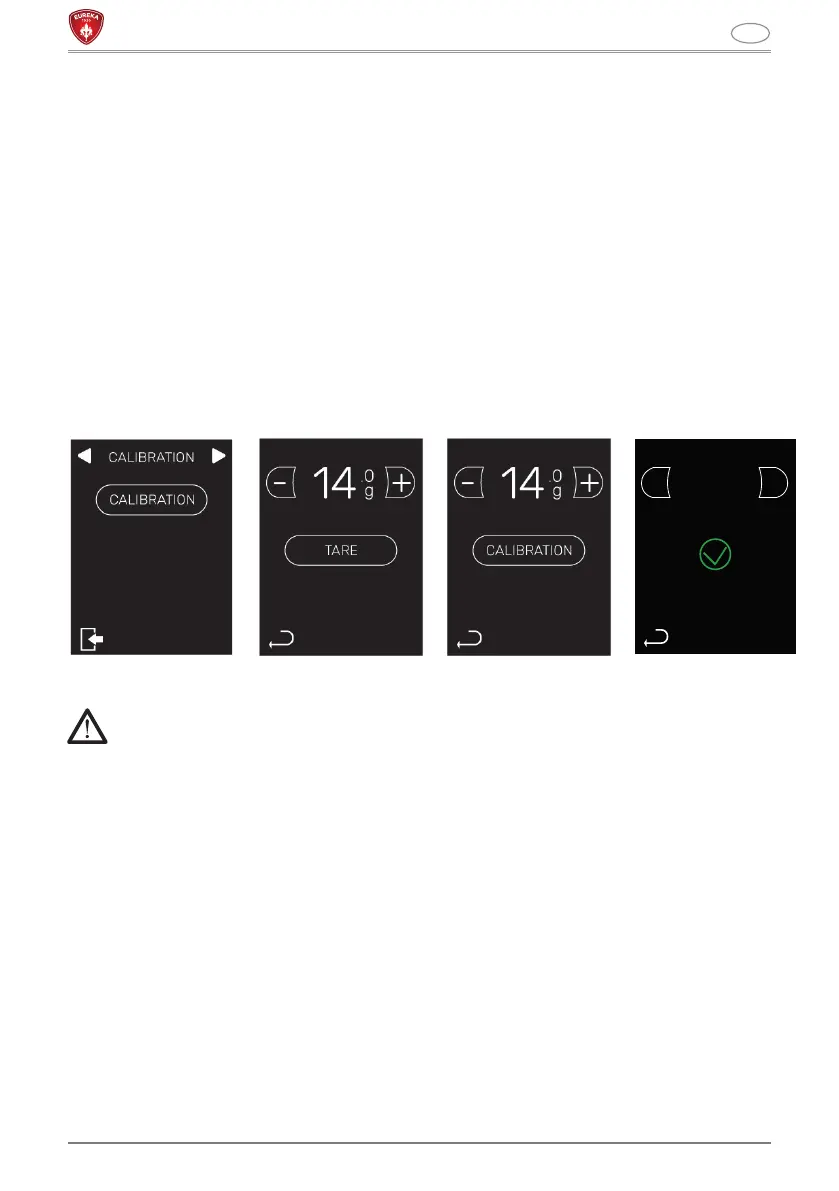
5.4 FILTER HOLDER FORK CALIBRATION
Press and hold the calibration key for 3 seconds. The menu to calibrate the system is
entered:
• The sample weight value available to the user flashes on the display. It is possible to
modify the weight by acting on the keys (B) and (G).
• By inserting the filter holder on the fork (8) the sample weight value on the display will
stop flashing.
• Press tare and after 2 seconds insert the sample weight inside the filter holder.
• After 2 seconds, press the calibrate key to finish the calibration.
• The display will show a green “V” if the calibration has been successful and a red “X”
if the calibration has not been successful.
PLEASE NOTE: maintenance intervention only necessary in case of loss of calibration
precision.
ATTENTION
If the weighing system, during the grinding phase, does not detect a change in
grams on the filter-holder, it will stop to prevent the motor from overheating.



 To Next Page