www.eureka.com
7
CAUTION
Never operating vacuum cleaner without all filters, filter screen and dust
cup in proper position.
How to operate your vacuum cleaner
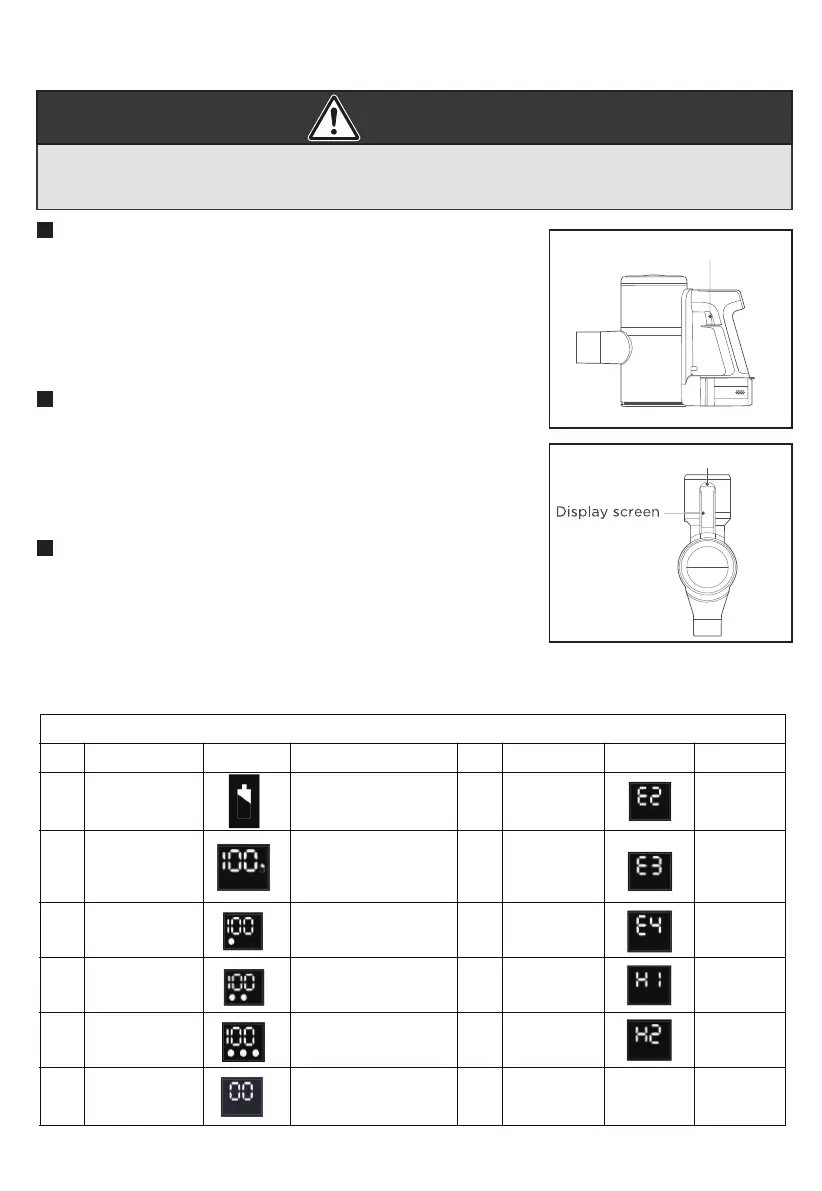
This vacuum cleaner has 2 buttons that you will use during
operation. One is an on/o trigger which turns the unit on
and o. The second is a mode button which will allow you to
choose the level of suction you wish to use during your
cleaning cycle. Battery level and suction levels will be
indicated on the display screen when the unit is turned on.
User Control Buttons:
On/o Trigger
Squeeze the trigger once and let go. The machine will turn
on. The default when the machine turns on is medium suction.
This is sucient to clean standard hard floors.
Squeeze the ON/OFF trigger once to shut down the machine
and stop cleaning.
Start and Shut Down
Touch the suction level control once at startup to change the
suction level to HIGH. Touch the button again to change it to
LOW suction. Touch it again to change it to MEDIUM suction.
The levels of suction will be indicated on the display as shown
below by 1, 2 or 3 dots. 1 = LOW suction. 2 = MEDIUM suction.
3 = HIGH suction. “100” is the battery level indicator and does
not correlate to suction level.
Suction Level Control
Suction Level Control
LED Display Status
Condition LED Status Remark Condition LED Status Remark
1 Charging display Charging icon blinking
Show a bright dot
Show two dots lit
Show three dots lit Show H2
and go o
in 20 seconds
6 Over
discharge
requires
Show 00
and go o
in 3s
2 Full display
3 Low suction
discharge state
4 Medium suction
discharge state
5 High suction
discharge state
11 Motor failure/
Motor not
connected
Display 100 charging icon
stop blinking.
It went out after six
seconds
7 Battery pack
8 Motor
overcurrent
Show E3
Show E4
Show H1
9 Charging
anomaly
10 Rolling brush
anomaly
error
Show E2





 To Next Page