Voice
navigation
09
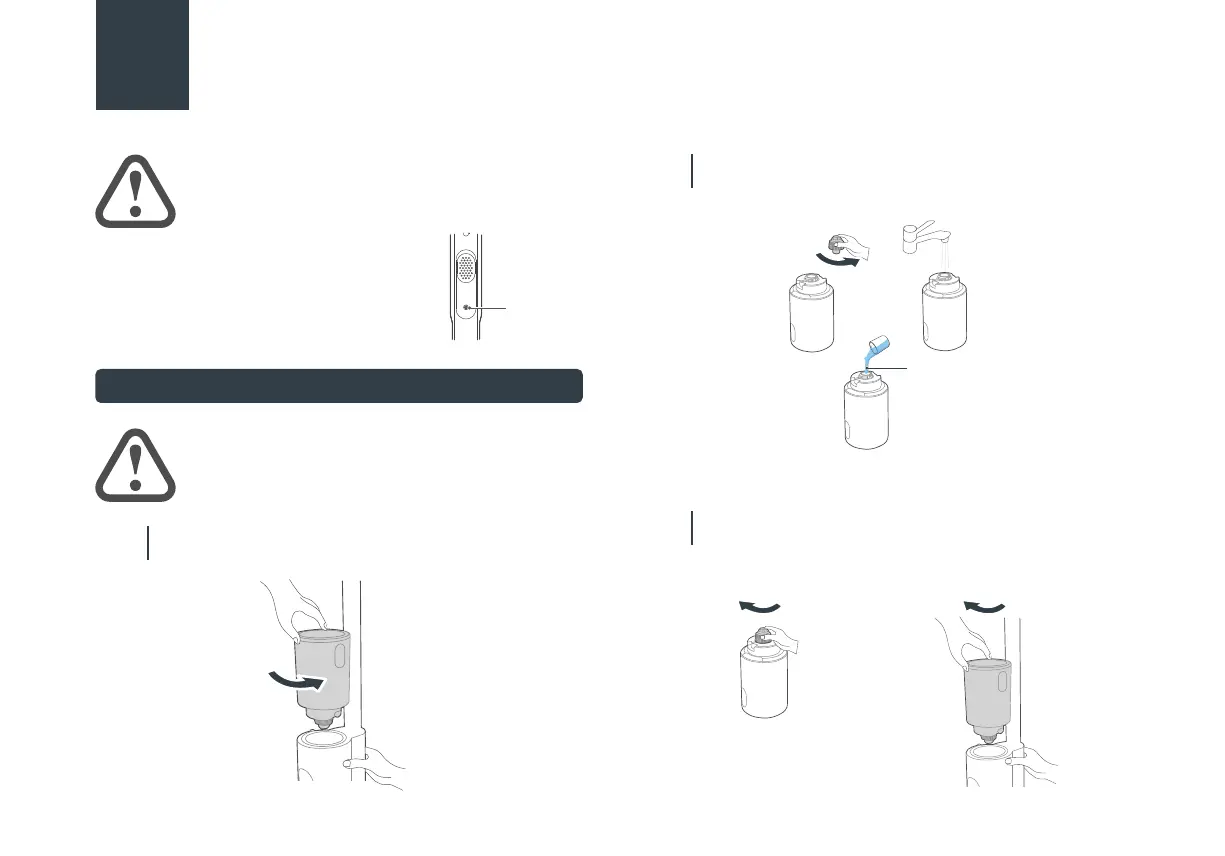
Filling Clean Water Tank
When the machine is powered on for the
first time, the voice function is turned on
by default, which can be turned o by
pressing the voice button, and be turned
on by pressing this button again.
4.
PRODUCT INSTALLATION
ATTENTION
Voice cannot be triggered when turned o.
ATTENTION
Fill water only to the clean water tank.
Note: Eureka cleaning solution only.
Hold the machine with one hand, grab the water tank
with the other hand, rotate and remove the water tank.
01
Unscrew the water tank cover, pour tap water into the
water tank, and add an appropriate amount of cleaning
solution if desired.
02
Screw the water tank back into place on the machine,
and when you hear a click sound, it means the
installation is successful.
03
Unscrew
Unscrew
Cleaning Solution
Screw back into Screw back into


 To Next Page