12 Eureka Customer Service HELPLINE 1-800-282-2886
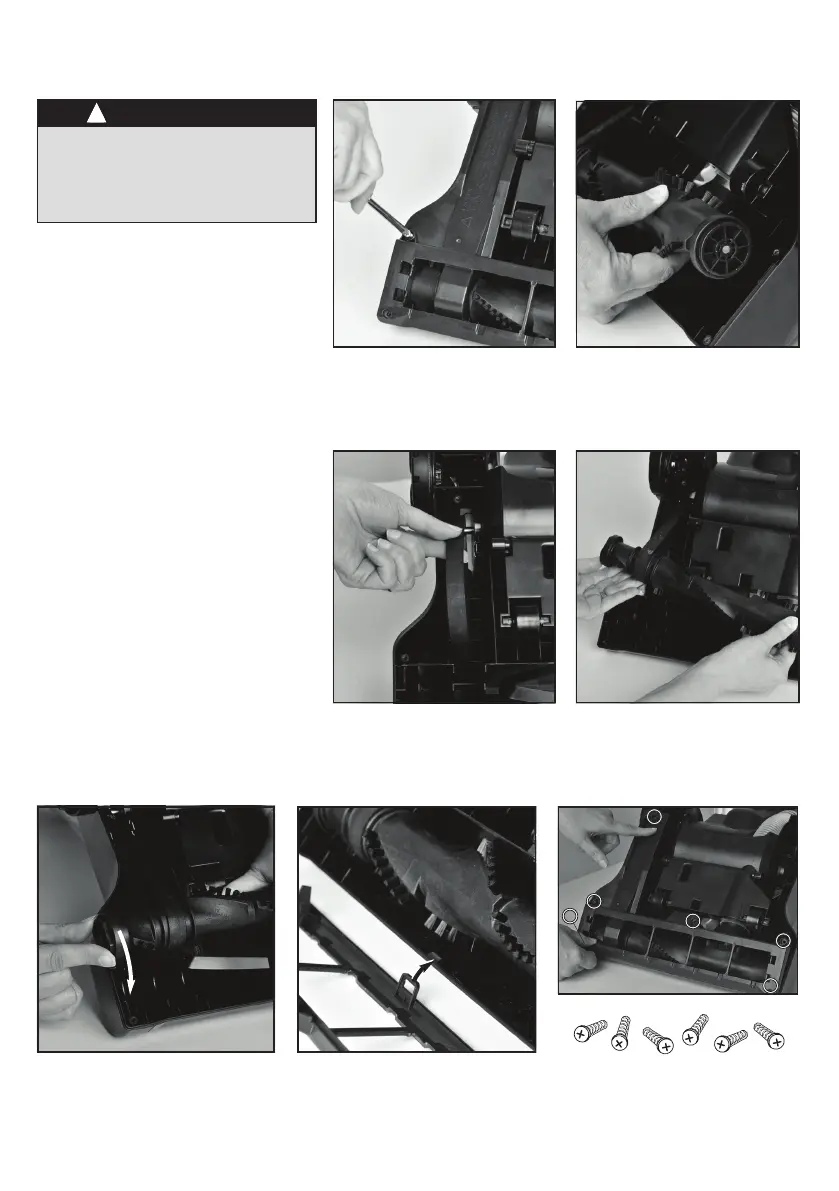
How to replace brushroll or belt
• Step on oor nozzle to lower the
nozzle.
• Use Phillips screwdriver to remove
6 screws from brushroll cover
(Fig. 1). Lift off cover. Refer to
Fig. 7 for location of screws.
• Rotate right end of brushroll and lift
out (Fig. 2).
• Lift out left end of brushroll.
• To replace belt, position new belt
around motor shaft (Fig. 3).
• Loop new belt around brushroll shaft
at left end of brushroll (Fig. 4).
• To reposition brushroll into base,
pull belt down and insert left end of
brushroll rst. Align brushroll end
cap with slot so it ts into position
(Fig. 5). Press right end of brushroll
into position.
• To replace brushroll cover, align
slot on cover with tab (Fig. 6) and
snap cover into place. Replace 6
screws (Fig. 7).
1
3
2
4
5 6 7
3
2
1
4
6
5
Make sure vacuum is
turned off and power cord
is unplugged.
CAUTION


 To Next Page