10
After Sales Support
(AU) 1300 886 649 (NZ) 0800 836 761 | tempo.org/support
Operating Instructions (Cont.)
Operating the device
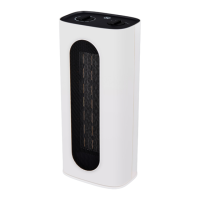
• To turn on the heater, press the ON/OFF switch at the back of the device, then
press the On/Off / Mode button on the control panel or the ON/OFF button on
the remote
• To turn off the heater, press the On/Off / Mode button on the control panel or
the ON/OFF button on the remote, switch off the ON/OFF switch at the back of
the device switch off the outlet, and remove the plug from the mains socket.
Using the oscillation function
• To start the oscillation, press the SWING button on the control panel or remote.
• Press this button again to switch off the oscillation.
Using the timer function
• To engage the timer function, press the Timer button on the control panel or
remote. This will allow you to set the timer in one-hour increments.
• The display will initially show 00 (0 hours, or timer cancel), and with each
press of the button, the time will increase by one hour, up to 12 hours (01, 02,
03...12).
• This cycle will repeat as you continue to press this button.
• When the timer function is enabled, the display will show the time remaining.
• Once the timer ends, the device will switch off automatically.
Adjusting the temperature
• To set the temperature, touch the Temperature button on the control panel.
This will allow you to set the target temperature.
• With each press of this button, the temperature will increase, from 15-40°C.
• Alternatively, press the [ + ] and [ - ] buttons on the remote to adjust the
temperature.
• The display will show the set temperature, blinking for around 5 seconds, after
which time the display will show the ambient temperature.
Changing the mode
• To set the mode, press the On/Off / Mode button on the control panel
• With each press of this button, the mode will change in the following order:
Fan Mode (00) -> Low Heating (01) -> High Heating (02) -> 30s Countdown to Off)
• This cycle will repeat as you continue to press this button.
• Alternatively, select the desired mode (Fan, Low, or High) on the remote.
NOTE: The display will switch off automatically if there is no operation for 5 min.



 To Next Page