17
After Sales Support
(AU) 1300 886 649 (NZ) 0800 836 761 | tempo.org/support
Instructions (Cont.)
Operation buttons (Control Panel)
On/off
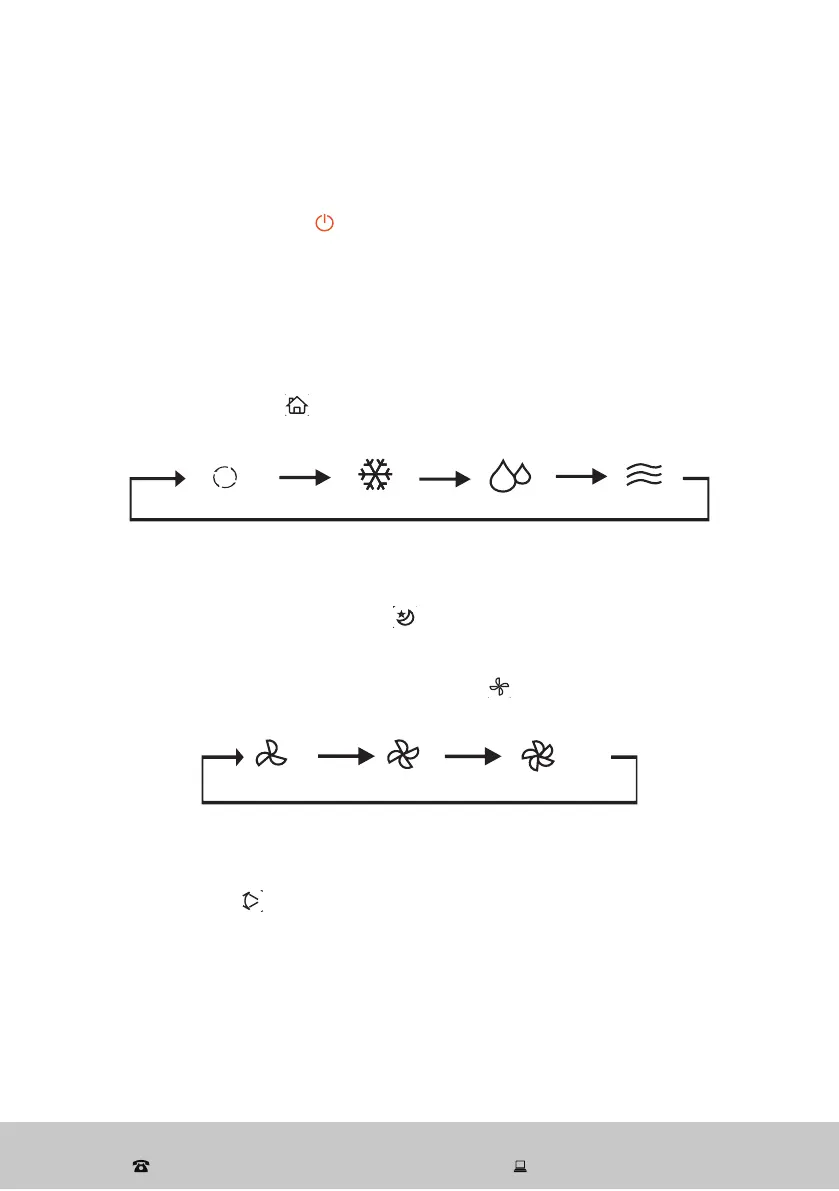
Press the POWER button [
] to turn the unit on. The unit has a memory
function - when it is switched on it will operate automatically using the last
used settings (unless the last mode was auto mode). This only applies if the
plug remains connected. Once the unit is unplugged, all settings will be re-
set. The display screen will show the current room temperature When the unit
is running, press the POWER button again to switch it to standby.
Operation mode
Use the MODE button [
] to select either cooling, dehumidifying (dry),
automatic or fan mode, following the sequence below.
The relevant indicator light will illuminate.
Sleep
In cooling mode, press this button [
] to turn the sleeping function on or off.
Fan speed
In cooling and fan mode, use the FAN button [
] to select the desired fan
speed (low, medium or high), following the sequence below.
The relevant indicator light will illuminate.
Swing
Press this button [
] to activate the 3D oscillation (swing) function. The air
deflector will start swinging continuously. During operation, press this button
again to stop oscillation when the airflow is in the desired direction.
Up (+) / Down (-)
In cooling mode, use this buttons to increase (+) or decrease (-) the setting
temperature within the 15–31 ºC range.
In timer mode, use this buttons to increase (+) or decrease (-) the setting time
within the 1–24 hour range.


 To Next Page