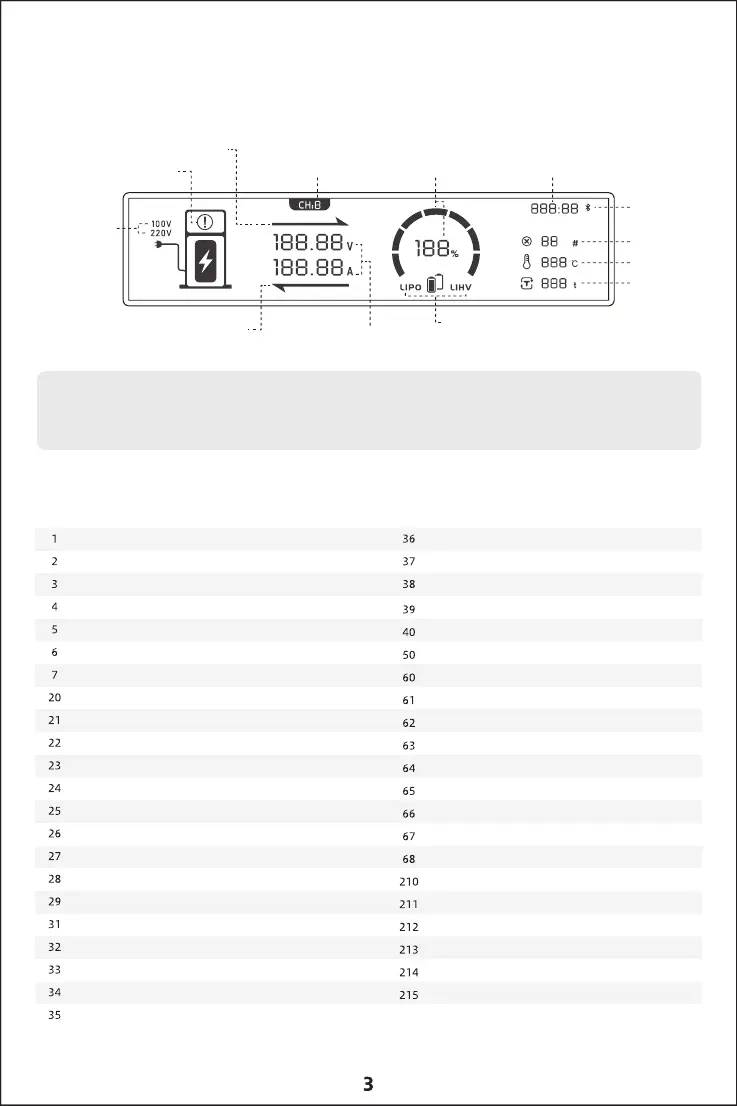
Screen display instructions
Charging status indicator arrow
Program error warning
input voltage display
Maintenance status indicator arrow
Current and voltage display
Battery type display
Automatic identification of
working channels Battery percentage Charging time display
Bluetooth display
Error code display
Temperature disp
Cycle times display
1.In the error state - no current display.
2. The charging/maintenance status arrow is only displayed in the corresponding status.
Error code comment
Current zero drift is too large
Poor contact
The error between the balance port and the total voltage exceeds 2.0V
There is a battery before starting, after 2 seconds the battery is removed
Terminal balance port
The number of batteries does not match
no battery
Total battery voltage is too high
The total battery voltage exceeds the maximum set voltage by 1v
total voltage low
Single cell voltage is too high
single cell low voltage
Charger resistor overheated
Discharge short circuit or overload
Safety timer arrives
The capacity exceeds the safety threshold
BMS communication error
CAN communication timeout
equalizer failure
Discharger failure
Upgrade failed
The BMS connection is interrupted, and the CAN contact is poor,
resulting in communication interruption
battery overheating
The charger failed to start
The charger failed to start
DJI485 communication lost
battery low temperature
The mode cannot be changed during charging and discharging!
Unsupported power supply model
Power failure, communication timeout
Power failure, short circuit failure, stop charging
Power failure, overheat protection, stop charging
Power failure, AC input undervoltage detected
Power failure, AC input failure detected
Power failure, the power may have shut down unexpectedly
Power failure, fan failure detected
Unsupported power supply model
wrong hardware version
wrong battery type
wrong number of batteries
Battery single cell voltage error
not calibrated
Calibrate voltage before calibrating current



 To Next Page