Remote control software
Thank you for purchasing this device. Scan the QR code to download the remote control
software of our company. Thank you for your support!
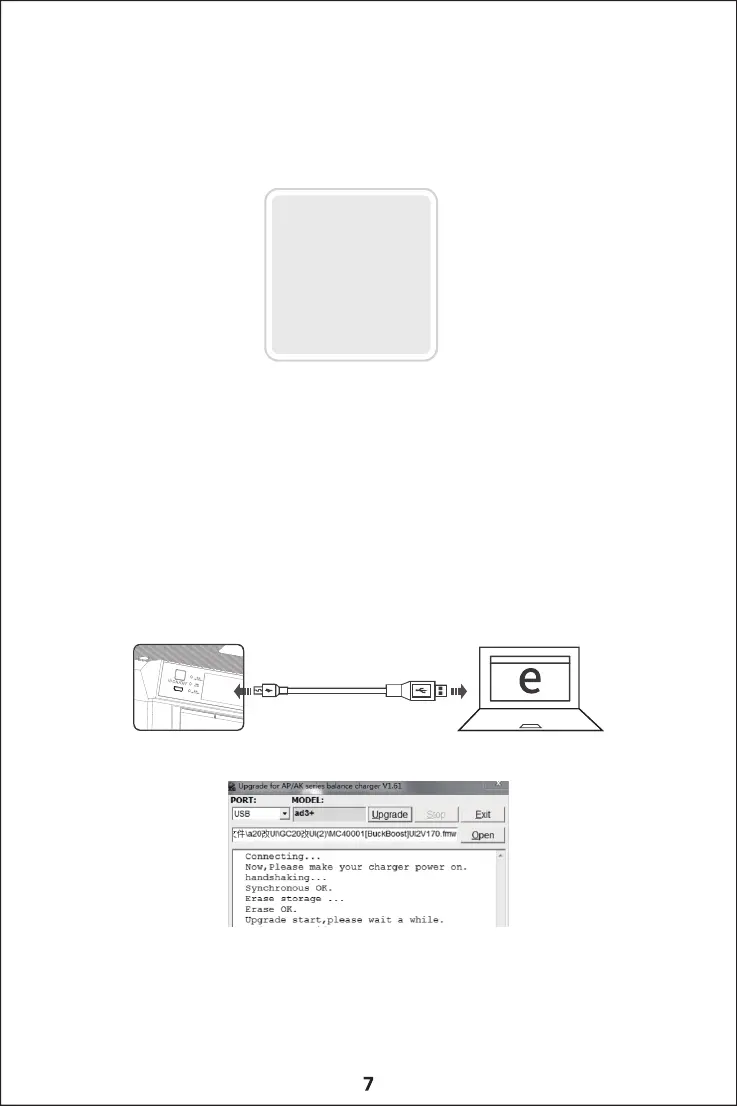
Firmware upgrade
If the firmware of the charger needs to be updated, please pay attention to the firmware upgrade program that
will be released on the EV-PEAK official website, and perform the firmware upgrade according to the following steps:
1.Visit EV-PEAK official website to download the latest firmware upgrade program(http://www.ev-peak.com/firmware)
2.Connect the charger, and use the USB cable to connect the firmware upgrade interface to the computer.
3. Run the firmware upgrade program, load the firmware file with the suffix fmw, click the upgrade button,
and wait for the upgrade.
4.After the upgrade is successful, the device will automatically restart.
5.If the upgrade fails, please try to upgrade again.
For detailed steps, please follow the prompts to upgrade the software!



 To Next Page