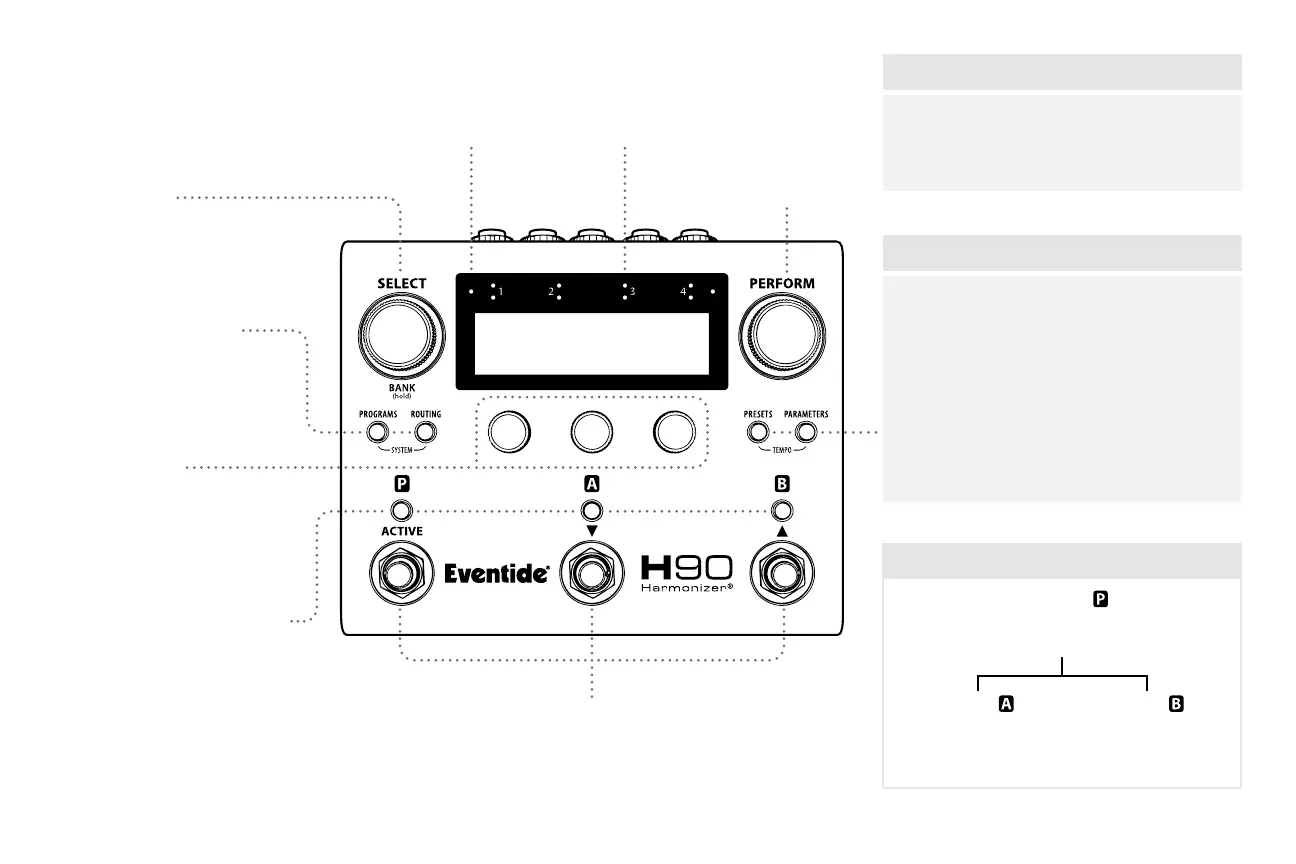
Overview
Select Knob
Press to enter Select/Bank Mode.
Quick Knobs
Adjust parameters and settings.
Input MetersBluetooth® LED Perform Knob
Press to enter
Perform Mode.
Edit Mode Buttons
Press to enter Edit Modes.
(See table on right)
Footswitch LED Buttons
Play Modes: Color indicates
footswitch function.
Edit Modes: Program and
Presets active/bypass status.
Footswitches
Select/Bank Mode: Scroll through and load Programs.
Perform Mode: User-programmable footswitches.
1
Select / Bank
Cue and load from the
Playlist. (pp. 4–5)
Perform
Customize footswitches
for live performance. (p. 6)
Play Modes
Programs
Browse Programs by
List, Eect Type and
Algorithm. (p. 7)
Presets
Browse User/Factory Preset
Library by Eect Type and
Algorithm. (p. 10)
Routing
Congure Preset
Routing and position
external Inserts. (pp. 8–9)
Parameters
Edit Program and Preset
parameters. (p. 11)
Edit Modes
Program
Active/Bypass, In/Out Gain, Routing & Inserts
Exp/Ctl mappings, HotKnob, HotSwitch (x3)
Preset
Active/Bypass, In/Out Gain,
Algorithm & settings,
HotKnob
Preset
Active/Bypass, In/Out Gain,
Algorithm & settings,
HotKnob
Anatomy of a Program



 To Next Page