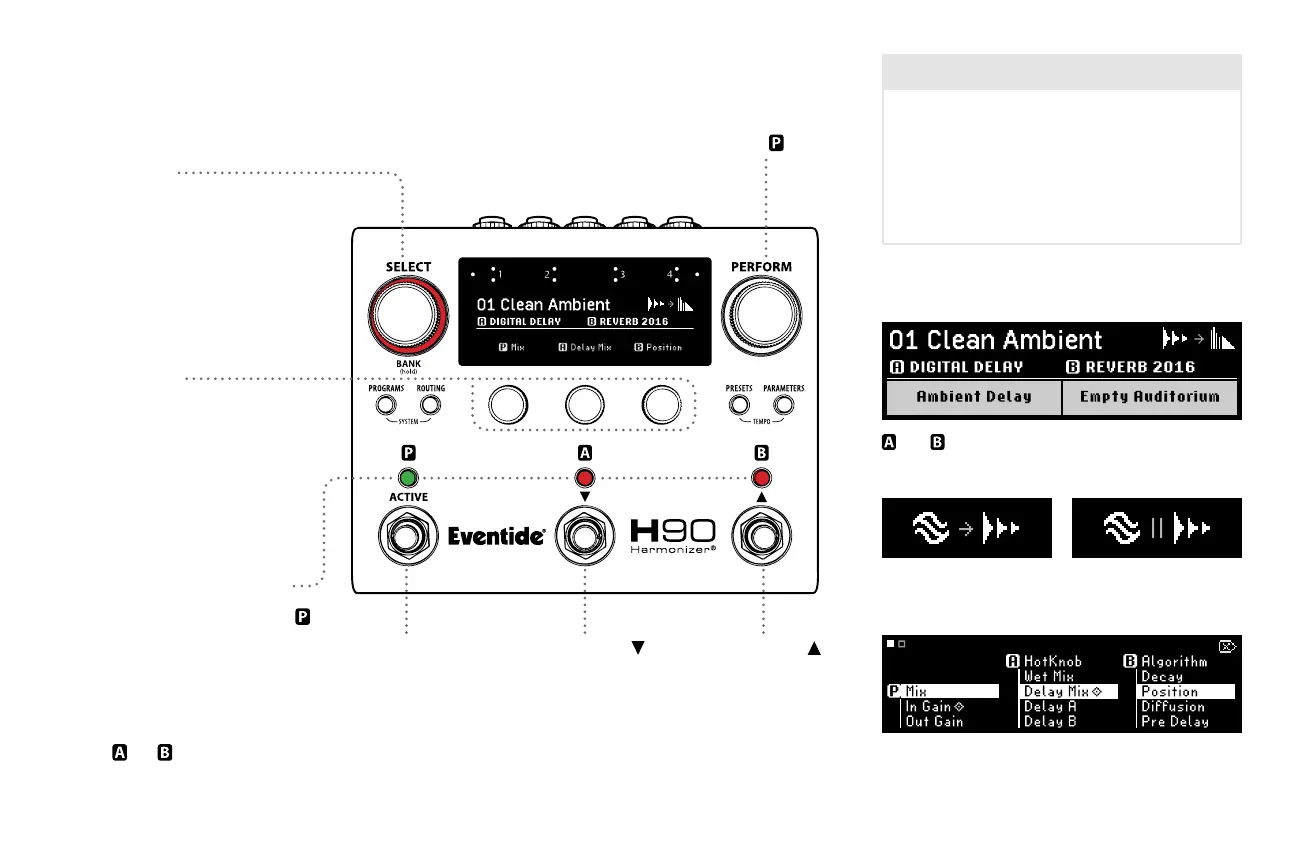
Select
Select Knob
Turn to scroll through the Playlist,
and cue up a Program.
Press to load a cued Program.
Press and hold to toggle
Bank Mode.
Footswitch LED Buttons
FS1 LED: Press to Active/Bypass
.
FS2 or 3 LED: Press to
momentarily display the
corresponding Preset name.
Press again to Active/Bypass
Presets , or .
Footswitch 1
Press to activate a
cued Program.
Press to Active/
Bypass the loaded
Program.
Footswitch 2
Press to scroll down
through the Playlist.
Footswitch 3
Press to scroll up
through the Playlist.
4
Perform Knob
Turn to adjust
HotKnob value.
Quick Knobs
Turn to adjust parameter value.
Press to view parameter values.
Press again to toggle pages.
Press and hold to enter
parameter assignment page.
Program number and name
and Algorithm and Preset names
Six assignable parameters per Program (two pages).
Press and hold a Quick Knob to assign parameters.
Eect Type symbols
Series Routing Parallel Routing
The Playlist
The Playlist is the currently enabled User Program
List for Select/Bank Modes. The H90 can have
many Program Lists, but only one User List is
designated as THE Playlist. Factory Lists found in
Programs Mode cannot be used as the Playlist.
The Playlist is selected in System Menu (See p. 12).



 To Next Page