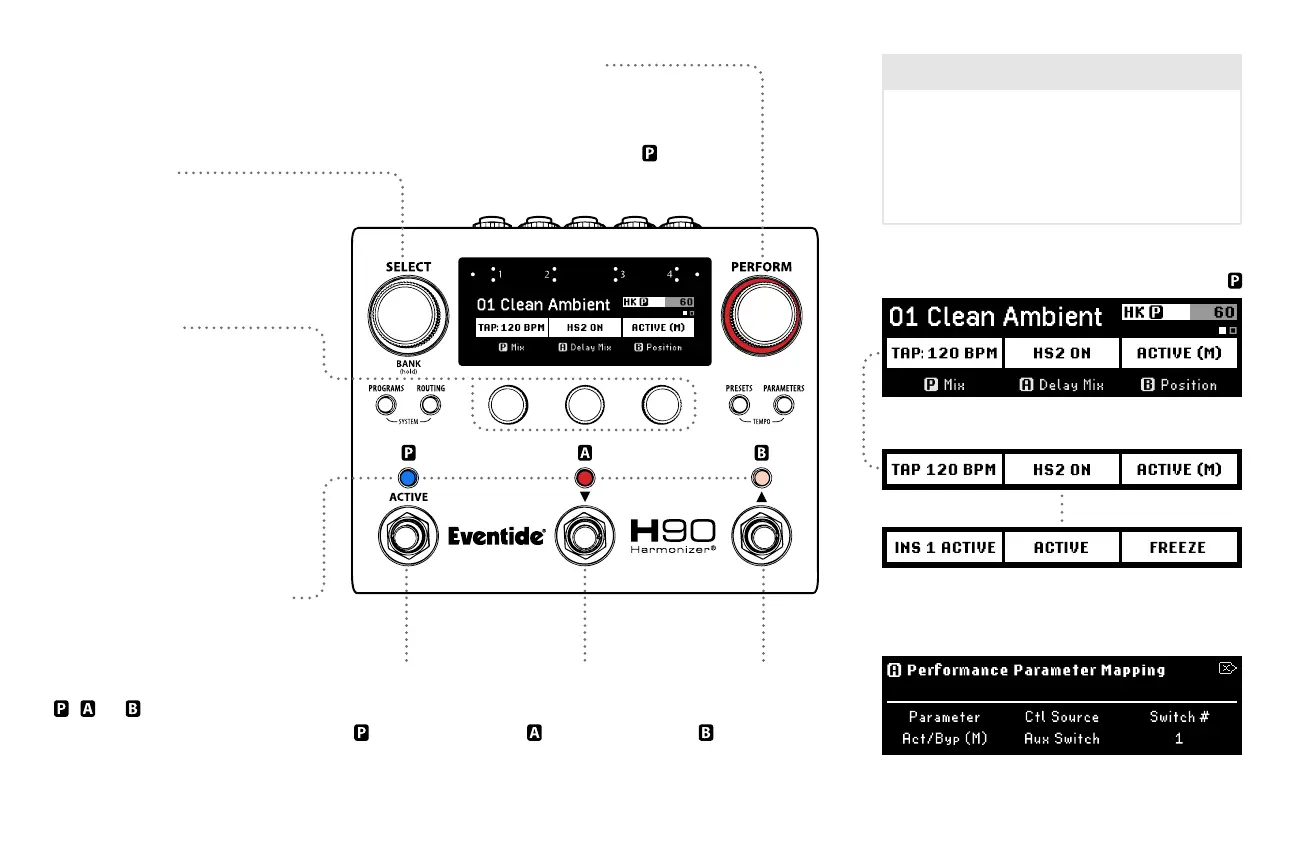
Perform
Footswitch 1
Press to engage
performance
parameters.
Footswitch 2
Press to engage
performance
parameters.
Footswitch 3
Press to engage
performance
parameters.
Perform Knob
Press to toggle pages of
user-programmable footswitches.
Turn to adjust HotKnob value.
Footswitch LED Buttons
Press to change Footswitch
assignment.
Press and hold to map
, , or
performance
parameters to an
external footswitch.
6
Quick Knobs
Turn to adjust parameter value.
Press to view parameter values.
Press again to toggle
parameter pages.
Press and hold to enter
parameter assignment page.
Select Knob
Turn to toggle pages of
user-programmable footswitches.
Program number and name HotKnob
Press and hold a Footswitch LED Button to map
performance parameters to an external footswitch.
Six user-programmable Footswitch assignments
per Program (two pages).
Page 1
Page 2
Performance Parameters
Perform Mode features two pages of user-
programmable Footswitch assignments such
as tap tempo, Active/Bypass, momentary Active,
three independent HotSwitches, and Algorithm-
specic parameters.



 To Next Page