Programs
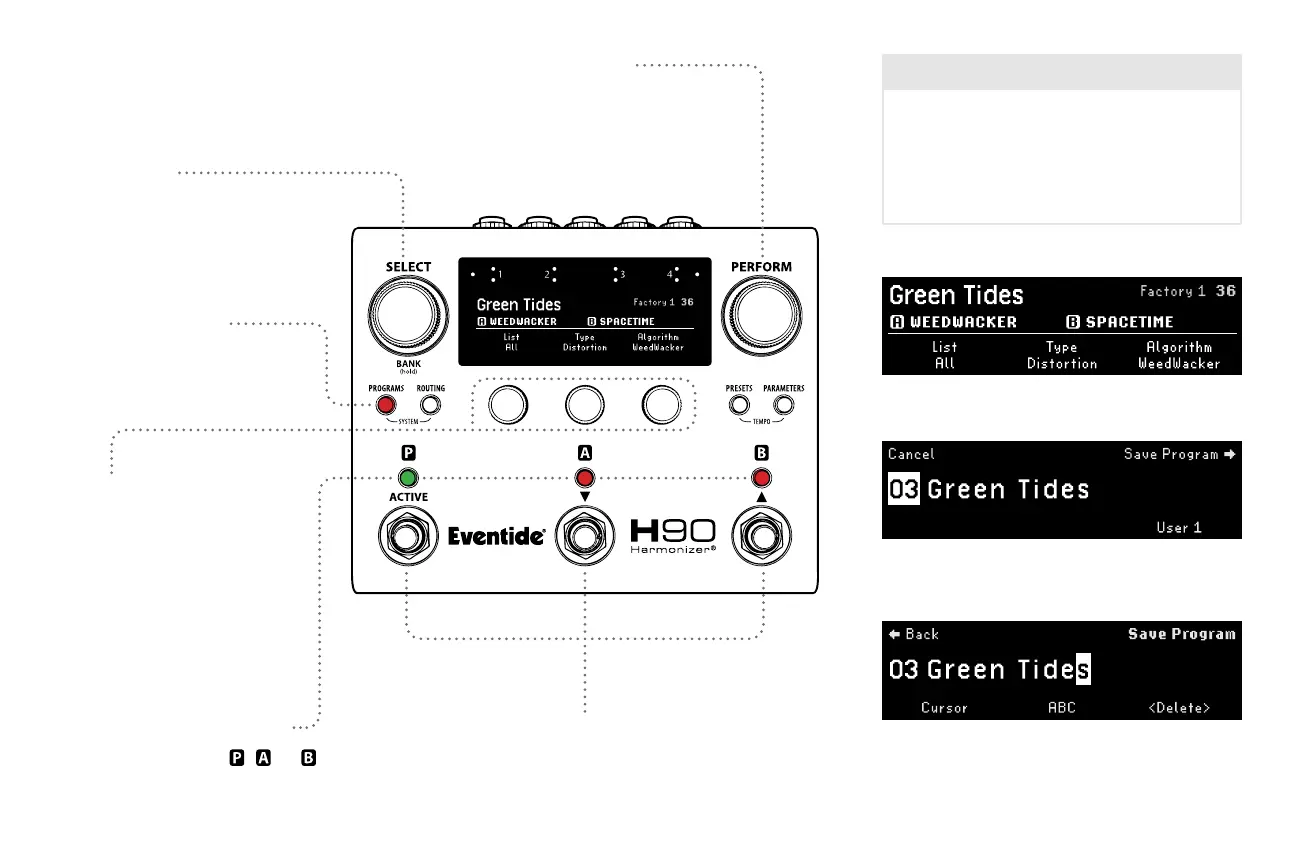
Select Knob
Turn to auto-load a new
Program from a ltered List.
Footswitch LED Buttons
Press to Active/Bypass , , or .
Programs Button
Press and hold in any Mode
to save the current Program.
7
Footswitches
Press any Footswitch to exit Programs Mode.
Quick Knobs
Turn to adjust Program List
search lters.
QK1: User and Factory Lists
QK2: Eect Type
QK3: Algorithm
Perform Knob
Turn to auto-load a new
Program from a ltered List.
Filtered Program name Location and number
Browse Programs by List, Eect Type and Algorithm.
Turn SELECT Knob to move cursor, turn PERFORM Knob
to change character, press PERFORM Knob to save.
Press and hold PROGRAMS Button to enter Program
saving, select a destination List and number.
Program Lists
H90 stores User and Factory Lists, with each List
containing up to 99 Programs. In Programs Mode
all Lists can be searched based on Eect Type
and Algorithm. The Playlist can be changed in
Global settings on the System Menu (see p. 12).



 To Next Page