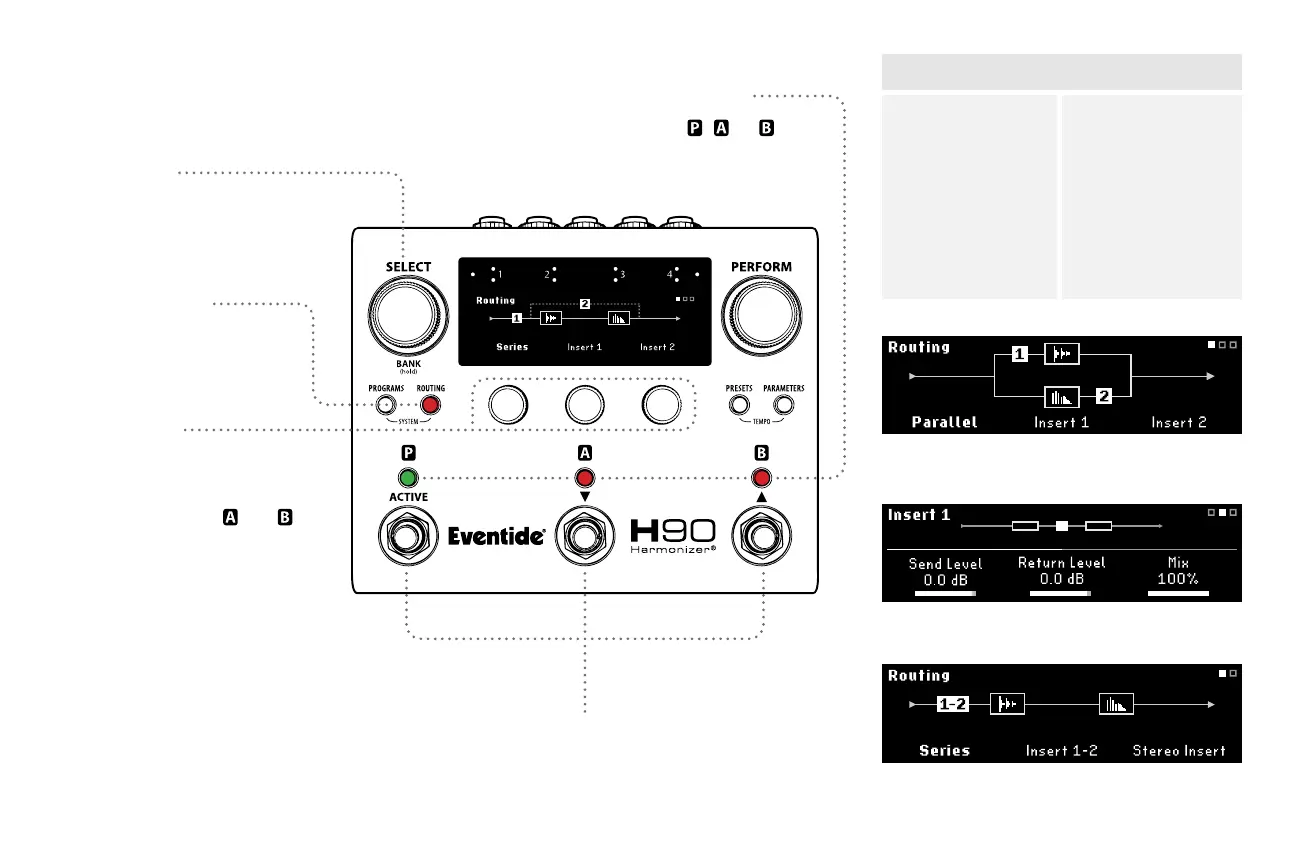
Insert Routing
Routing Button
Press to cycle through
Routing and Insert pages.
Select Knob
Turn to scroll through all
Routing pages.
8
Quick Knobs
QK1: Turn to change Routing
between Series and Parallel.
Press to Swap Presets and .
QK2: Turn to enable Insert 1
and adjust the insert position.
Press to Active/Bypass Insert 1.
QK3: Turn to enable Insert 2
and adjust the insert position.
Press to Active/Bypass Insert 2.
*Turning Quick Knob 3 all the way
clockwise will enable Stereo Insert 1-2
Footswitches
Press any Footswitch to exit Routing Mode.
Footswitch LED Buttons
Press to Active/Bypass , , or .
Insert 1 (Pre A), Insert 2 (Post B) in Parallel Routing.
Stereo Insert: Turn QK3 all the way to the right to
enable Stereo Insert. Turn QK2 to change position.
Insert 1 parameters, page 1.
Series Routing
Pre A
Parallel
Mid
Post B
Stereo Inserts*
Insert Positions
Parallel Routing
Pre
Pre A
Pre B
Parallel
Post A
Post B
Post
Stereo Insert*



 To Next Page