5
INSTALLATION
This section covers simple steps and detail installation. Please follow instruction for preventing
any unnecessary damage.
Simple Steps:
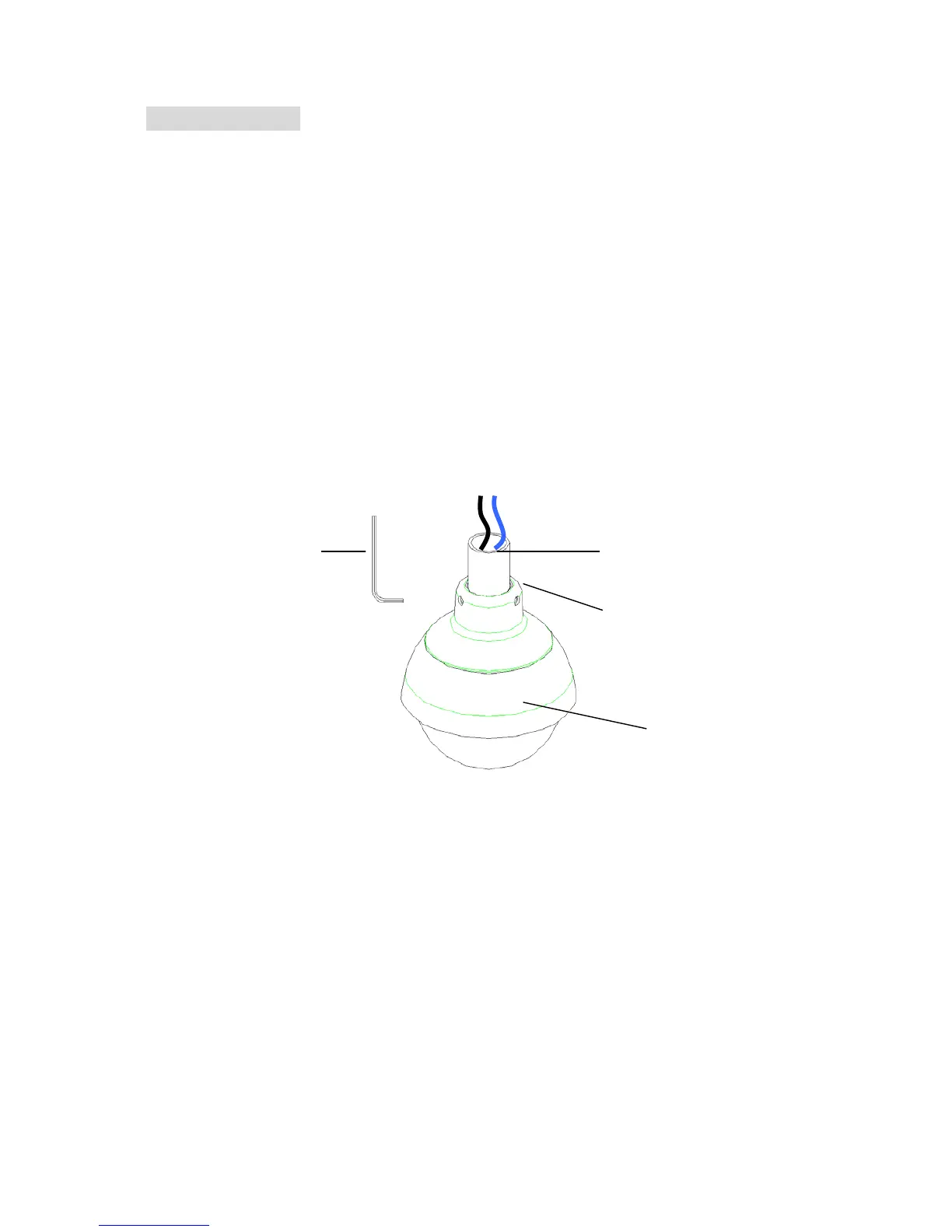
1. Connect to 26mm/1.06” EMT Conduit Pipe and lock it with Hex Wrench
2. Open camera bubble cover
3. Connect to testing monitor(optional accessories)
4. Adjust lens, camera position
5. Optional adjust camera setting on Dip Switch
1. Mount Camera
a. Pre-install 26mm/1.06” EMT conduit pipe and wire video and power cables though conduit
pipe. Connect power and video to the camera.
b. Locking pipe with camera by tightening set screws with supplied Hex wrench.
Note!! When connect to 12VDC with Power Extension cable . Please make sure you
connect powr +,- correctly. Wrong connection may damage the camera.
Camera
26mm EMT
Conduit Pipe
2.5mm Hex
Wrench
Set Screws








 To Next Page