EasyManua.ls Logo

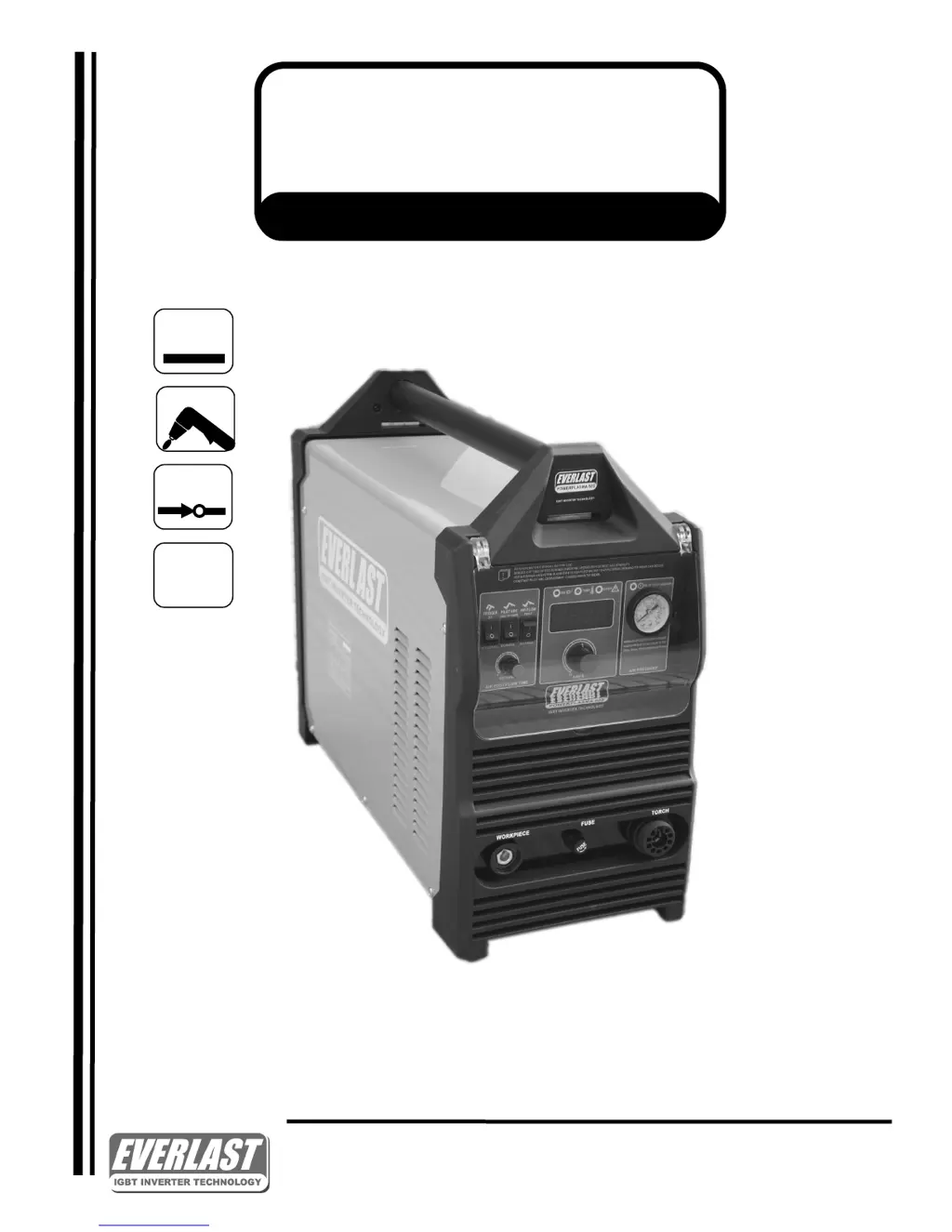
Everlast PowerPlasma 60S - User Manual

Everlast PowerPlasma 60S
32 pages
Print Icon
To Next Page IconTo Next Page
Loading...
EVERLAST
POWERPLASMA S SERIES
Operators Manual for the PowerPlasma S Series
(60-100 Amp Models)
Safety, Setup and General Use Guide
CC
IGBT
1
~
PHASE
Rev. 5 0 000330-18
everlastwelders.com
1-877-755-9353
Specicaons and Accessories subject to change without noce.
329 Lileeld Ave. South San Francisco, CA 94080 USA
PAC
60-100 Amp S Series IGBT Inverter Platform Plasma Cutters

Questions and Answers

  • T
    Theodore JamesSep 9, 2025
    What to do if my Everlast Cutter air flows but the arc does not start within 2-3 seconds?
    • R
      Roger SullivanSep 9, 2025
      Check the consumables for wear and tightness. Also, check the fuse and air pressure. Ensure the spring/piston on the torch blow back mechanism isn't sticky or slow. You can also release the trigger and try again.
  • B
    Brandy KimAug 23, 2025
    What to do if the Everlast Cutter over current/duty cycle LED illuminates?
    • H
      hnelsonAug 23, 2025
      If the Over current/Duty cycle LED illuminates but there is no output, allow the machine to cool down. After it has fully cooled, reset the main power switch. Also, ensure that the fan is not blocked and check the wiring.
  • M
    Melissa PhillipsAug 25, 2025
    Why won't the pilot arc light on my Everlast Cutter, but the arc starts when I drag the torch on the metal?
    • L
      Larry MartinezAug 25, 2025
      The fuse might be blown.
  • K
    Kathleen ClarkAug 26, 2025
    What to do if the Everlast Cutter arc tries to start but melts through the side of the nozzle?
    • D
      David HumphreyAug 27, 2025
      This issue may be caused by a missing or worn swirl ring, or a worn electrode. Check these parts and replace if necessary. Ensure the swirl ring isn't cracked.
  • K
    Kaitlyn SimsAug 27, 2025
    What causes dirty consumables and premature wear on my Everlast Cutter?
    • J
      jenniferdownsAug 28, 2025
      Dirty, smutty looking consumables with premature wear, shortened life, and melted tips can be caused by moisture or oil contamination. Other potential causes include using the wrong or poor-quality aftermarket consumables, drag cutting, or incorrect cutting techniques.
  • B
    barajasnathanielAug 29, 2025
    What to do if my Everlast Cutter arc blows out when ready to cut?
    • J
      Joshua WilliamsAug 29, 2025
      If the arc blows out when you're ready to cut, the air pressure might be too high. Try reducing it to 72 psi.
  • S
    Shawn ChurchSep 18, 2025
    What to do if the air flows but the pilot arc does not start on my Everlast Cutter?
    • G
      gevansSep 18, 2025
      If the air flows but the pilot arc does not start or spark, but the arc starts when the nozzle is rubbed on the metal, the fuse may be blown. Replace it with a 30 A automotive-type, slow-blow fuse.
  • J
    Justin GarrettSep 18, 2025
    Why won't the pilot arc transfer and amps read approximately 25-27 amps while switch is held on my Everlast Cutter?
    • A
      Anna WalterSep 22, 2025
      Check the work clamp connection and ensure any rust is removed from the work clamp contact area. A faulty clamp may also be the cause. The arc continuity may not be sensed.
  • J
    Joshua VincentSep 8, 2025
    How to fix unstable arc at lower amps with Everlast Cutter?
    • M
      Michael YoungSep 8, 2025
      To fix an unstable arc at lower amps, use a nozzle with a smaller orifice.
  • R
    rogersamySep 4, 2025
    What to do if my Everlast Cutter cup or nozzle is melting or cracking?
    • S
      Sean RaySep 4, 2025
      Melting or cracking of the cup and/or nozzle may be due to improper cutting technique or excessive piercing.

Summary

Contact Information

Everlast US Contact Details

Provides email, website, phone, and fax for US customer service and technical support.

Everlast Canada Contact Details

Lists email, website, phone, and fax for Canadian customer service and technical support.

Everlast Australia Contact Details

Includes phone numbers and addresses for Sydney and Port Macquarie, plus after-hours support.

Safety Precautions

General Operation and Maintenance

Emphasizes operator responsibility for safe operation, proper maintenance, and reading the manual.

Personal Protective Equipment

Details the need for safety glasses, welding helmets, hearing protection, clothing, footwear, and gloves.

Environmental and Electrical Hazards

Warns about HF energy, EMF, ventilation, hazardous materials, electrical shock, and fire prevention.

Equipment Integrity and Cylinder Safety

Covers faulty equipment, maintenance, cylinder safety, and seeking expert advice.

Introduction to PowerPlasma S Series

Product Components Overview

Illustrates and identifies key components like the torch, work clamp, and regulator assembly.

PowerPlasma S Series Specifications

Model Comparison Table

Compares technical specifications, duty cycles, air requirements, and cut thicknesses across models.

General Operation and Usage

Machine Overview and Features

Describes the non-high frequency start, blow-back type, IGBT construction, and torch features.

General Use, Care, and Duty Cycle

Covers maintenance, environmental considerations, and explains the unit's duty cycle limitations.

Quick Setup Guide: Connections

Torch and Work Clamp Connection

Illustrates how to connect the torch and work clamp to the plasma cutter unit.

Rear Connections and Wiring

Gas Inlet and Power Plug

Details the gas inlet connection and the standard NEMA 6-50P power plug for US/Canada.

Air Supply System Setup

Compressor and Air Dryer Configuration

Explains the setup of the air compressor, regulator assembly, and the necessity of an air dryer.

Front Panel Controls

Front Panel Diagram and Identification

Identifies and labels all controls and indicators on the plasma cutter's front panel.

Front Panel Control Descriptions

Detailed Explanation of Front Panel Features

Provides detailed purpose and operation for each control and indicator on the front panel.

Rear Panel Features

Rear Panel Connector Identification

Illustrates and labels the rear panel connections including CNC, power switch, gas inlet, and ground bolt.

Rear Panel Control Descriptions

Detailed Explanation of Rear Panel Connections

Explains the function of CNC connection, power switch, power cable, gas input, HF ground, and regulator assembly.

Basic Cutting Theory

Edge Start Technique

Details the edge start method for promoting consumable life and a smooth cut start.

Pierce Start Technique

Explains the pierce start method, its impact on consumables, and proper technique for piercing.

Cutting Techniques and Consumables

Pilot Arc Usage and Travel Speed

Provides tips on pilot arc usage, travel speed effects on cut quality, and consumable care.

Cut Quality Analysis

Interpreting Cut Results

Illustrates how speed, air pressure, torch angle, and consumable condition affect cut quality.

Advanced Cutting Patterns

Lead-In Cuts for Shapes and Holes

Demonstrates using lead-in cuts for pattern shapes and holes to improve cut quality and avoid damage.

IPT 60 Torch Appendix

IPT 60 Torch Components Diagram

Provides a detailed exploded view diagram of the IPT 60 torch and its parts.

IPT 60 Torch Parts List

IPT 60 Torch Part Numbers and Descriptions

Lists part numbers, codes, and descriptions for all components of the IPT 60 torch.

IPT 80;80 M Torch Appendix

IPT 80;80 M Torch Components Diagram

Presents an exploded view diagram detailing the components of the IPT 80/80M torch.

IPT 80;80 M Torch Parts List

IPT 80;80 M Torch Part Numbers and Descriptions

Provides a comprehensive list of part numbers, codes, and descriptions for the IPT 80/80M torch.

IPT 100;100 M Torch Appendix

IPT 100;100 M Torch Components Diagram

Shows an exploded view diagram of the IPT 100/100M torch, illustrating all its parts.

IPT 100;100 M Torch Parts List

IPT 100;100 M Torch Part Numbers and Descriptions

Lists part numbers, codes, and descriptions for all components of the IPT 100/100M torch.

CNC Application Appendix

CNC Connector Pin Assignments

Details the pin-out configuration for the CNC control board and rear socket connections.

Troubleshooting Guide

Common Issues and Solutions

Provides a table of common problems with their causes and recommended solutions for the plasma cutter.

Optimizing Cutting Performance

Cutting Setup and Optimization Tips

Offers tips for setup, air pressure, standoff distance, and general cutting speed guidelines.

Pilot Arc Operation Explained

Explains the purpose of the pilot arc, its role in continuity, and normal amperage during its operation.

Everlast PowerPlasma 60S Specifications

General IconGeneral
Input PhaseSingle Phase
Input Frequency50/60Hz
Output Current Range10-60A
Rated Output Current60A
Cutting Thickness3/4"
Weight35 lbs
Duty Cycle60% at 60A
Dimensions14.5 in

Related product manuals