Page 25
HIGH FIDELITY MUSIC STREAMER
The DMP-A6 has USB audio, HDMI audio, Coaxial and Optical digital audio outputs, as well
as RCA single-ended and XLR balanced analogue outputs.
Connection and Setting
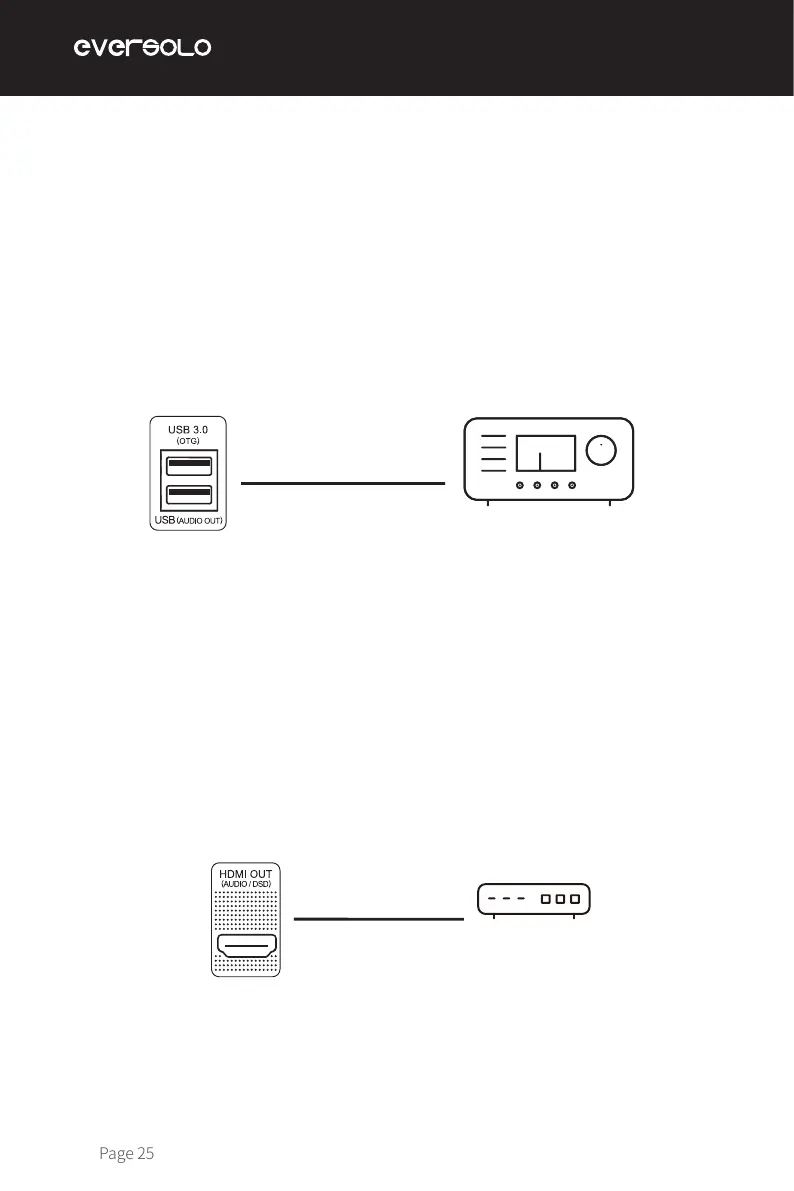
Use a USB audio cable to connect the device’s USB audio output to the external DAC's USB
input. Then go to "Home screen > Source > Internal Player > USB DAC".
Use an HDMI cable to connect the device’s HDMI DSD output to the AV receiver input, then
go to "Home screen > Source > Internal Player > HDMI".
Note:
* USB audio output supports up to stereo DSD512 Native, PCM 768KHz 32Bit and MQA.
Notes:
*HDMI output supports audio output only, no video output.
*HDMI audio output supports DSD64 Native multichannel/PCM 192KHz multichannel raw
output.
USB Output
HDMI Output
USB audio cable
Audio DAC/Audio decoder
HDMI cable
AVR


 To Next Page