EasyManua.ls Logo

Everybot EDGE RS350 - Remote Control Guide; Remote Control Button Functions; Remote Control Modes and Navigation; Remote Control Battery Installation

Everybot EDGE RS350
24 pages
Print Icon
To Next Page IconTo Next Page
To Previous Page IconTo Previous Page
Loading...
10
Pre-usage Inserting Batteries into the Remote Control
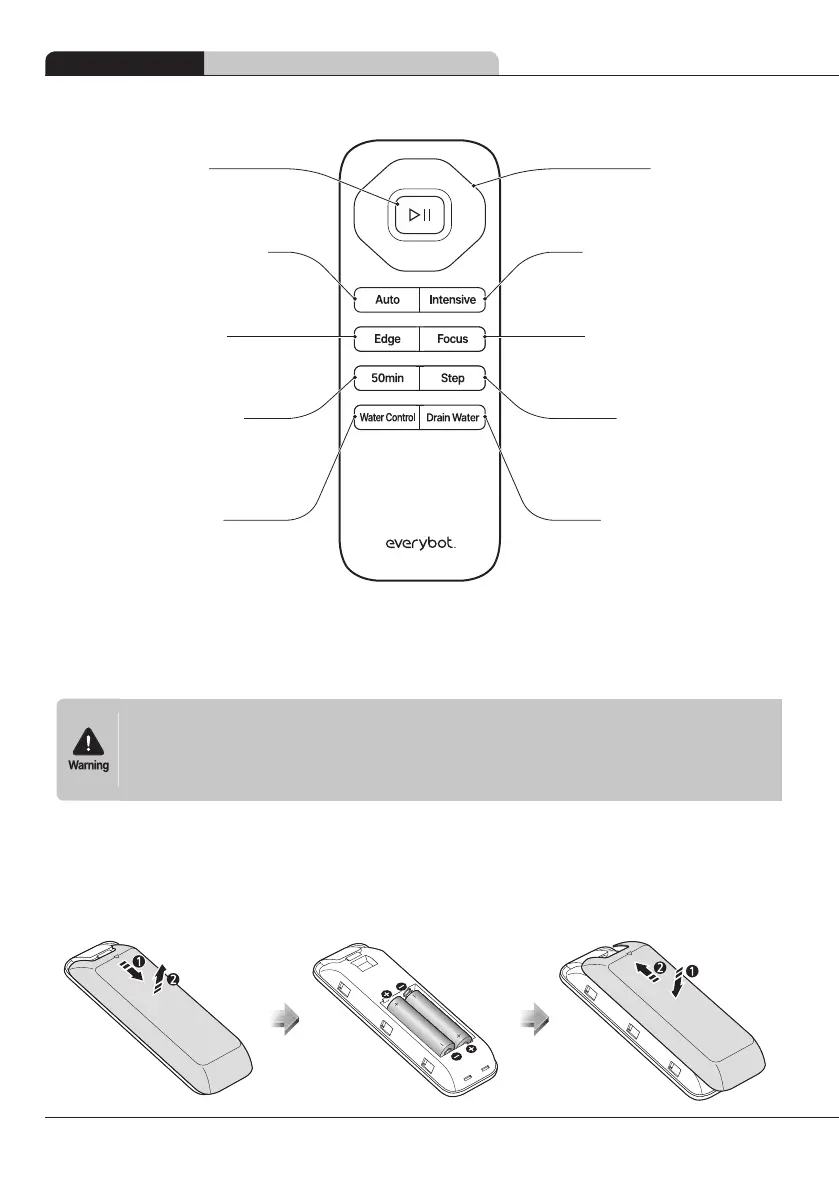
Remote control
Direction button


Water drainage button


Intensive cleaning button


Focused cleaning button


Step cleaning button


Start/pause button

Edge cleaning button


Automatic cleaning button


50-min cleaning button



Water control button


Inserting Batteries into the Remote Control







1
Separate the battery cover underneath the remote control.
2
Insert the 2 AAA batteries provided with the product into the correct polarity.
3
Close the remote control battery cover.