Install EVGA CLCx
Backplate Installation
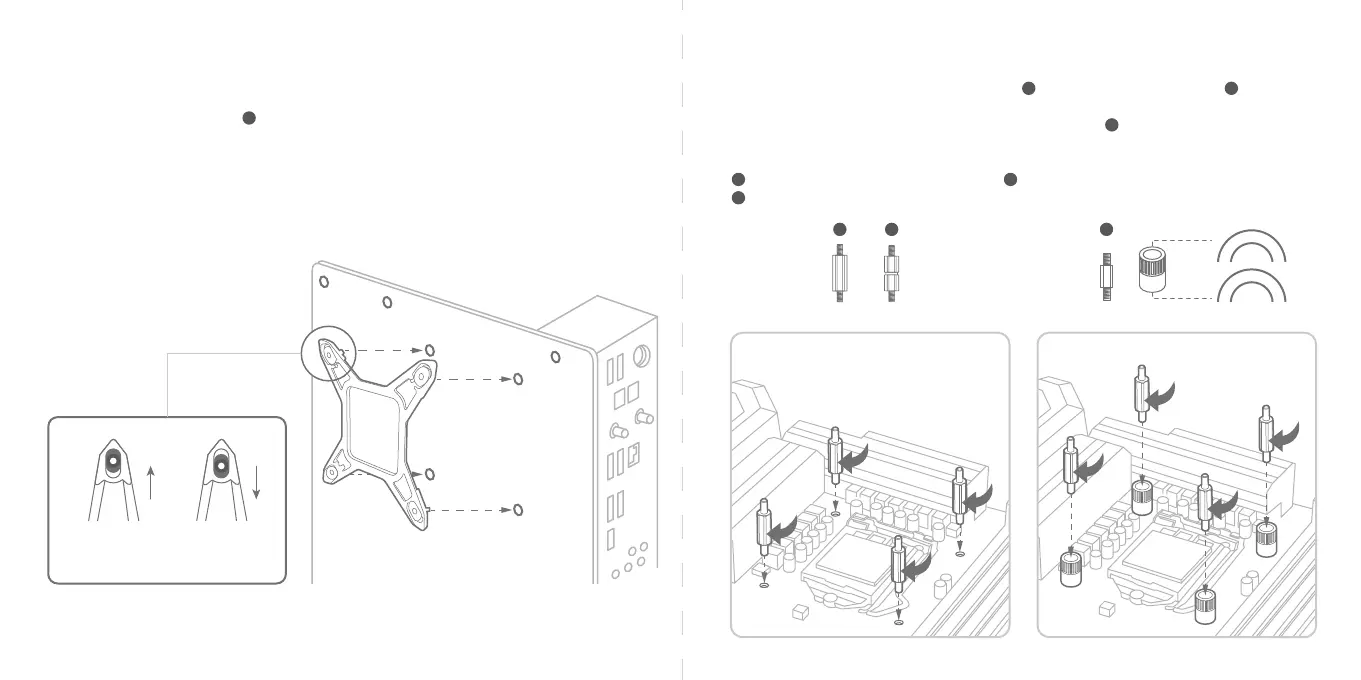
Install the mounting backplate part on the back of the motherboard if you are using an Intel LGA 17XX,
12XX or 115X socket motherboard. Slide the standos to line up with the cooler mounting holes on your
motherboard.
*Please skip this step for AMD motherboards as you will use the existing motherboard’s backplate.
H
Standos
Next, screw the stando into the backplate. Fasten the standos to the backplate you installed in the
previous step for LGA 12XX / 115X motherboards part and LGA 17XX motherboards part .
For AMD platforms, remove the stock AMD mounting bracket, keep the original backplate. After aligning the
collars, screw in the stando to the collars and stock AMD Backplate .
*The collars have marked “AM5” and “AM4” on each side, facing up the correct side of collars according
your AMD platform.
C
E
D
Intel LGA 17XX Intel LGA 12XX
Intel LGA 115X
D
E
C
Intel
Intel LGA 12XX / 115X Stando (M3 thread)
Intel LGA 17XX Stando (M3 thread)
AM5/AM4 Stando (UNC 6-32 thread) & Collar x4
C
D
E
A
M
5
A
M
4



 To Next Page