EVGA X299 DARK (151-SX-E299)
- 44 -
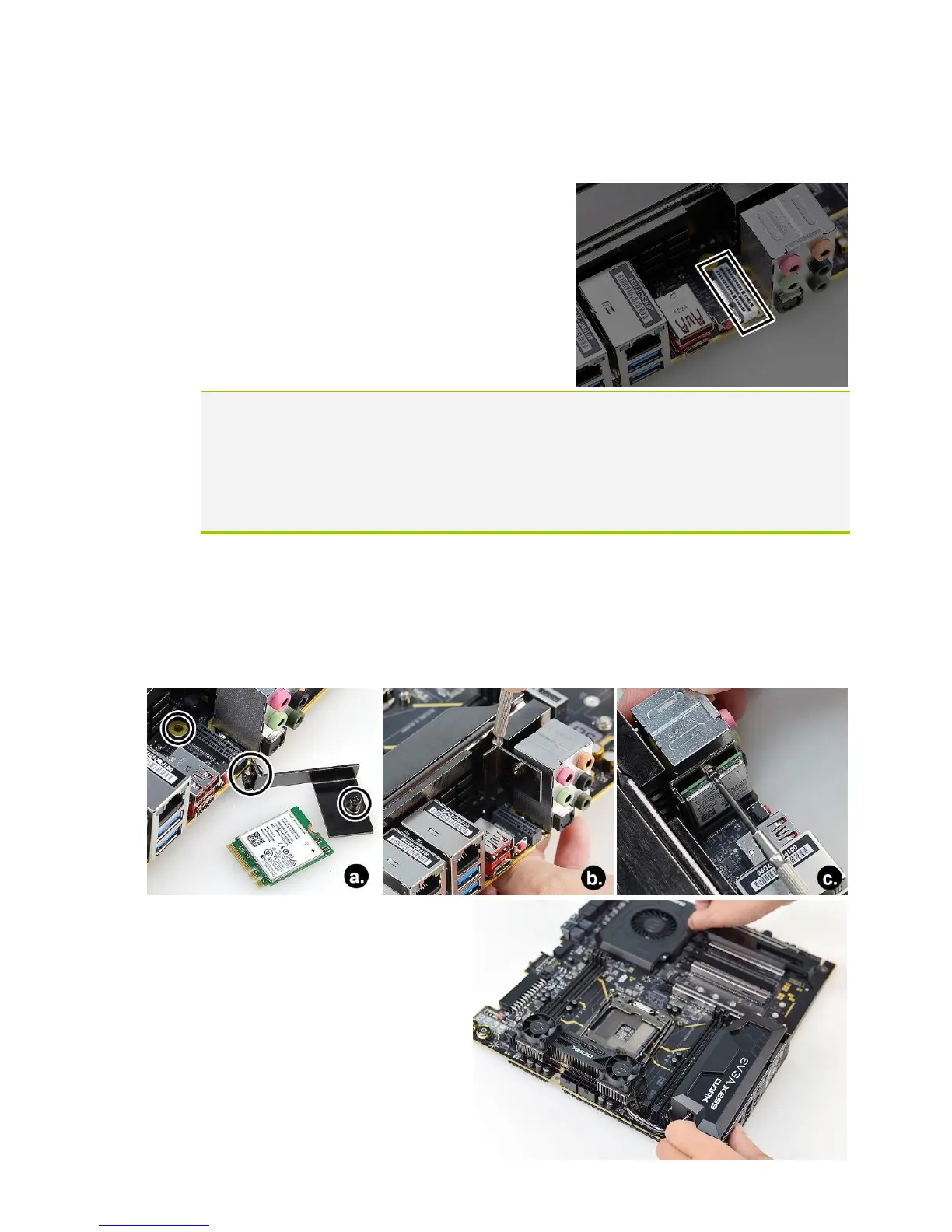
4. At this point, you may remove the I/O cover
from the motherboard. After removing the cover,
the M.2 Key-E slot will be located here:
Note: The M.2 Key-E slot on the X299 Dark is a vertical-angle slot, requiring a
bracket to stabilize your Key-E device. This bracket is included with the X299 Dark
accessories and featured in the following images; however, the Key-E device pictured
below is not included with the X299 Dark and must be purchased separately.
If your M.2 Key-E device uses a different mounting assembly, please follow the
instructions included with your device.
5. (a) Remove the circled nut and screw from the bracket and briefly set aside; the
bracket will be mounted to the circled area. (b) Align the bracket parallel to the M.2
Key-E Socket, use a Phillips #1 screwdriver to help align the screw over the mounting
hole, and loosely fasten the nut from underneath the motherboard. (c) Insert your M.2
Key-E device into the slot, secure the device with the screw you removed in (a), and
fasten the nut from (b) to secure the bracket.
6. Reinstall the motherboard I/O
cover you removed in Step 4, and
reseat the internal I/O shield you
removed in Step 3.



 To Next Page