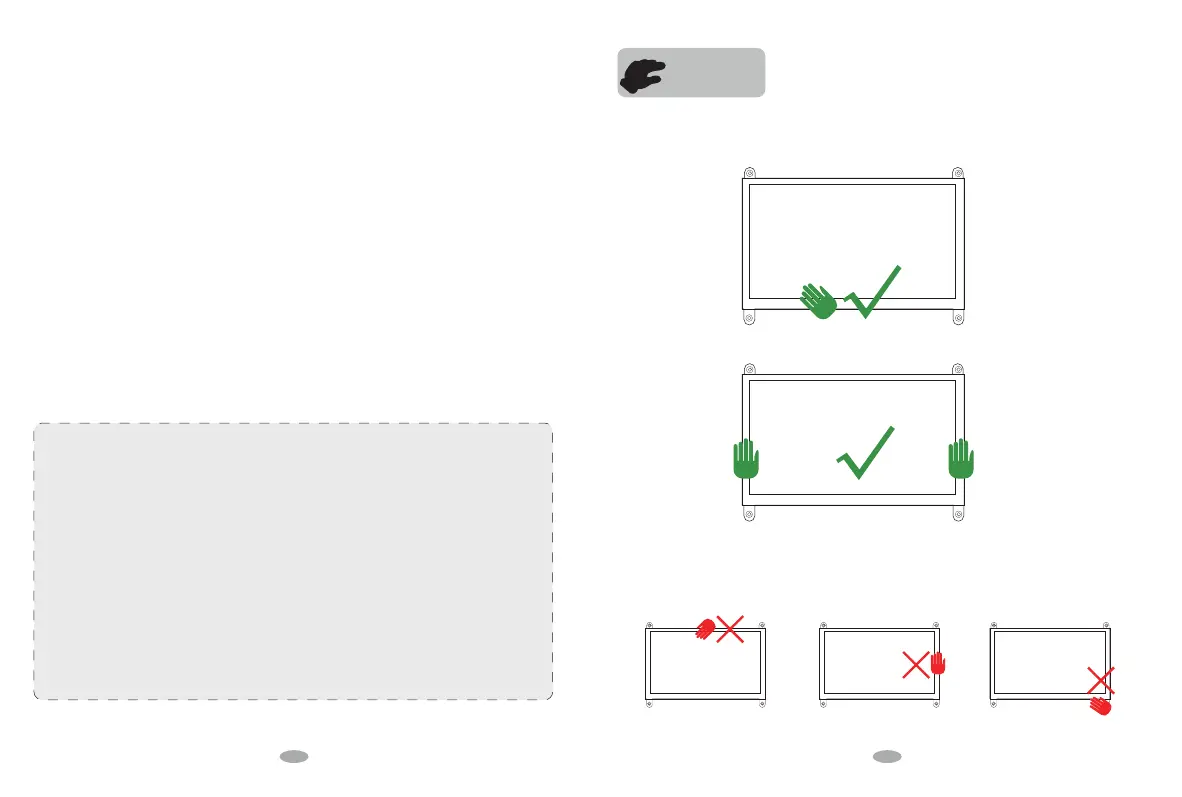
HOLD WAY
To prevent other injuries, please observe the following rules:
Slim Monitor Design, please Take Care when Holdling.
To prevent the machine damage, the following situations should be avoided:
1. Please turn o the monitor when you leave for a long time please;
2. Do not allow Children to throw or insert objects into the monitor;
3. Do not install spare parts that are not specifically designed for this device;
4. Please Unplug the power cord when the device is unattended for a long time.
5. Do not touch the power cord or signal cable when lightning strikes, otherwise it may cause
electric shock;
6. Do not let any object compress or wrap the power cord;
7. Do not place the monitor where the power cord can be easily damaged.
1. Place the monitor where it is easy to fall;
2. Place the display near a radiator or heat source;
Do not rub the screen with a hard object as it will scratch or permanently damage the screen.
Do not use your fingers to press the screen for a long time, otherwise it will produce screen smear, and even a
screen damage.
Red, green, and blue pixel defects may appear on the screen, but it does not aect the display function.
The power cord is the main isolation device and must be put in an Easy-to-operate place.
If possible, try to use the recommended resolution for best results. Because if you use other resolution other
than the recommended resolution, a screen abnormality may occur. But this is a feature of a LCD panel with
the fixed resolution.
A still picture on the screen for a long time will cause damage to the screen and produce afterimages. Please
make sure to use the screen saver, the afterimage and related issues are not covered in the scope of product
repairing warranty.
If you encounter any technical problems while using this device, please contact our professionl After-Service
Team immediately
on
Page 15,
we will provide you the best solution in 12 Hours.
Hold the Bottom part of the monitor.
Hold both sides of the monitor screen.
The following is the Error Holding method:
2 3


 To Next Page
 Loading...